

12 Best Knowledge Base Software Platforms for 2025

A well-organized knowledge base is no longer a luxury-it's the backbone of efficient customer support, streamlined internal operations, and scalable digital businesses. The right platform empowers customers to find their own answers, reduces support ticket volume, and provides a single source of truth for your entire team.
But with countless options flooding the market, how do you find the best knowledge base software for your specific needs? This guide cuts through the noise. We have meticulously researched and analyzed 12 of the top platforms available today, from dedicated documentation tools perfect for technical teams to all-in-one creator suites like Zanfia that integrate knowledge libraries with courses and communities.
Our goal is to provide the clarity you need to make an informed decision for your business in 2025. Instead of generic marketing descriptions, you will find a practical breakdown of each solution's core strengths, honest assessments of its limitations, and clear guidance on its ideal use case. We’ll cover everything from customer-facing help centers that deflect tickets to internal wikis that organize company knowledge. Each review includes screenshots to give you a feel for the user interface and a direct link to explore the platform further. This comprehensive resource is designed to help you confidently select the software that will best support your team, delight your customers, and scale your operations. Let's find the perfect fit.
1. Zanfia
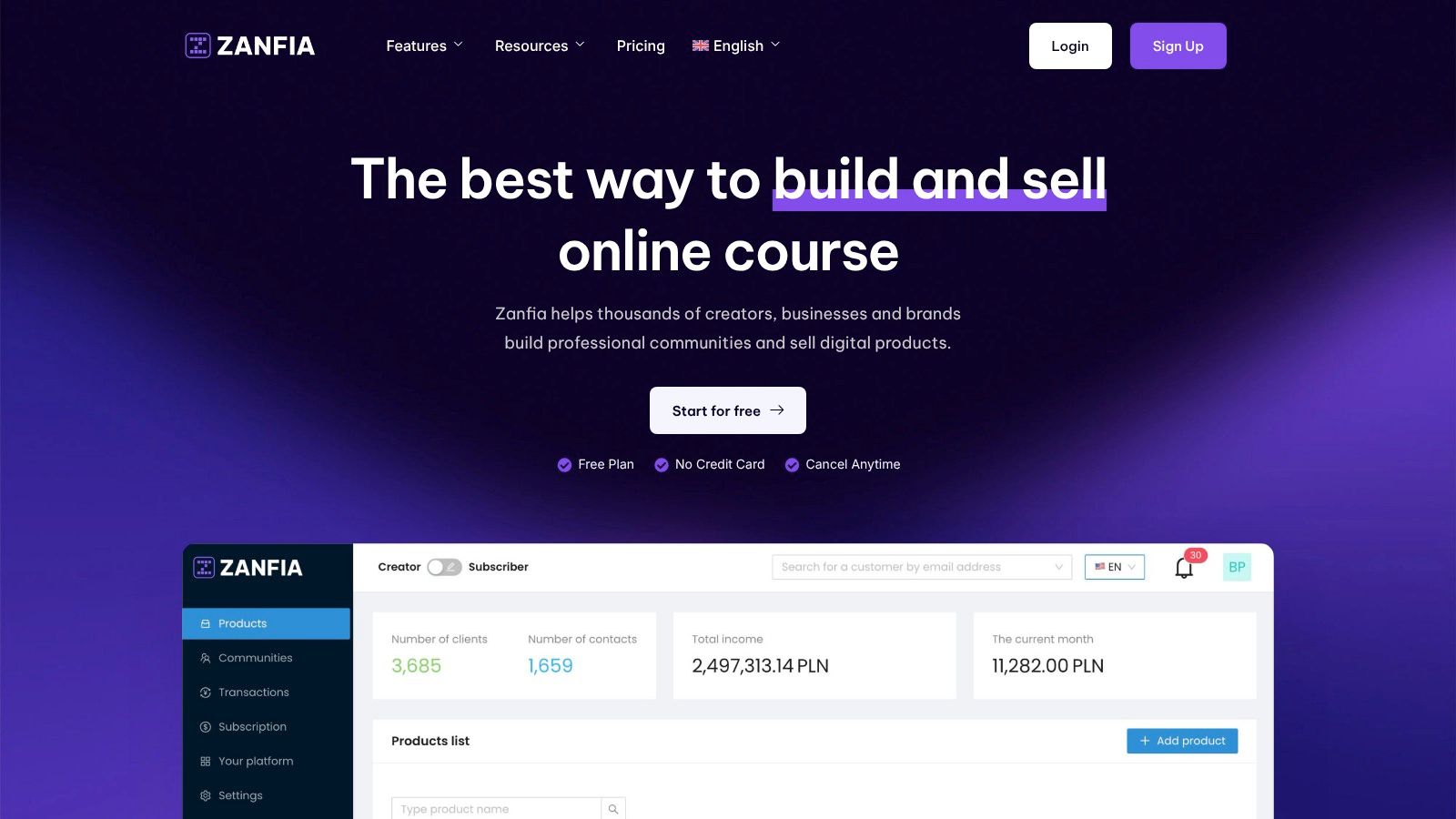
Zanfia is a comprehensive Polish all-in-one platform for digital creators and businesses who want to scale their online business under their own domain. It eliminates the need for piecing together multiple tools by offering an integrated ecosystem where creators can launch professional communities, online courses, paid newsletters, knowledge libraries, and sell digital products—all managed through a single system. This unified approach makes it the ideal choice for entrepreneurs who want to provide support documentation as part of a premium, branded content experience.
The platform is engineered to remove technical and financial friction. Its most compelling advantage is the 0% platform transaction fee model, a revolutionary differentiator in the Polish market. Creators keep 100% of their revenue, paying only standard fees to payment operators like Stripe or PayU. This transparent, partnership-based approach makes Zanfia especially attractive to established creators tired of commissions eating into their margins.
Key Features and Use Cases
Zanfia's knowledge base is a core component of its creator-centric toolkit, designed to foster deep engagement and long-term customer relationships.
- Integrated Learning & Community: Build a comprehensive knowledge library that supports students in your online courses or members of your paid community. Unlike platforms that push users to external tools, Zanfia keeps everything unified under your brand, dramatically boosting engagement and member retention.
- Monetization Flexibility: Sell knowledge-based products as one-time purchases, subscriptions, installment plans, or bundles. The platform integrates seamlessly with Polish and global payment gateways like Stripe, PayU, Przelewy24, and BLIK.
- White-Label Branding & Custom Domain: All plans include full custom domain support, allowing you to host your knowledge base and digital products on your own URL. This is vital for experts and premium brands who need to maintain full control over their brand identity.
- Powerful Automation: Automate workflows that save 5-10+ hours per month, such as granting course access after payment, adding buyers to community channels, triggering email sequences, or handling subscription renewals. Built-in analytics provide deep visibility into your entire funnel.
Pricing and Availability
Zanfia's SaaS subscription model is designed to grow with creators, not at their expense.
- Free Plan: Allows you to explore core features without a credit card.
- Paid Plans: Paid tiers unlock higher limits for clients, products, and native video hosting. Pricing starts with accessible plans for "Potential Explorers" and scales to support "Business Architects" (earning PLN 10k-100k+/mo) and "Craft Masters" (100k+/mo). All paid plans include the 0% platform fee promise.
Pros and Cons
| Pros | Cons |
|---|---|
| True all-in-one platform combining a knowledge base, courses, community, and e-commerce with a single login. | Its standalone knowledge base features may be less specialized than dedicated tools built exclusively for technical documentation. |
| Revolutionary 0% platform fee model means creators keep 100% of their revenue. | The platform's deep focus on the Polish market means international users should verify specific localization needs. |
| Deep localization with Polish payment gateways (PayU, Przelewy24, BLIK) and automatic invoicing (inFakt, Fakturownia). | |
| Full white-labeling and custom domain support are included on all plans, strengthening brand control and professional trust. |
Website: https://zanfia.com
2. Zendesk (Knowledge Base within Zendesk Suite)
For businesses seeking a knowledge base that is deeply embedded within a comprehensive customer service ecosystem, Zendesk is a formidable contender. Its knowledge base, Zendesk Guide, isn’t a standalone product but a core component of its powerful support suite. This tight integration is its main differentiator; articles can be seamlessly suggested to agents within tickets and shared with customers, dramatically improving first-contact resolution rates and reducing agent workload.
Zendesk excels in enterprise-grade environments where scalability and omnichannel support are critical. Features like multi-brand and multi-language help centers allow large organizations to manage distinct knowledge bases for different products or regions from a single account. AI-powered tools assist content managers by identifying knowledge gaps from incoming support tickets and flagging articles that need updates, ensuring the content remains relevant and effective. While a powerful solution, it's best for teams who need the full ticketing and CRM functionality, as its true value is unlocked when used with the entire suite.
Key Features & Considerations
- Best For: Businesses needing an integrated KB with a full-stack customer service platform.
- Pros: Excellent for scaling, strong AI features for content maintenance, and an extensive app marketplace.
- Cons: Can become costly as you add more agents and features; advanced analytics are often gated behind higher-tier plans.
A well-maintained Zendesk knowledge base can become a significant asset for customer self-service, which also has positive SEO implications. For insights on driving more visitors to your help center, learn more about how to bring traffic to your blog.
Website: https://www.zendesk.com/service/knowledge-base/
3. Help Scout (Docs knowledge base)
Help Scout offers an elegant and user-centric approach to customer support, with its Docs knowledge base acting as a seamlessly integrated component of its wider help desk platform. It stands out for teams that prioritize a clean interface and straightforward functionality without the complexity of enterprise-level systems. The platform is designed for ease of use, allowing small to medium-sized businesses to create a branded, SEO-ready public knowledge base quickly and efficiently.

Intercom positions itself as an AI-first customer service platform where the knowledge base, called Articles, is a central pillar of a deeply integrated support and engagement suite. Its primary strength lies in its ability to proactively serve information to users directly within an app or website via its messenger, powered by its Fin AI Agent. This approach is tailored for SaaS businesses and tech companies that prioritize in-product support and automated, conversational resolutions.
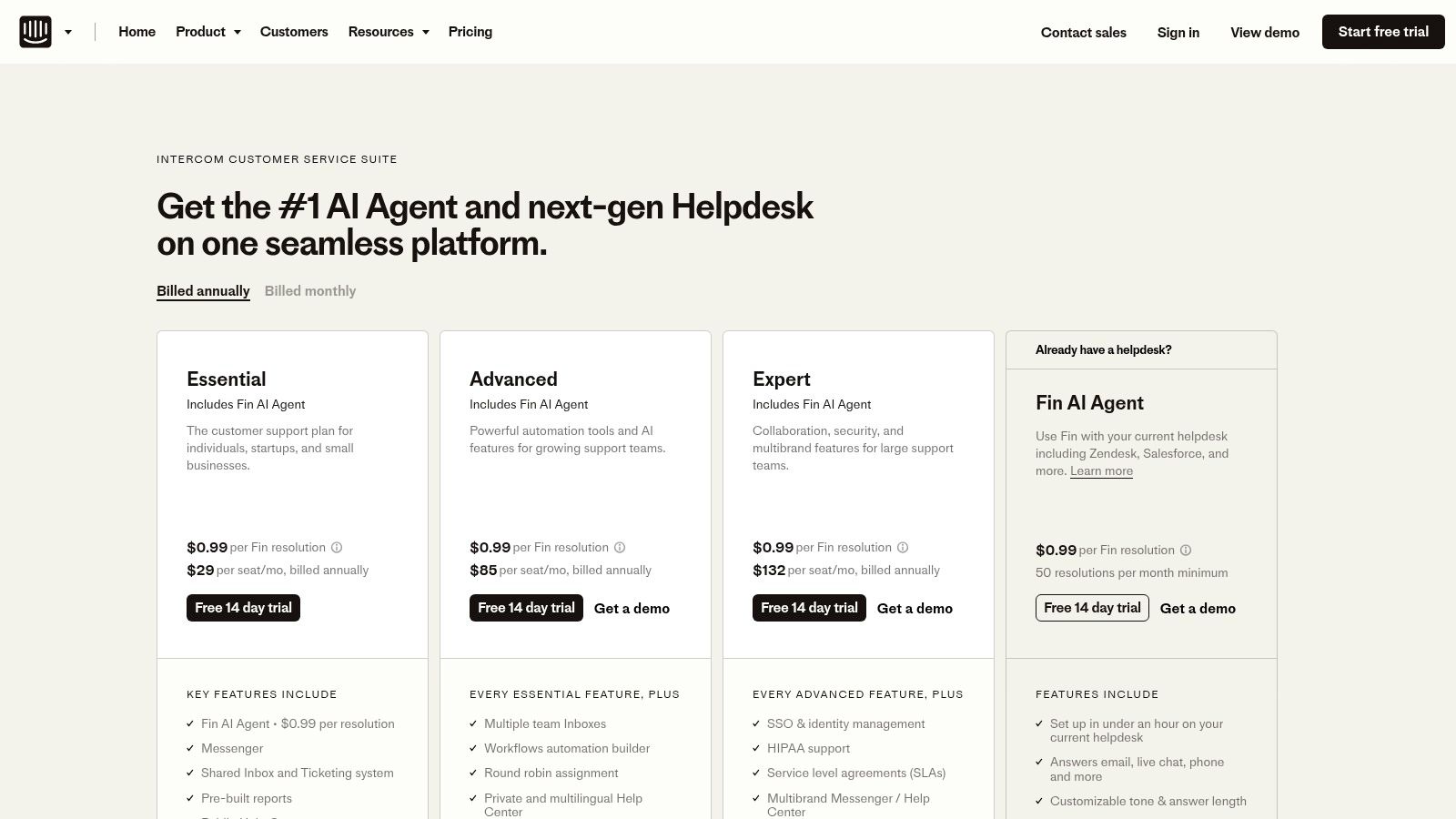
The platform excels at using its knowledge base content to power automations, workflows, and its AI chatbot, deflecting common queries before they reach a human agent. Intercom's help center can be public, private, or serve multiple languages, adapting to different audience needs. While a powerful solution for those committed to its ecosystem, the true value of its knowledge base is unlocked when used alongside its Inbox, proactive messaging, and AI tools. Usage-based fees for AI resolutions and telephony can also impact overall cost.
Key Features & Considerations
- Best For: SaaS and tech companies wanting to provide automated, in-app support driven by their KB.
- Pros: Excellent in-product messaging and automation capabilities, and clear seat-based pricing tiers with cost calculators.
- Cons: AI resolutions and telephony add usage-based costs; best value is realized when adopting the full Intercom suite.
By integrating your knowledge base with proactive messaging, you can foster a more interactive and supportive user environment, which is a core tenet of modern customer engagement. This strategy often complements efforts to build a loyal user base, so you may want to learn more about community management software to further enhance customer relationships.
Website: https://www.intercom.com/pricing-new?utm_source=openai
5. Atlassian Confluence (Cloud)
For teams already embedded in the Atlassian ecosystem, Confluence is the natural choice for building a powerful internal knowledge base. It functions as a collaborative workspace where teams can create, organize, and discuss work, making it an excellent platform for project documentation, team wikis, and internal process guides. Its key strength lies in its seamless integration with other Atlassian products like Jira and Trello, allowing for a unified workflow where documentation lives right alongside development tasks and project boards.
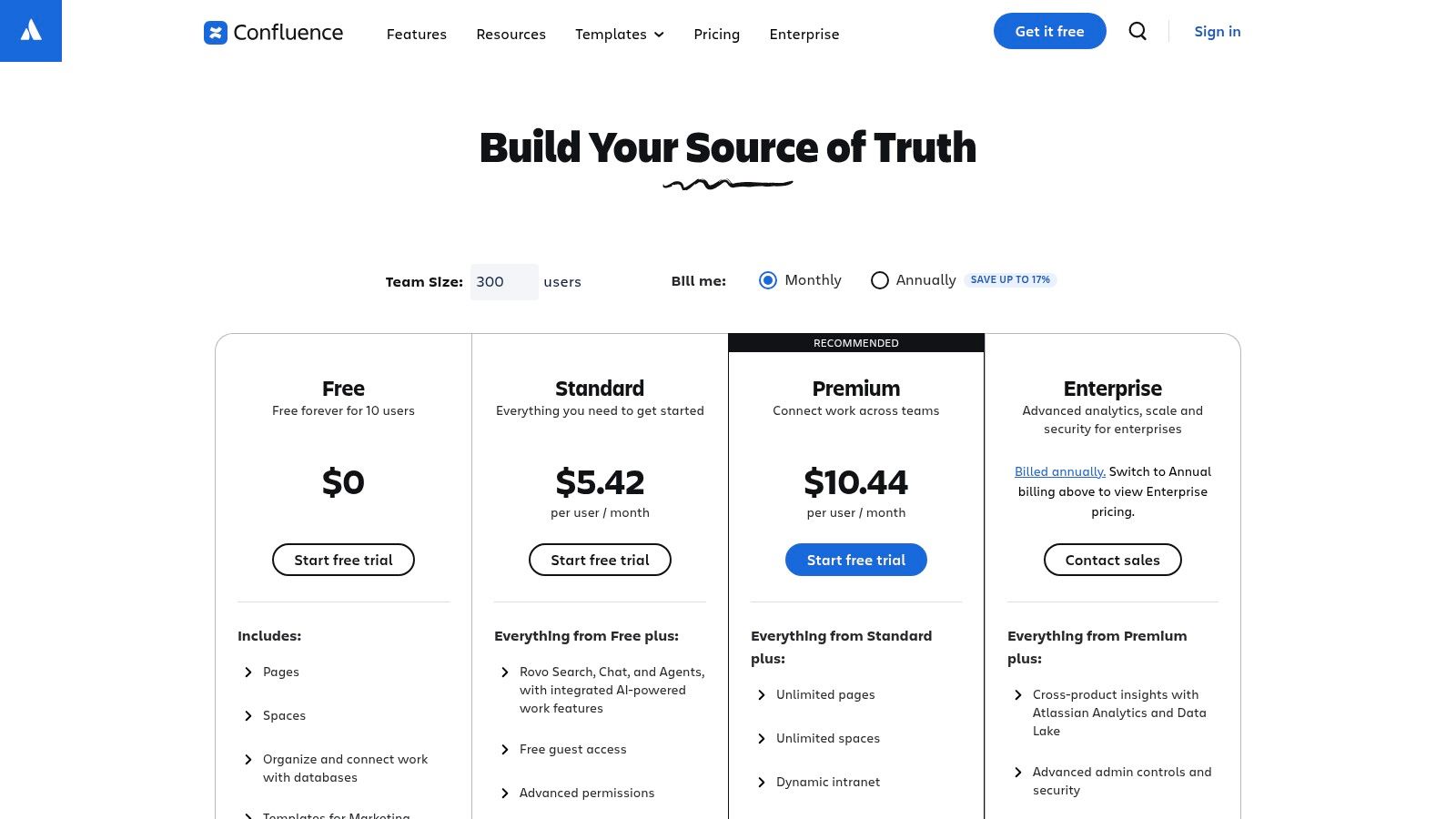
Confluence is particularly dominant in technical and engineering environments. Its structured "spaces" and "pages" system, combined with powerful templates for everything from meeting notes to technical specifications, helps maintain order and consistency. Newer AI features on premium tiers can help summarize long documents or generate content, further boosting productivity. While its free plan is generous for small teams (up to 10 users), scaling up requires careful planning, as pricing is tiered per user and advanced features like analytics, automation, and enhanced security are reserved for paid plans. Confluence is a top-tier solution, but its value is most apparent for internal knowledge management rather than public-facing help centers.
Key Features & Considerations
- Best For: Engineering, IT, and product teams needing an internal knowledge base that integrates with their development workflow.
- Pros: Unbeatable integration with Jira and the Atlassian suite, strong templating capabilities, and flexible cloud or Data Center deployment options.
- Cons: Can become expensive as user count grows; the user interface may feel complex for non-technical teams, and it's less suited for external, customer-facing KBs.
Website: https://www.atlassian.com/software/confluence/pricing
6. Notion (Knowledge Base + docs/sites)
Notion has evolved from a powerful note-taking app into a flexible, all-in-one workspace that excels at housing a company’s collective brain. Its core strength lies in its modular, database-driven structure, allowing teams to build a knowledge base that is deeply integrated with project management, internal documentation, and task tracking. This interconnectedness eliminates the need to jump between separate tools, creating a single source of truth where information is both stored and acted upon.
Unlike traditional knowledge base software, Notion empowers any team member to contribute easily, while granular permissions and features like verified pages ensure that official information remains accurate and trusted. Its ability to publish any page to the web with a single click makes it incredibly simple to create both internal wikis and public-facing help centers. With the recent addition of Notion AI, teams can now summarize long documents, generate content drafts, and quickly find answers within their workspace, further accelerating knowledge sharing and accessibility.
Key Features & Considerations
- Best For: Teams of any size wanting a unified workspace for internal docs, project management, and a public-facing knowledge base.
- Pros: All-in-one tool reduces tooling sprawl, and it's extremely easy to publish internal or external KB pages from existing documents.
- Cons: Advanced governance and analytics features are reserved for higher-tier Enterprise plans; pricing and features can also vary by billing currency.
The versatility of Notion allows it to serve not only as a knowledge base but also as a platform for organizing and selling digital products. For a deeper look into such platforms, you can explore the best platforms to sell digital products.
Website: https://www.notion.com/pricing
7. Guru (AI-native knowledge base and enterprise search)
For teams where verified, trustworthy information is paramount, Guru offers an AI-native internal knowledge base designed to eliminate content chaos. Its core philosophy centers on verification and accuracy, ensuring that the answers surfaced are always current and approved by subject matter experts. Guru excels at delivering knowledge directly within existing workflows, integrating seamlessly into platforms like Slack, Microsoft Teams, and various CRMs, so employees can find what they need without switching contexts. This focus on "in-flow" knowledge makes it one of the best knowledge base software choices for fast-paced support, sales, and operations teams.
Guru’s main differentiator is its powerful trust model combined with secure enterprise AI. Content is organized into "Cards," each with an owner and a verification schedule, which prevents outdated information from circulating. Its AI-powered enterprise search can scan connected apps to provide comprehensive, reliable answers while respecting data permissions and security protocols. Unlike generic AI tools, Guru's search is designed with governance in mind, using a zero-data-retention policy with its LLM partners to protect sensitive company information. It provides a structured way to manage institutional knowledge that is both intelligent and secure.
Key Features & Considerations
- Best For: Internal teams (support, sales, ops) that require a single source of truth with strong verification and AI search capabilities.
- Pros: Excellent trust and verification workflows, delivers knowledge directly in popular work apps, and flexible scaling from seat-based to usage-based AI plans.
- Cons: The 10-seat minimum on self-serve plans can be a barrier for very small teams; heavy AI usage may require purchasing enterprise credit pools.
By ensuring information is accurate and easily accessible, Guru helps implement core organizational principles. For a deeper look into structuring your information architecture, explore these knowledge management best practices.
Website: https://www.getguru.com/pricing?utm_source=openai
8. Document360
Document360 is a dedicated, purpose-built platform that shines in creating both public-facing and private internal knowledge bases. It’s engineered specifically for technical documentation, product manuals, and complex help centers where granular control is paramount. Its standout feature is the ability to manage multiple distinct projects or knowledge bases from a single dashboard, making it ideal for companies with diverse product lines or departments needing separate documentation hubs. This multi-project architecture provides a clean and organized content management experience.
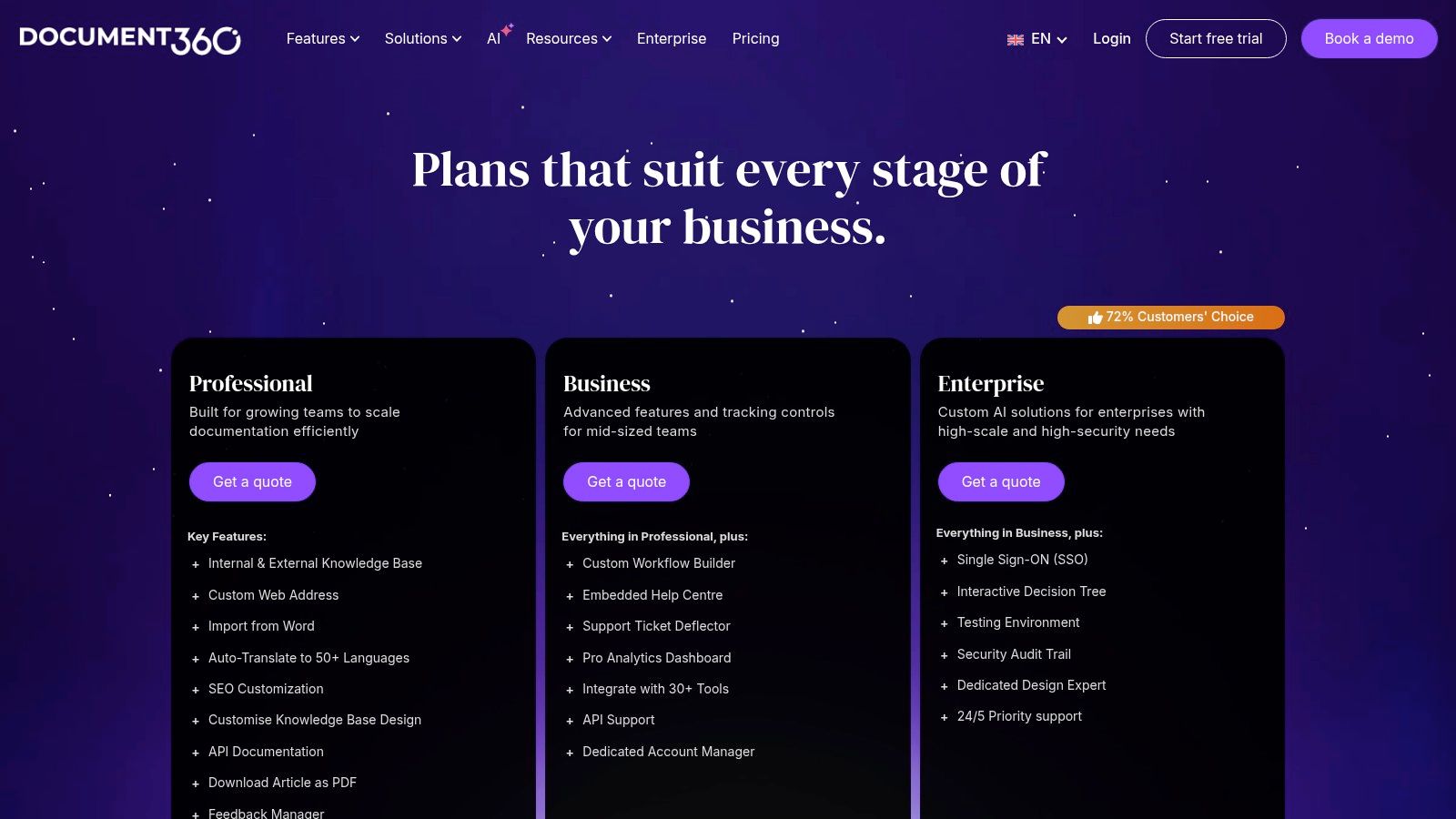
The platform offers extensive customization options, allowing businesses to use custom domains and apply unique branding with CSS and JavaScript to ensure the help center perfectly matches their brand identity. Document360 also addresses global audiences with features like automatic translation into over 50 languages and version control. For developers and advanced users, the enterprise plan supports API documentation and interactive decision-tree guides. While some advanced features are reserved for higher tiers with quote-based pricing, its focused toolset makes it one of the best knowledge base software options for documentation-heavy organizations.
Key Features & Considerations
- Best For: Businesses needing a powerful, dedicated platform for technical product documentation or multi-brand help centers.
- Pros: Purpose-built KB user experience with strong SEO controls, excellent multi-project structure, and a 14-day free trial.
- Cons: Many tiers have quote-based pricing, and some of the most powerful features are gated behind expensive Enterprise plans.
A well-structured knowledge base is crucial not just for support but also for marketing and sales, especially when you are selling digital products. To understand how to leverage your documentation in your sales process, find out more about how to sell digital goods online.
Website: https://document360.com/pricing/
9. GitBook
For teams that live and breathe code, GitBook offers a modern, developer-centric approach to knowledge management. Its core strength lies in its tight integration with Git workflows, allowing technical documentation to be managed just like source code through GitHub or GitLab synchronization. This turns documentation into a collaborative, version-controlled process, which is a natural fit for software development teams wanting to keep their internal and external product guides perfectly in sync with their codebase.
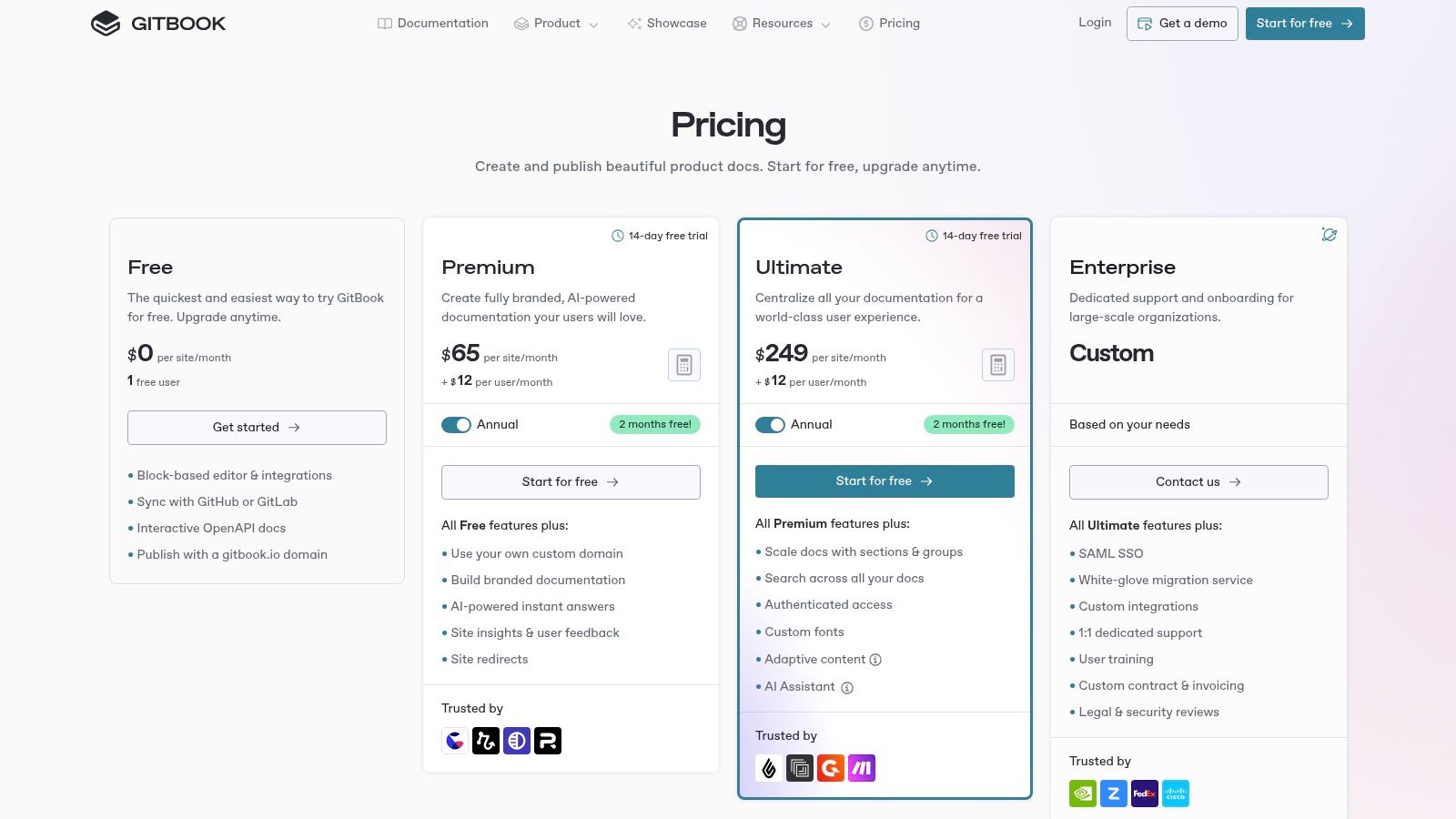
GitBook is not just for developers; its clean, block-based editor provides an intuitive writing experience for all team members. It excels at creating both public-facing help centers and private internal knowledge bases with robust access controls. For users, AI-powered features like instant answers and an integrated assistant can significantly speed up information discovery, searching across all documentation to provide relevant responses. While it’s one of the best knowledge base software options for technical content, its per-site pricing model means costs can escalate for organizations needing to manage many separate documentation projects.
Key Features & Considerations
- Best For: Development teams and tech companies needing version-controlled documentation that integrates with Git.
- Pros: Excellent, clean UX designed for technical documentation, and transparent per-site and per-user pricing.
- Cons: Per-site fees can become costly if hosting multiple distinct knowledge bases; some AI features are metered or require add-ons.
GitBook's focus on structure and developer-friendly tools makes it a powerful choice for creating clear, maintainable, and highly organized product documentation. For those looking to build a comprehensive digital business around their expertise, platforms like Zanfia offer an all-in-one solution that integrates knowledge bases with courses and communities, all with a 0% platform fee.
Website: https://www.gitbook.com/pricing
10. Freshdesk (Freshworks) – Knowledge Base within the help desk
Freshdesk is a popular choice for small to medium-sized businesses looking for an affordable, yet powerful help desk solution with a seamlessly integrated knowledge base. Its main advantage lies in its quick setup and generous free tier, making it one of the most accessible options for teams wanting to combine ticketing with self-service capabilities without a significant upfront investment. The platform is designed for efficiency, allowing support agents to convert ticket replies into knowledge base articles with a single click, ensuring that valuable solutions are captured and reused.
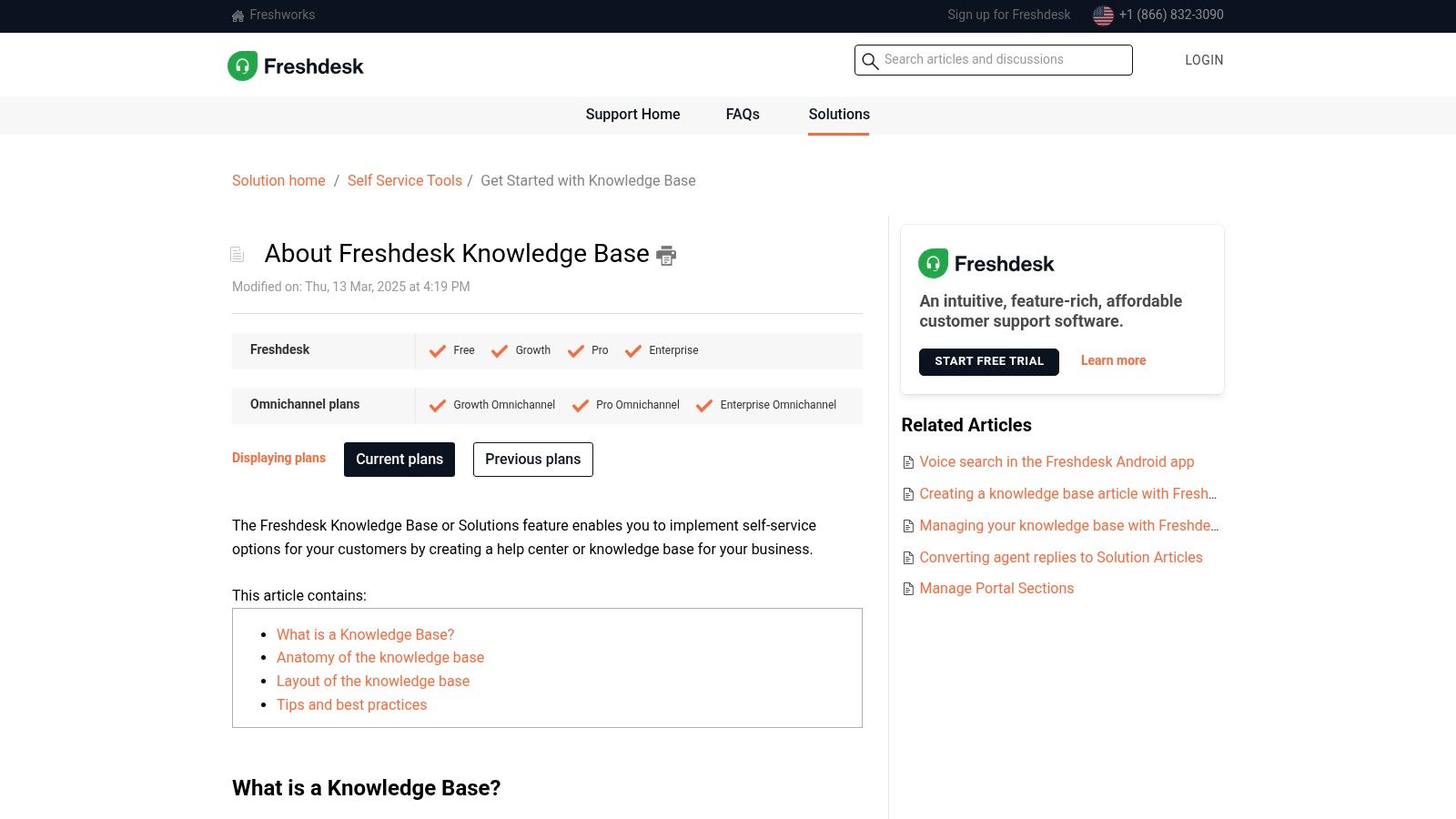
As part of the broader Freshworks ecosystem, the Freshdesk knowledge base benefits from AI-powered features through its assistant, Freddy. This AI can suggest relevant articles to both agents and customers, power chatbots to deflect common queries, and identify content gaps based on support trends. Freshdesk also includes a built-in community forum, allowing businesses to foster a user-driven support environment where customers can help one another. This three-pronged approach of ticketing, knowledge base, and community forums creates a comprehensive support hub.
Key Features & Considerations
- Best For: SMBs and startups needing a cost-effective, all-in-one help desk and knowledge base software.
- Pros: Generous free plan available for up to 10 agents, quick and easy to set up, and a large ecosystem of add-ons and integrations.
- Cons: Certain advanced features are tied to specific plan families, and usage-based add-ons for AI sessions can increase the overall cost.
11. Zoho Desk (Help Center / KB)
For businesses already operating within the extensive Zoho ecosystem or those seeking a powerful yet cost-effective help desk, Zoho Desk offers a compelling solution. Its knowledge base is not a standalone product but a deeply integrated component of its customer service platform, designed to work seamlessly with ticketing, community forums, and AI-powered support tools. This integration is its core strength, allowing teams to build a comprehensive self-service portal that also empowers support agents.
Zoho Desk stands out with its robust multi-language capabilities, supporting over 40 languages to help global brands deliver localized content. Its AI assistant, Zia, can leverage knowledge base articles to provide instant answers to customers through an answer bot, deflecting common tickets and freeing up agent time. The platform also enables the creation of community forums where users can help each other, with valuable discussions easily converted into official KB articles. While its full potential is realized within the broader Zoho suite, it remains a feature-rich and one of the best knowledge base software options for teams of all sizes.
Key Features & Considerations
- Best For: Companies using the Zoho product suite or SMBs needing a feature-rich help desk with an integrated KB.
- Pros: Competitive pricing with a generous feature set, excellent for multi-language support, and works cohesively within the Zoho ecosystem.
- Cons: The user interface has a learning curve due to its depth, and key enterprise features like SSO are reserved for higher-tier plans.
A well-organized Zoho Desk Help Center can significantly enhance customer satisfaction by providing instant, 24/7 access to information. To maximize its impact, it is crucial to understand what drives users to your support content. For further reading, explore how user search intent shapes content strategy.
Website: https://www.zoho.com/desk/pricing.html
12. KnowledgeOwl
For teams seeking a dedicated, standalone knowledge base solution without the complexity of a full-fledged help desk suite, KnowledgeOwl is an excellent choice. It focuses purely on creating, managing, and delivering high-quality help content. This singular focus allows it to offer robust features tailored specifically for documentation, such as powerful access control, versioning, and detailed analytics on how readers interact with articles. It's built for organizations that want complete control over their content presentation and user access in one neat package.
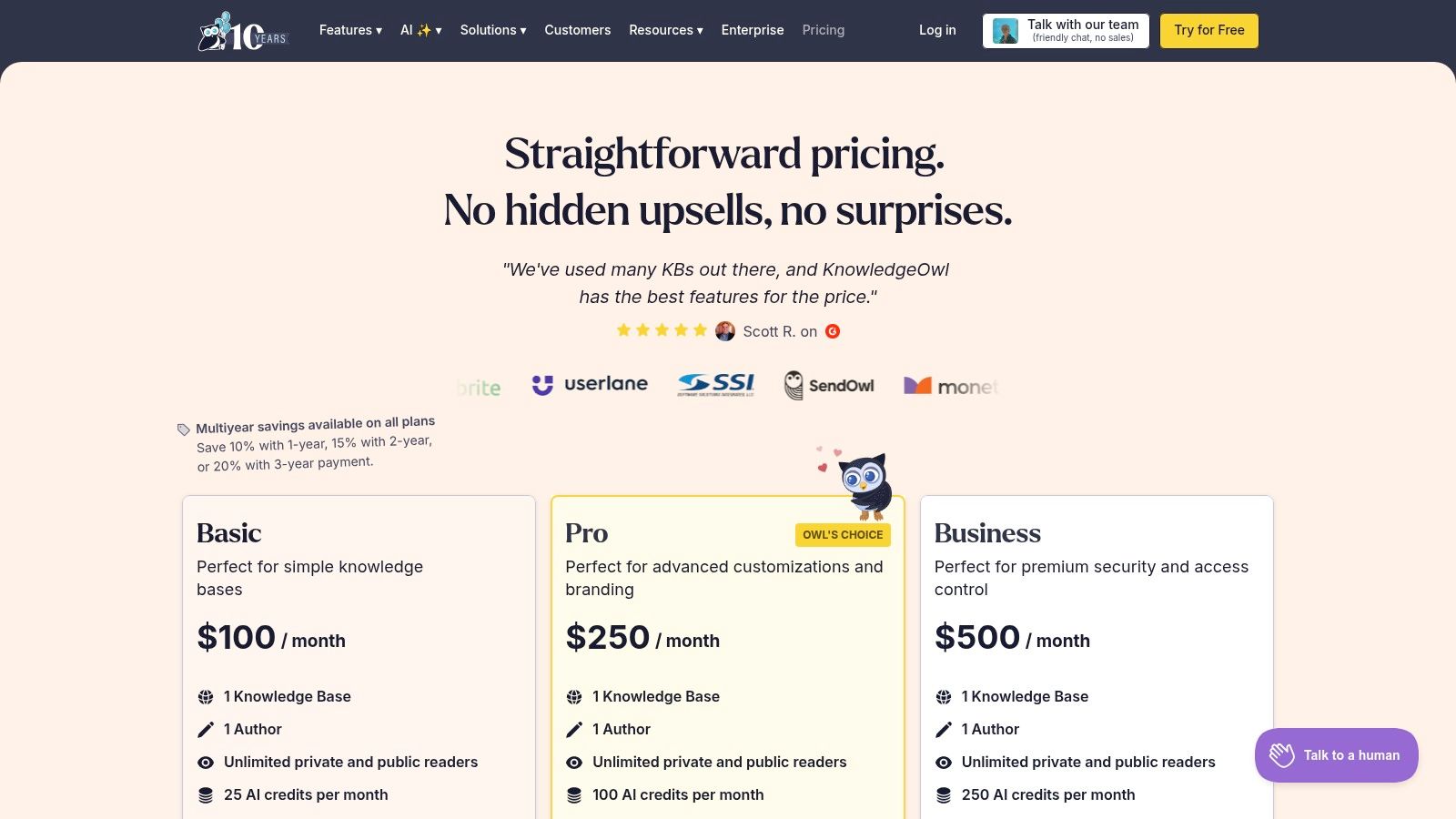
KnowledgeOwl excels at providing granular control over both public and private knowledge bases. Businesses can customize their help centers extensively with custom domains and full HTML/CSS/JS access, ensuring the branding aligns perfectly with their main website. Its strength lies in security and permissions, with higher-tier plans offering SSO integration and role-based access to manage who sees what. While its per-author pricing model may seem limiting initially, the ability to host multiple distinct knowledge bases under a single subscription offers significant value for companies managing different products or departments. This makes it one of the best knowledge base software options for content-focused teams.
Key Features & Considerations
- Best For: Companies wanting a powerful, standalone knowledge base with strong customization and access controls.
- Pros: One subscription can host multiple knowledge bases; clear pricing with discounts available; strong compliance and security features.
- Cons: The default per-author pricing can be restrictive for larger content teams; advanced enterprise features come at a premium price.
Crafting a well-structured knowledge base is crucial for improving customer satisfaction and internal efficiency. For guidance on organizing your content effectively, explore strategies for creating a user-friendly site structure.
Website: https://www.knowledgeowl.com/pricing
Top 12 Knowledge Base Software Comparison
| Product | Core features | UX & Quality (★) | Price & Value (💰) | Target audience (👥) | Unique selling points (✨) |
|---|---|---|---|---|---|
| Zanfia 🏆 | Communities, courses, paid newsletters, KB, checkout, automations, analytics | ★★★★★ — easy setup, responsive support | 💰 Free starter; paid tiers, 0% platform fees | 👥 Creators, educators, SMBs, brands | ✨ True all‑in‑one branded platform, conversion analytics, local payment gateways, API/webhooks |
| Zendesk (Guide) | AI KB, omnichannel ticketing, agents, theming & apps | ★★★★★ — enterprise reliability & scale | 💰 Tiered enterprise pricing, add‑ons can increase cost | 👥 Large support teams, enterprises | ✨ Deep integrations, multi‑brand & AI‑driven article maintenance |
| Help Scout (Docs) | Branded public KB, Beacon widget, messaging, reporting | ★★★★☆ — simple, fast UX, unlimited users | 💰 Contact‑based pricing, predictable for small teams | 👥 Small teams, SMBs wanting public KB | ✨ SEO‑ready KB, Beacon AI, transparent pricing |
| Intercom (Articles) | Public help center, Fin AI Agent, inbox, in‑product messaging | ★★★★☆ — strong automation & proactive messaging | 💰 Seat tiers + usage fees for AI/telephony | 👥 SaaS & in‑app support teams | ✨ Fin AI agent, workflows for proactive user engagement |
| Atlassian Confluence | Internal wiki, templates, permissions, Jira integration | ★★★★☆ — robust for engineering/internal KBs | 💰 Per‑user tiers, Premium/Enterprise for advanced features | 👥 Engineering teams, enterprises | ✨ Tight Jira integration, scalable cloud/Data Center options |
| Notion | Docs + databases, publishable sites, Notion AI, teamspaces | ★★★★☆ — flexible all‑in‑one workspace | 💰 Tiered per team; Enterprise for governance | 👥 Startups to enterprises wanting single workspace | ✨ Publishable sites, integrated docs + DBs, Notion AI |
| Guru | Verified cards, enterprise search, secure AI, integrations | ★★★★☆ — trust/verification focused UX | 💰 Usage‑based AI credits, 10‑seat min on self‑serve | 👥 Support, ops, revenue teams needing accurate knowledge | ✨ Verification workflows, secure AI search, Slack/Teams in‑flow answers |
| Document360 | Purpose‑built KB, multi‑project support, auto‑translate | ★★★★ — strong KB UX & SEO controls | 💰 Quote‑based tiers, 14‑day trial | 👥 Product doc teams, multi‑project docs | ✨ Auto‑translate 50+ languages, deep doc customization |
| GitBook | Product docs, block editor, GitHub/GitLab sync, AI | ★★★★☆ — clean UX for technical docs | 💰 Per‑site + per‑user pricing (transparent) | 👥 Developer teams, technical writers | ✨ Git sync, AI assistant for instant answers |
| Freshdesk (KB) | Help desk + public KB, community portal, Freddy AI | ★★★★ — quick to set up, generous free tier | 💰 Free tier + paid plans; add‑ons/AI usage extra | 👥 SMBs wanting ticketing + KB | ✨ Fast setup, broad add‑on ecosystem, multilingual support |
| Zoho Desk (Help Center) | KB authoring, forum, multi‑language, Zia AI | ★★★★ — good value, feature rich | 💰 Competitive pricing within Zoho suite | 👥 Teams using Zoho ecosystem, cost‑sensitive orgs | ✨ 40+ language support, integrated omnichannel workflows |
| KnowledgeOwl | Hosted public/private KBs, roles, analytics, SSO | ★★★☆ — focused standalone KB UX | 💰 Clear plans, discounts (nonprofit/multi‑year), per‑author model | 👥 Teams needing standalone KB & compliance | ✨ Multi‑KB hosting, strong access control & compliance |
Making Your Final Decision
Navigating the landscape of knowledge base software can feel overwhelming. With a dozen powerful contenders, each with distinct strengths and ideal use cases, the "best" choice is never universal. It's a strategic decision rooted in your specific goals, your audience, and your operational priorities. This comprehensive review was designed to move beyond feature lists and provide the clarity needed to make that pivotal choice for your business.
We've explored a wide spectrum of solutions. For large enterprises seeking a robust, internal "single source of truth" tightly integrated with development workflows, platforms like Atlassian Confluence and GitBook are engineered to excel. Their version control, collaborative editing, and deep connections with tools like Jira make them indispensable for technical teams. On the other hand, for customer-facing support operations, tools such as Zendesk, Help Scout, and Intercom offer powerful, AI-enhanced knowledge bases embedded within a broader customer service suite. Their focus is on deflecting tickets, empowering agents, and providing fast, contextual answers to user queries.
Distilling Your Core Need: Support, Internal Docs, or a Business Engine?
The first and most critical step is to define your primary objective. Don't fall into the trap of choosing a tool based on an exhaustive list of features you may never use. Instead, ask yourself a simple question: What is the primary job this knowledge base needs to do?
- Is it to reduce support tickets? If your main goal is to empower customers to self-serve and decrease the load on your support team, focus on platforms with excellent search functionality, analytics on article effectiveness, and integration with help desk software. Look at how easily users can find answers and whether the system can suggest relevant articles automatically.
- Is it to centralize internal company knowledge? For this use case, prioritize collaboration features, permission controls, and ease of content creation for non-technical team members. Platforms like Notion and Guru shine here, offering flexible, intuitive interfaces that encourage company-wide adoption for everything from HR policies to project documentation.
- Is it to build a business around your expertise? This is where a fundamental shift in perspective is required. If your knowledge isn't just a support asset but is, in fact, your core product, then a standard knowledge base tool is insufficient. You need an ecosystem. You need a platform that treats your knowledge library as a monetizable asset, seamlessly connected to courses, communities, and payment systems.
The Creator and Entrepreneur's Choice: Beyond Documentation
For small business owners, digital marketers, and online educators, the goal is often not just to document information but to commercialize it. This is the crucial differentiator that sets a platform like Zanfia apart. While it provides robust knowledge library features, its true power lies in its all-in-one design. It understands that for a creator, a knowledge base is often a lead magnet, a premium resource for paying members, or supplementary material for an online course.
By integrating your knowledge base directly with community channels, course modules, and e-commerce functionalities, Zanfia creates a unified user experience under your own brand. A customer can read a free article, join a paid community, enroll in a course, and access exclusive resources all with a single login. This cohesive journey dramatically increases customer lifetime value and retention. Furthermore, its revolutionary 0% platform transaction fee model and deep integration with Polish payment and invoicing systems make it a financially astute choice for entrepreneurs who are tired of seeing their revenue eroded by platform commissions. It’s a solution built not just to share knowledge, but to build a scalable, profitable business upon it.
Ultimately, selecting the best knowledge base software is an investment in your organization's future. Whether you are streamlining internal processes, enhancing customer support, or building an educational empire, the right tool will act as a catalyst for growth. Take the insights from this guide, align them with your core mission, and choose the platform that will serve as a true partner in achieving your goals.
Ready to transform your expertise into a thriving online business? If you're a creator, expert, or entrepreneur looking for a platform that combines a powerful knowledge base with courses, community, and e-commerce, explore Zanfia. See how its all-in-one ecosystem and 0% platform fee model can help you build and scale your brand with confidence. Learn more and get started at Zanfia.

