

How to Make Great Presentations That Truly Connect
Here’s the thing about presentations that actually work: the magic doesn't happen in PowerPoint or Keynote. It happens long before you ever choose a font or drag-and-drop an image.
The secret to turning a standard talk into an experience that moves people—whether to buy, learn, or join—is laying the right foundation. It all comes down to three crucial pre-flight checks: defining your goal, analyzing your audience, and structuring your story.
Building the Foundation of Your Presentation
Most people make the same mistake. They get an idea, open their slide software, and start typing. This is a recipe for a rambling, unfocused mess.
A truly great presentation is built on strategy, not slides. Before you even think about design, you need a rock-solid purpose. What is the one thing you absolutely need your audience to think, feel, or do when you're done?
This objective becomes your North Star. It guides every word you write, every slide you create, and every story you tell. Without it, you’re just navigating in the dark.
Define Your Core Objective
Start with a question that is brutal in its simplicity: “If my audience only remembers one thing, what is it?”
This isn't about listing all your points. It’s about nailing your single, most critical takeaway. This one sentence is the DNA of your entire presentation.
For a creator selling a course, that objective might be: "Convince them my framework is the fastest path to solving their specific problem." For an expert growing a community, it could be: "Show them that this network is the missing piece in their professional journey."
This singular focus is your greatest weapon against trying to cram too much in.
Analyze Your Audience
Once you know your destination, you need to know who you’re taking with you. A talk that kills with industry veterans will put a room of beginners to sleep. You have to tune your message to the right frequency.
To really connect, get inside their heads. Consider:
- Their Knowledge: What do they already know? Don't bore them with the basics or lose them by skipping crucial context.
- Their Pain Points: What keeps them up at night? Your presentation needs to speak directly to their problems and frame your ideas as the solution they've been looking for.
- Their Expectations: Why did they show up? Are they hoping for a dose of inspiration, a list of actionable steps, or cold, hard data? Give them what they came for.
When you make it about them, they'll feel seen, heard, and ready to listen.
Structure Your Narrative
Now you have your "what" (your objective) and your "who" (your audience). It's time to build the "how"—the narrative that will carry your message. This is where you organize your main points into a logical flow, guiding your listeners from a hook that grabs their attention to a conclusion that demands action.
This simple workflow is the bedrock of any impactful presentation.
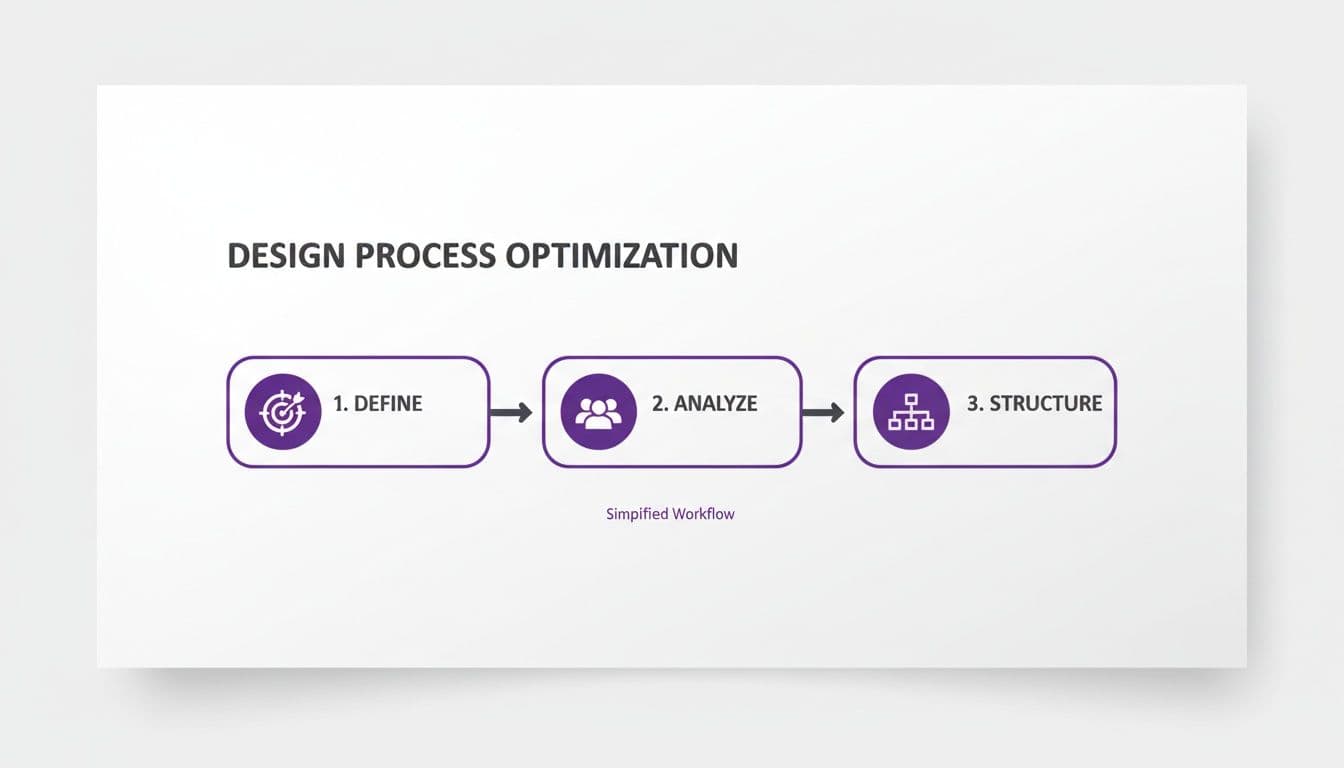
As you can see, this isn't random. It's a strategic progression. You define the core message—your unique promise of value, which you can learn more about in our guide on what is a value proposition. From there, you analyze the people you need to reach and structure your story to resonate.
Nailing this planning phase is what separates the amateurs from the pros. It guarantees every single element of your presentation has a purpose.
Designing Slides That Clarify, Not Complicate
Let's be honest: your slides are a visual aid, not your script. Their one and only job is to back up what you're saying and keep the audience hooked. But far too often, they become a distraction—a wall of text that puts you in direct competition with your own screen.
When your audience is busy reading your slides, they aren't listening to you. The secret to a killer presentation is designing slides that make your points crystal clear, not more complicated.
This all starts with a "less is more" mindset. Forget filling every pixel. You need to get comfortable with white space. Think of it as visual breathing room; it directs the eye to what truly matters and gives your core ideas the space they need to make an impact.
The most powerful rule you can follow is this: one main idea per slide. This single principle is a game-changer. It prevents your audience from getting overwhelmed and forces you to be ruthlessly disciplined with your message. Got three bullet points on one slide? Great. Now you have three slides. This creates a much more dynamic and digestible flow.
Choosing Fonts and Colors That Work
Your visual choices broadcast the professionalism of your entire presentation. Consistency is everything here.
- Fonts: Keep it simple. Stick to two fonts maximum —one for your headings, one for your body text. Go with clean, sans-serif fonts like Arial, Helvetica, or Calibri for the best readability on screens.
- Colors: Build a simple, cohesive color palette of 3-5 colors that matches your brand. Use one dominant color, a secondary accent color to make things pop, and neutral colors (like gray and white) for backgrounds and text.
These aren't just decorative choices; they build a solid visual identity that makes your material feel polished and authoritative. For any creator building a business, this kind of visual consistency is non-negotiable.
You wouldn't let a platform slap its generic branding all over your online course, so why would you treat your presentations any differently? This is especially true when you're building a premium brand. Some platforms box you in and limit your ability to control your brand's look. A platform like Zanfia works differently: instead of a course tool bolted onto templates, it puts an AI team behind your business and lets you dictate the work by chat or by voice, while giving you complete white-label control over your ecosystem and a checkout with order bumps, upsells and installment plans (like splitting a $600 course into four payments) so the work ends in a sale. Higher-plan capabilities and packaging can vary, so check the current Zanfia pricing before committing. This ensures your brand is always the star of the show.
From Bullet Points to Visual Storytelling
Nothing kills an audience's attention faster than a slide choked with bullet points. Your job is to transform those key points into visuals that actually tell a story.
Your slides should be a billboard, not a document. Aim for a message that can be understood in three seconds.
Instead of writing out a full sentence, find a powerful image that triggers the right emotion. Instead of just listing data, turn it into a clean, simple chart that reveals the story at a glance.
Data Visualization Done Right:
- Keep Charts Simple: Bar charts, line graphs, and pie charts are your best friends. Ditch the complex 3D effects and cluttered labels that make the data a chore to read.
- Highlight the Key Takeaway: Use a bright, contrasting color or a simple arrow to draw everyone's attention to the single most important number on the chart. Don't make your audience hunt for the insight.
- Use Quotes Effectively: When you have a powerful quote to share, give it its own slide. Use a large, clean font and attribute it clearly. This gives the statement the weight and focus it deserves.
If you want a great starting point for designing slides that clarify rather than complicate, exploring a well-structured startup pitch deck template can show you how to put these principles into practice.
At the end of the day, great slide design directs the audience’s focus right back where it belongs: on you. When your slides are clean, visual, and focused, they don’t compete for attention—they amplify your words. The slide provides the visual punchline, but you deliver the story. If you're building a brand as an expert, check out our list of the best tools for content creators to help you get the job done right.
Crafting a Narrative That Connects and Persuades
Data and bullet points don't stick. Stories do.
While a good outline gives your presentation a skeleton, it’s the narrative that gives it a soul. This is your chance to stop just listing facts and start taking your audience on a journey—one that moves them from passive listener to active participant.
Every great presentation, from a team update to a high-stakes sales pitch, follows the same timeless structure as a great story. It needs a hook to grab attention, a middle that builds a rock-solid case, and an ending that demands action.
This isn’t just for creative keynotes. It’s a battle-tested framework for persuasion.
The Anatomy of a Presentation Story
Think of your presentation's narrative as a simple, three-act play. Each part has a specific job to do, guiding your audience from where they are to where you need them to be.
- The Hook (The Beginning): You have about 30 seconds to earn their attention. Start with a jolt—a surprising statistic, a relatable problem, a bold question, or a quick personal story. The goal is to make every person in the room think, "Okay, this is for me. I need to listen."
- The Build (The Middle): This is where you deliver on the promise of your hook. You build your argument, piece by piece, using a mix of logic, evidence, and examples. This is your core message, backed up with data, powerful testimonials, or clear case studies that prove your point.
- The Payoff (The End): Your conclusion can't be an afterthought. It needs to be sharp, clear, and actionable. Reiterate your single most important message, and then tell the audience exactly what to do next. This call to action should feel like the only logical conclusion to the story you just told.
Writing a Script That Sounds Like You
One of the quickest ways to lose an audience is to read a script that sounds like it was written by a robot. Stiff, formal language is the enemy of connection.
Your goal isn't to memorize a script word-for-word. It's to internalize your key points so you can speak about them naturally.
So, write like you talk. Use contractions. Use shorter sentences. Read every line out loud as you write it. If a sentence feels clunky or awkward to say, it will sound ten times worse to your audience. Scrap it and try again.
The best speakers don't perform a script; they have a conversation with their audience, guided by their key points. Your authenticity is your most powerful tool for building trust.
This is especially critical for creators. When you're selling a course or a digital product, you're not just selling information—you're selling a relationship with you and your expertise. For something as direct as a sales video, the script has to feel deeply personal. We cover this exact technique in our guide on how to create high-converting Video Sales Letters.
Making It Real with Stories and Examples
Facts tell, but stories sell. It’s an old saying because it’s true. The most persuasive presentations I’ve ever seen are built on a foundation of relatable stories and real-world examples.
Instead of listing product features, tell the story of a real customer who used them to overcome a specific, painful problem. That’s infinitely more powerful.
If you're a creator building a business, this means you need to stop talking about your product and start talking about your customer's journey. They are the hero, they have a problem, and your course is the guide that gives them the plan to win. This simple shift in framing makes your offer feel essential, not just "nice to have."
Even your choice of tools can become part of this story. Instead of picking a generic international giant like Kajabi or Teachable, choosing a platform like Zanfia becomes a strategic talking point. It shows you've built your business on an AI-first stack where an assistant handles the work by chat or by voice, where 12 product types live under one brand, and where the current model charges 0% platform commission on your sales—all details that prove you're a savvy business owner.
Mastering Your Delivery and Stage Presence
You can have the most beautiful slides and a brilliant script, but if your delivery falls flat, the entire presentation sinks with it. Your physical presence, your voice, your confidence—these are what breathe life into your message. Getting this right isn’t about faking it or becoming some over-the-top stage performer; it’s about learning how to project the authority you already possess.
I've seen more presentations fall apart from one simple mistake than any other: trying to memorize a script word-for-word. It sounds like a safe bet, but it almost always leads to a stiff, robotic delivery where you sound disconnected from your own ideas.
The goal isn't to memorize. It's to internalize.
From Memorizing to Internalizing
When you internalize your material, you know your core points so well that you can talk about them naturally, with genuine conviction. It frees you from the panic of forgetting a specific sentence and allows you to actually connect with your audience.
Here’s how you get there:
- Practice with bullet points, not full paragraphs. Rehearse using only your key talking points for each slide. This forces you to find the right words in the moment, just like in a real conversation.
- Record yourself. Fire up your phone's voice recorder or video camera during practice. Listening back is the fastest way to spot where you sound robotic, unsure, or are rushing. You'll hear your delivery get more authentic with each take. The skills here are very similar to podcasting; you can learn more about how to record a podcast in our dedicated guide.
- Time your run-throughs. Do this several times to build muscle memory for your pacing. It’s the best way to make sure you won’t speed through your points or drag on too long when the pressure is on.
This deep level of preparation is the ultimate cure for stage fright. The more you know your material inside and out, the less room there is for fear to creep in.
Commanding the Stage with Body and Voice
What you don't say often carries more weight than what you do. Confident posture and a dynamic voice can command attention, even when you're explaining something complex.
Confident Body Language:
- Stand tall and open. Keep your shoulders back and avoid crossing your arms. Fidgeting or closing yourself off signals nervousness.
- Use purposeful gestures. Let your hands emphasize your points naturally. Don't just lock them in your pockets or clasp them behind your back.
- Make meaningful eye contact. If you're in person, scan the room and connect briefly with different people. If you're online, look directly into the camera lens. This creates the feeling of direct eye contact for everyone watching.
The strategic use of a pause is one of a speaker’s most powerful tools. A two-second silence before or after a key statement adds immense weight and gives your audience a moment to absorb your point.
Your voice is an instrument for engagement. You have to vary your pitch, pace, and volume to keep your audience from tuning out. A monotonous drone will lose a room in minutes, but a dynamic vocal range shows command and keeps people leaning in.
Freeing Up Your Focus with Smart Systems
A huge source of anxiety for presenters is worrying about all the logistics that come after the "thank you" slide. Will everyone get the follow-up email? Will new customers get access to the course you just sold? That mental clutter is a massive distraction right when you need to be 100% present.
This is where automation is a presenter's best friend. For creators selling courses or memberships, a platform like Zanfia puts an AI team behind the busywork: you can tell the assistant by chat or by voice to grant course access after a sale, add new members to the right community channels based on their purchase, or trigger a welcome email sequence, and the visual Workflows builder wires it all together. Advanced automation and AI capabilities depend on the plan, so check the current Zanfia pricing for what unlocks where.
These automations can easily save you 5–10+ hours a month, freeing up critical mental energy so you can focus entirely on your performance.
Great delivery transforms your presentation from a simple transfer of information into a genuine experience. To truly master this, you need to think about the entire process, so dig deeper into the strategies on how to give the best presentation and turn your talks into a powerful tool.
Nailing Your Tech and Follow-Up Strategy
A killer presentation doesn't just happen. It's built on a foundation of seamless technology and a smart plan for what comes after you take your bow. Too many creators deliver a fantastic talk, only to get tripped up by a bad microphone or lose all their momentum because they have no clear next step for their audience.
This is your game plan to avoid those mistakes. We’ll cover the essential tech checks that separate the amateurs from the pros, and then we’ll dive into the most critical piece for any business: turning that room full of inspired listeners into customers and community members.

Your Pre-Show Tech Sanity Check
Nothing sabotages your confidence faster than tech that decides to fail two minutes before you go live. A quick pre-flight check is non-negotiable.
For an online presentation, your tech is the entire experience. Get these three things right:
- Audio is Everything: Is your mic crystal clear? Do a quick recording. Muffled, noisy audio is the fastest way to get your audience to tune out.
- Look the Part: Are you lit from the front, not from behind? A bright window behind you creates a silhouette. Good lighting makes you look credible and helps people connect with your message.
- Make Eye Contact: Position your camera at eye level. Looking directly into the lens feels like you're talking right to each person in the audience. If you're getting serious about video, our guide to the best camera for streaming is a must-read.
When you're presenting in-person, the variables change, but the principle is the same—leave nothing to chance:
- Connector Confidence: Have you tested your laptop with the venue's projector? Always bring your own adapters ( HDMI , USB-C , etc.). Never assume the venue has what you need.
- Clicker Control: Is your slide advancer paired and working? Walk the stage and test its range. You don't want to be tethered to your laptop.
- The Ultimate Backup: Always, always have your presentation on a USB drive and saved in the cloud. Tech gremlins are very real. A backup turns a potential disaster into a minor hiccup.
Before you go on, it pays to run through a quick checklist. This simple habit can save you from a world of stress.
Pre-Presentation Tech Checklist
| Category | Check Item | Status (Ready/Needs Attention) |
|---|---|---|
| Audio | Microphone is connected and sounds clear (test recording). | |
| Video | Camera is at eye level and lighting is good. | |
| Connectivity | Laptop connects to projector/screen without issues. | |
| Peripherals | Slide advancer (clicker) is paired and working. | |
| Backup | Presentation file is on a USB drive and in the cloud. | |
| Software | All presentation apps are open and running smoothly. |
Completing this checklist gives you the peace of mind to focus entirely on your delivery, not on whether your gear will cooperate.
From Interest to Action: Your Conversion Playbook
For creators, the presentation isn't the finish line; it’s the starting gun. Your final slides are where you guide the audience toward the next logical step. This is your call-to-action (CTA), and it has to be unmissable.
Never end with a weak "Any questions?" slide. That’s a dead end. Instead, end with a strong, clear directive that tells them exactly what to do next.
- "Join our free community to continue the conversation."
- "Download the exclusive checklist from today's talk."
- "Enroll in the course now and get these three bonuses."
This is how you bridge the gap between inspiration and revenue. If your talk just proved your expertise, your CTA should point directly to where they can buy that expertise, like an online course. This is even more powerful when your content is hosted natively on your own platform. For example, Zanfia pairs native video hosting (no separate Vimeo or Wistia bill) with a checkout built to sell—order bumps, upsells and installment plans like splitting a $600 course into four payments, plus a test mode you can use to buy your own product before launch and confirm the whole flow works. This ensures your valuable content lives securely within your own branded ecosystem.
The moments immediately after your presentation are golden. Your audience is engaged and motivated. Your follow-up strategy must capture that energy instantly, not hours or days later.
A frictionless transition from your presentation to the next step is crucial. If you’re selling a course, the purchase and access process has to be instantaneous. Any delay or complicated checkout process will kill the momentum you just worked so hard to build. This is where a system like Zanfia becomes your best friend: Stripe and PayPal handle payments with Apple Pay and Google Pay at the wallet layer, the assistant can wire up follow-ups by voice or chat, and the current model charges 0% platform commission on your sales.
Turn Your One-Time Talk into a Long-Term Asset
Think about it. You pour weeks of effort into a killer presentation, deliver it once, and then… what? It just disappears into the ether. That’s a massive waste of a valuable asset.
A great presentation isn't a one-and-done performance. It's intellectual property. By shifting your mindset from "performing" to "packaging," you can transform that single event into a product that generates revenue for months or even years.
The best part? You don't need a fancy production studio. A high-quality screen recording of your slides paired with clean audio from a decent microphone is all it takes to get started.
How to Package Your Expertise
Once you have that recording, you’ve got a flexible asset that can be deployed in several smart ways to grow your business:
- Create a Standalone Mini-Course: Isolate the presentation and sell it as a focused, bite-sized course. This is perfect for people who want a deep dive on a specific topic but aren't ready to commit to your flagship program.
- Add it as a Premium Module: Instantly boost the value of an existing course by adding the recorded presentation as a bonus lesson or expert module. It's a low-effort way to justify a higher price point or simply delight your current students.
- Build a High-Value Lead Magnet: Forget boring PDF checklists. Offer the full recorded presentation for free in exchange for an email. This is a power move that attracts a seriously qualified audience and positions you as a top-tier expert from the very first interaction.
This strategy turns a single burst of effort into a reliable business asset, letting you reach a much wider audience and earn from your knowledge long after you've left the stage.
From Recording to Revenue
Okay, you’ve got the video file. Now what? You need a secure, professional way to get it in front of paying customers without becoming an IT expert overnight. This is exactly where an all-in-one platform becomes non-negotiable for serious creators. It handles the messy stuff so you can focus on your content.
A platform like Zanfia, for instance, is built for exactly this. Upload your video to native hosting, lock it behind a paywall, and sell it as one of 12 product types—a downloadable file, a paid newsletter, or a full online course—all managed under one brand. You can dictate the setup to the assistant by chat or by voice instead of clicking through menus, and Workflows handles the entire flow—from payment to instantly granting access—without you lifting a finger.
The real power here is owning the entire stack. When you sell your recorded presentation on your own platform, you control the branding, you own the customer relationship, and most importantly, you keep the revenue.
This is a serious advantage for any creator building a business. Zanfia's current model charges a 0% platform transaction fee on your sales, so you keep 100% of your revenue, paying only the standard, unavoidable fees from payment processors like Stripe (roughly 2.9% + $0.30 in the US).
This approach ensures the platform's success is tied to yours—it grows with you, not at your expense. It’s the ideal setup for turning your hard-earned knowledge into a truly scalable business.
Your Top Presentation Questions, Answered
As you gear up to present, a few common questions always pop up. Let’s tackle them head-on, covering everything from timing and slide counts to keeping your nerves in check.
How Long Should My Presentation Be?
The honest answer? It depends entirely on the context. There's no single magic number.
For a high-impact keynote or an inspirational talk, the famous 18-minute 'TED Talk' model is a brilliant benchmark. It’s long enough to develop an idea but short enough to maintain peak audience engagement. If you're running a detailed educational webinar, however, plan for 45-60 minutes to allow for deeper content and a proper Q&A.
The golden rule is to always prioritize concise, powerful value over just filling the clock. It’s far better to leave your audience wanting more than to have them checking their watches.
How Many Slides Is Too Many?
Stop counting slides. It's the wrong metric to focus on. Instead, burn this rule into your brain: "one main idea per slide."
Following this principle keeps your presentation feeling dynamic and prevents you from cramming a wall of text onto a single slide, which is the fastest way to lose your audience. A 20-minute talk might have 10 dense slides or 40 quick, visual ones. What matters is clarity and impact, not hitting an arbitrary number.
The best way to handle nerves is through thorough preparation. When you internalize your material—not just memorize it—your confidence will naturally increase. The audience is on your side and wants you to succeed.
How Can I Keep an Online Audience Engaged?
Presenting online means you're in a constant battle for attention. You're not just competing with your own content; you're up against emails, notifications, and a dozen other open tabs. Passive presenting is a death sentence.
You have to be relentlessly interactive. Weave in elements that pull your audience back in.
- Use live polls to take the room’s temperature on a topic.
- Drop chat prompts to spark real-time discussion.
- Run dedicated Q&A sessions to make them feel heard.
Beyond that, vary your visual stimulus every 60-90 seconds. Switch between your slides and a full-screen shot of your face. Modulate your voice, ask direct questions, and transform them from passive viewers into active participants. This is especially easy on platforms that seamlessly integrate community spaces with content, like Zanfia, where you can use topical discussion channels to keep engagement high, all under your own brand.
Ready to turn your presentations into valuable digital products? With Zanfia, an AI team stands behind your business—dictate the work by chat or by voice, launch it through a checkout built to sell with order bumps, upsells and installment plans, and keep your revenue at 0% platform commission. Start your 14-day free trial (no credit card required) at https://zanfia.com.