

Finding the Best Camera for Streaming in 2026
Here’s the thing: the “best” camera for streaming is whichever one fits your content, your wallet, and your brand. There’s no single right answer.
For someone just starting out, a solid webcam like the Logitech C922 Pro is a fantastic, no-fuss entry point. But for creators chasing that buttery-smooth, cinematic look, a mirrorless camera like the Sony ZV-E10 is often the weapon of choice. Your camera is your audience’s first impression—make it count.
Why Your Camera Is the Cornerstone of Your Streaming Business
Think of your camera as more than just a piece of tech. It’s your most important tool for building trust and looking credible. The single biggest leap you can make from "hobbyist" to "pro" is upgrading from that grainy, built-in laptop camera.
This isn't about vanity. It's about viewer psychology. A crisp, clear video tells your audience you're serious and that you invest in the quality of your content. When you're selling digital products or creating video training, that polish builds the authority you need to turn a casual viewer into a paying customer.
Quick Guide: Which Camera Type Is Right for You?
Feeling overwhelmed by the options? Let's break it down. This table gives you a quick snapshot of the most common camera types so you can see where you might fit.
| Camera Type | Best For | Pros | Cons |
|---|---|---|---|
| Webcam | Beginners, meetings, simple streams | Plug-and-play, affordable, no extra gear needed | Lower quality, poor in low light, limited control |
| Mirrorless | Pro creators, high-quality streams | Excellent video, interchangeable lenses, great low-light performance | Expensive, requires a capture card, more complex setup |
| DSLR | Hybrid photo/video creators | Great image quality, huge lens selection | Can be bulky, may have recording time limits, often less ideal for streaming than mirrorless |
| Action Cam | IRL streamers, dynamic environments | Durable, wide angle, compact and portable | Small sensor, can have a "fisheye" look, not ideal for static shots |
Each type has its place. A webcam is perfect for getting started without a fuss, while a mirrorless camera is a long-term investment in professional quality.
Choosing Your Starting Point
To find your perfect camera, you need to balance your budget with your ambition. This decision tree is a simple way to visualize that choice.
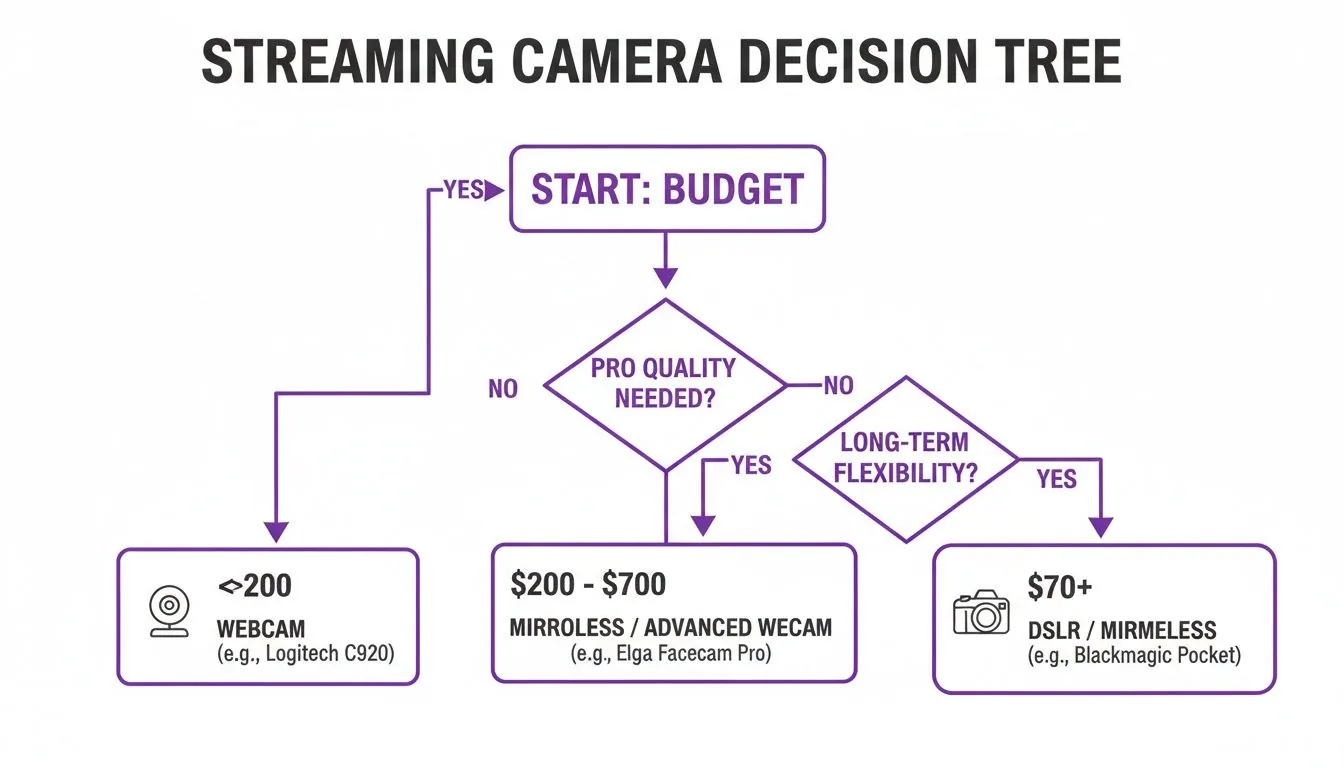
As the flowchart shows, your budget is the first filter. It will point you toward either a simple but effective webcam setup or a more versatile (and more complex) mirrorless or DSLR system.
This decision is becoming more important every day. The live streaming camera market is on track to hit an astronomical USD 233.4 billion by 2035. For creators, that means more competition, but also more opportunity. A quality camera helps you stand out and keeps viewers engaged, which is critical for turning them into paying subscribers for your courses and communities.
Ultimately, your camera sets the visual standard for your brand. It directly influences how people perceive the value of what you're offering, whether it's your first online course or an exclusive membership. A sharp, professional video isn't just a nice-to-have; it's the foundation of a successful digital business.
Translating Tech Specs Into Better Streaming Quality
Diving into camera specs can feel like trying to read a foreign language. It's an alphabet soup of jargon and numbers. But here’s the secret: you only need to understand a handful of them to pick the right camera and get incredible value for your money. You don't need a degree in optical engineering; you just need to know how these specs translate into real-world results for your stream.
Think of it this way: you are the talent, and your camera is your personal production crew. Its only job is to make you look fantastic, keep you perfectly in focus, and deliver a smooth, professional picture that keeps your audience hooked. Let's pull back the curtain on the specs that actually make this happen.
Sensor Size: The Foundation of Image Quality
If you remember one thing, make it this: sensor size is the single most important factor for video quality.
Picture the sensor as a bucket catching raindrops of light. A bigger bucket (a larger sensor) can capture more light. This simple fact directly translates into a cleaner, brighter, and more detailed image, especially when your lighting isn't exactly a Hollywood set.
This is precisely why a mirrorless camera or a DSLR, with their massive sensors, will almost always blow a tiny webcam sensor out of the water. A bigger sensor gives you two game-changing advantages:
- Stunning Low-Light Performance: You can get a crisp, clear shot without blasting yourself with blindingly bright lights. This means less of that ugly, grainy "noise" in the shadows of your video.
- That Beautiful Background Blur (Bokeh): A large sensor, when paired with the right lens, is the secret sauce behind that professional, cinematic-looking blurred background. This effect, called bokeh , makes you pop right off the screen and hides any distracting clutter in your room.
For creators on platforms like Zanfia, building a premium brand means looking the part. The visual separation you get from a large sensor isn't just a style choice—it's a powerful tool that commands viewer attention and signals quality, whether you're teaching a high-ticket course or hosting an exclusive community video. Zanfia is built around an AI team that runs the day-to-day work: you dictate what needs to happen by voice or chat, and the assistant performs any action available in the interface, from publishing a lesson to opening a checkout with order bumps and installments. A high-quality visual presentation is the front end of that unified system.
Resolution and Frame Rate: What Your Viewers Actually See
Next up are resolution and frame rate. These two work together to define how sharp your video looks and how smooth the motion feels to your audience.
Resolution is just the number of pixels that make up your image. And while 4K sounds impressive on the box, 1080p (Full HD) is the true gold standard for live streaming. Most platforms compress your video feed anyway, and many viewers are on phones or laptops where the extra detail of 4K is completely lost. Streaming in 1080p gives you fantastic quality while being much easier on your computer and internet connection.
Of course, a great camera is only half the battle. You need a solid internet connection to deliver that quality without frustrating buffering. Make sure your audience gets a smooth experience by checking the requirements for the best upload speed for streaming.
Frame rate, measured in frames per second (fps), is all about the smoothness of motion.
- 30fps: This is the standard for most streams. It looks perfectly natural for talking-head content like webinars, coaching calls, or course lessons.
- 60fps: This delivers buttery-smooth, fluid motion that’s a must-have for anything fast-paced—think gaming, fitness tutorials, or hands-on product demos.
Autofocus: Your Unseen Hero
Finally, let's talk about the unsung hero of great streaming video: autofocus. This is the magic that keeps you sharp and crystal-clear, even when you lean in to make a point or move around your space. A camera with slow or clumsy autofocus will constantly "hunt" for focus, blurring in and out, which looks incredibly amateurish and pulls your viewers right out of the moment.
Modern mirrorless cameras from brands like Sony and Canon are legendary for their lightning-fast, reliable autofocus systems. Many have incredible eye-tracking tech that literally locks onto your face and refuses to let go. For any serious streamer, this is a non-negotiable feature. It frees you up to move naturally and connect with your audience, without ever giving a second thought to whether or not you've gone blurry.
Getting your video and audio to work together in harmony is key to a professional production. You can dive deeper into this by checking out our guide on how to record a podcast. It's a fantastic resource for understanding the complete production picture.
Webcams: The Smart Starting Point for Professional Streams
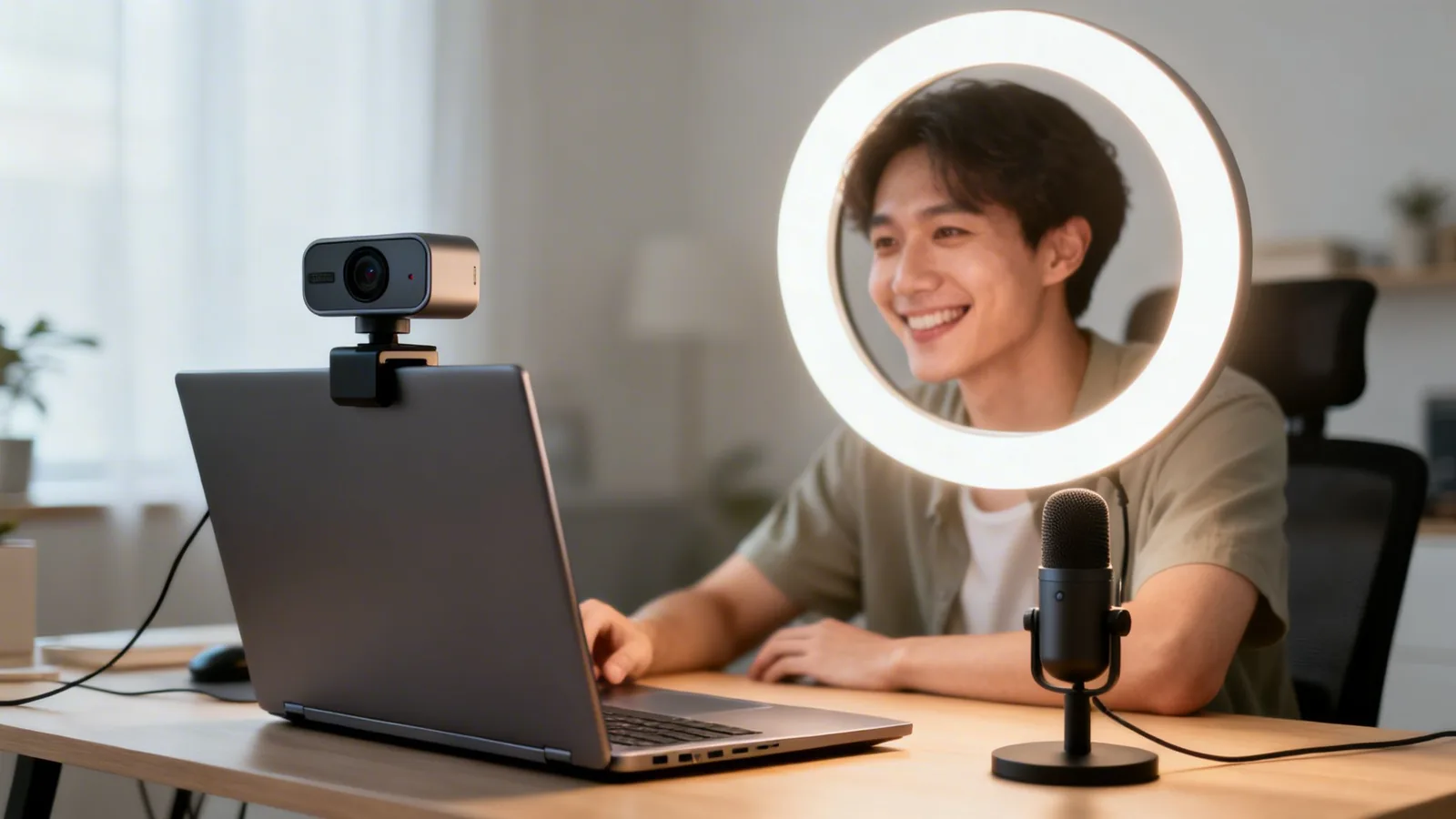
For creators ready to ditch their laptop's built-in camera but not quite ready for a complex mirrorless setup, a modern webcam is the undisputed workhorse. Forget the grainy, pixelated video calls of the past. Today’s high-quality webcams from brands like Logitech and Razer deliver a surprisingly polished look right out of the box.
Their biggest advantage? Plug-and-play simplicity. You can go from unboxing to live streaming in minutes, not hours. That’s huge when you’re focused on creating content for your online course or engaging your community, not fiddling with tech. It removes a massive technical barrier, empowering creators to stop worrying about gear and start sharing their expertise.
This accessibility has fueled a massive market. The global webcam industry was valued at a staggering USD 9.17 billion in 2025. For digital entrepreneurs, these devices are a direct line to better business outcomes; streamers using dedicated webcams see 22% higher engagement rates, which is vital for converting viewers into customers.
What Separates a Good Webcam from a Great One
Not all webcams are created equal. While a basic model gets you on screen, stepping up to a great webcam in the $70 to $150 range unlocks features that dramatically elevate your stream's quality. When you're shopping in this category, there are a few key things to look for.
First is low-light performance. A quality webcam uses a much better sensor and lens to pull in more light, producing a clear, bright image even in a typically lit room. This means you won't need to invest in a complicated, three-point lighting setup just to avoid looking like you’re broadcasting from a cave.
Second, look for intelligent autofocus. A premium webcam will have fast, reliable autofocus that keeps you perfectly sharp as you move around. It's a small detail that makes a huge difference in perceived professionalism. Your audience stays focused on you and your message, not a blurry, distracting image.
A well-chosen webcam is the ultimate tool for versatility. It’s perfect for delivering crisp webinars, recording high-quality course modules for a knowledge library, and hosting interactive community calls that make members feel seen and valued. This is why it’s a great starting point for creators on Zanfia: an AI team runs the business behind the scenes, you can dictate the next move by voice or chat instead of clicking through menus, and everything you record lands on a checkout built to sell, with order bumps, installments and test mode so you can buy your own product before launch.
Taking Control with Software
The final piece of the puzzle is software control. The best webcams come with dedicated apps that let you dial in your image, giving you control over settings that are often locked down on cheaper models.
These apps put you in the director's chair. You can fine-tune:
- Exposure: Manually adjust the video’s brightness to compensate for changing light.
- White Balance: Correct the color so your skin tones look natural, not too orange or blue.
- Field of View (FOV): Widen the shot to show more of your background or crop in for a tighter, more focused look.
- Digital Zoom: Punch in on the shot for emphasis without sacrificing too much quality.
Mastering these simple controls allows you to craft a consistent and professional visual identity for your brand. It's how you ensure your video quality matches the high value of your content—all without breaking the bank. For more suggestions, check out our guide on the best tools for content creators.
Upgrading to a Mirrorless or DSLR for Cinematic Quality
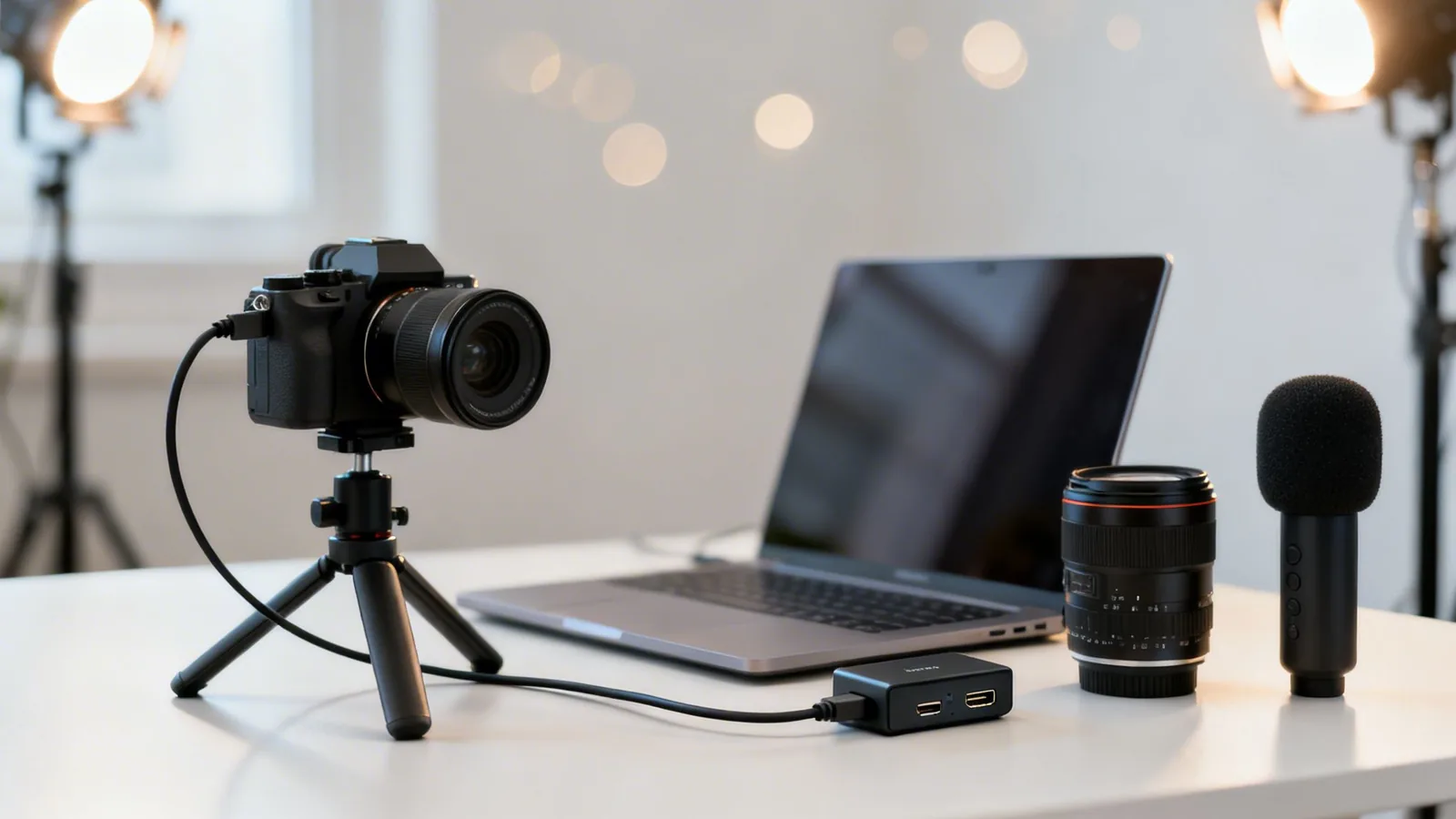
When you're ready to elevate your brand from looking "professional" to feeling truly "premium," stepping up to a mirrorless or DSLR camera is the definitive move. This is the investment that creates a cinematic image to match the high value of your content. This isn't a small tweak—it's a massive leap in quality your audience will notice instantly.
The magic comes from two key ingredients: large sensors and interchangeable lenses. A bigger sensor captures far more light, which gives you that clean, rich image with fantastic performance even when the lighting isn't perfect.
Pair that with a "fast" lens (one with a wide aperture like f/1.8), and you unlock that coveted shallow depth of field. This is how you get that beautifully blurred background that makes you the undeniable focus of every frame. You're no longer just capturing an image; you're crafting it.
Building Your Camera Ecosystem
Here's the deal: using a mirrorless or DSLR for streaming involves more than just plugging in the camera. You need to build a small "ecosystem" of gear to make it work seamlessly for a live broadcast. Don't worry, it sounds more complex than it is.
Think of it like assembling a high-performance kit. Each piece has a specific job that turns your photography camera into a streaming powerhouse.
You'll need three non-negotiable components:
- A Capture Card: This is the essential bridge between your camera and your computer. It takes the high-quality HDMI video signal from your camera and translates it into a format your computer recognizes as a webcam. This allows you to use it in OBS Studio , Zoom, or any other streaming software.
- Clean HDMI Output: Your camera must have a "clean" HDMI feature. This means it can send out a video signal without all the on-screen clutter like battery life, focus points, or settings menus. Without it, your audience sees everything on your camera's display.
- A Dummy Battery (AC Power Adapter): A standard camera battery might last an hour or two, max. That's a dealbreaker for streaming. A dummy battery replaces the internal one and plugs directly into a wall outlet, giving you continuous, uninterrupted power for as long as you need to stream.
Mirrorless vs. DSLR for Streaming: The Clear Winner
While both camera types will give you incredible image quality, the market has overwhelmingly shifted toward mirrorless cameras for video and streaming. They are generally smaller, lighter, and packed with video-first features that make them a much better long-term investment for creators.
Here's a quick head-to-head comparison to show you why.
Mirrorless vs. DSLR for Streaming: A Head-to-Head Comparison
This table breaks down the key differences that matter most when you're live.
| Feature | Mirrorless Camera | DSLR Camera | Recommendation for Streamers |
|---|---|---|---|
| Size & Weight | Compact and lightweight. | Bulkier and heavier. | Mirrorless is far more practical for desk setups. |
| Autofocus | Advanced, fast, with reliable eye-tracking. | Slower and often unreliable in live video mode. | Mirrorless wins by a landslide with its superior video AF. |
| Viewfinder | Electronic (EVF) shows a real-time video preview. | Optical shows a direct view through the lens (off during video). | The Mirrorless EVF is much better for composing video shots. |
| Overheating | Can be an issue on some models during long sessions. | Less of a concern due to larger bodies. | Look for Mirrorless models known for good heat management. |
The conclusion here is pretty straightforward.
For the vast majority of creators looking for the best camera for streaming, a mirrorless body is the superior investment. Brands like Sony and Canon are leading the pack, offering models with phenomenal autofocus and features built specifically for video creators. That premium footage deserves a premium home. Zanfia hosts your video natively (no separate Vimeo or Wistia bill), and the AI team around it runs the surrounding work: you can dictate a new lesson description by voice, ship a checkout with order bumps and installments, and route the sale through a chat with your assistant instead of clicking through menus.
When choosing a model, your top priorities should be reliable autofocus and effective heat dissipation. A camera that overheats or constantly "hunts" for focus mid-stream completely defeats the purpose of upgrading. Popular entry points like the Sony ZV-E10 and Canon EOS M50 Mark II are great examples for this reason.
With the right camera and a few key accessories, you get a flawless, high-end broadcast that solidifies your brand's premium image.
Thinking Beyond the Desk Cameras for Dynamic Content
Let's be honest: not all streaming happens neatly at a desk. For a huge number of creators, the magic happens on the move, across a studio, or in any dynamic setting where a tethered webcam just can't keep up. When your content isn't static, your camera shouldn't be either.
This is where you need to start thinking beyond the traditional setup to find the perfect camera for your kind of stream. The market is exploding with options for this exact reason—the action camera market alone is expected to hit a staggering USD 18,044.1 million by 2033. And it's not just hype; streams from action cams can pull in up to 35% more views because their immersive, stabilized footage is just that much more engaging. You can dive deeper into the numbers by exploring the full action camera market analysis on GrandViewResearch.com.
Action Cameras for High-Energy Content
If you're a fitness instructor, an artist demonstrating a technique, or a workshop host who needs to move around, an action camera is a game-changer. A camera like the GoPro HERO is practically tailor-made for this. They are incredibly tough, tiny, and feature mind-blowing image stabilization that keeps your footage buttery-smooth, no matter how much you're moving.
The beauty of these cameras is their versatility. Mount one on a tripod for a wide shot of your yoga class, rig it overhead for a flawless cooking tutorial, or strap it to your chest for a hands-on, first-person view of a project. Their naturally wide field of view is perfect for capturing an entire room without having to place the camera miles away.
Your Smartphone: The Powerhouse in Your Pocket
Seriously, don't sleep on the camera you already carry everywhere. Modern smartphones pack phenomenal video quality that often punches well above its weight, easily rivaling dedicated entry-level cameras. With an app like Camo, you can instantly turn your iPhone or Android into a high-quality streaming camera for your computer.
This is a fantastic, budget-friendly move that delivers shockingly professional results. It’s perfect for getting a second camera angle during a webinar or for any creator who wants a quick quality boost without buying any new hardware. It fits well with how creators work on Zanfia: dictate the next community post, spin up a paid Q&A checkout with an order bump, or launch a new digital product by voice, and the AI team executes it inside the same platform your audience already lives on.
Getting started is simple: you just need your phone, a small tripod to keep it steady, and the app. For the best, most reliable connection, hook it up via USB to eliminate any potential lag. It’s an amazing way to test the waters of a higher-quality stream.
PTZ Cameras for Educators and Studio Setups
For anyone who needs to cover a lot of ground—like an educator at a whiteboard or a creator in a large studio—a PTZ (Pan-Tilt-Zoom) camera is a powerful, if niche, solution. These are essentially robotic cameras that you control remotely. You can pan across a room, tilt up and down, and zoom in on specific details, all without leaving your seat.
This is a lifesaver for live events, detailed product demos, and complex presentations where you need to direct the audience's focus. A smooth presentation can make all the difference, and you can find more great advice in our guide on how to run effective webinars.
Your Complete Streaming Studio Checklist
Choosing the perfect camera is a great start, but it’s just that—a start. The hard truth is that a great camera in a bad setup will still give you a bad stream. To create that polished, professional broadcast that keeps people hooked, you need to think about the entire studio environment.
This checklist breaks down the three pillars that support any high-quality stream: Connection, Environment, and Software. Getting these right is how you transform a great camera into an incredible stream, ensuring your production quality truly reflects the value you provide.
Pillar 1: The Connection
This is the technical backbone of your entire operation. It's all about how your camera, computer, and audio gear talk to each other without glitches. A weak link here is the fastest way to look unprofessional.
For anyone using a mirrorless or DSLR, the most critical piece of hardware is a capture card. Think of it as a translator. Your camera outputs a beautiful, high-quality video signal via its HDMI port, but your computer has no idea what to do with it. The capture card converts that signal into something your computer recognizes as a simple webcam feed.
Don't overlook the small but crucial accessories, either:
- Solid Cables: Don't cheap out here. A shoddy HDMI or USB cable is a common culprit for signal drops and endless frustration.
- Dummy Battery: If you plan on streaming for more than 30-60 minutes , this is a must-have. A dummy battery (or AC power adapter) plugs into a wall outlet, giving your mirrorless or DSLR camera constant power. No more dead batteries mid-stream.
Pillar 2: The Environment
Your environment—what your audience actually sees and hears—is where you truly shape their experience. Frankly, this is more important than your camera. A fantastic environment can make a basic webcam look surprisingly good, while a messy, poorly-lit room will make a cinematic camera look amateurish.
Lighting is everything. The single biggest jump in video quality you will ever make has nothing to do with your camera; it comes from good lighting. The goal is to illuminate yourself cleanly and create a sense of depth by separating yourself from the background.
The gold standard for a reason is the "three-point lighting" setup. It uses a Key Light (your main light source), a Fill Light (a softer light to reduce harsh shadows), and a Backlight (to create a halo effect that separates you from your background). Even a simple setup with one big, soft key light (like a large ring light) can be a total game-changer.
Audio is non-negotiable. Viewers will forgive grainy video, but they will click away instantly from bad audio. The tiny microphone built into your camera just won't cut it for a professional stream. A dedicated USB or XLR microphone is a fundamental investment that makes your voice sound rich, clear, and effortless to listen to.
Pillar 3: The Software
Software is the command center where all your pieces come together. Your camera feed, microphone, screen shares, and graphics all merge here into one cohesive broadcast. For this, the industry standard is OBS Studio (Open Broadcaster Software)—an incredibly powerful and completely free tool.
At its core, OBS acts as your virtual production switcher. You can set up different "scenes" for various moments in your stream—like a "Welcome" scene with music, a "Presentation" scene with your slides, or a "Guest Interview" scene with a split-screen layout—and switch between them with a click.
For creators building a business, this kind of production control is how you deliver a premium, TV-like experience. As you get more comfortable, you can start adding overlays, transitions, and custom graphics. Honing the fundamentals of training video creation is a great way to practice these skills in a low-pressure environment before you go live.
By dialing in these three pillars, you ensure every part of your streaming studio is working in harmony. This complete system empowers you to deliver the kind of high-quality content that builds a real community on a platform like Zanfia.
Frequently Asked Questions About Streaming Cameras
Diving into streaming gear always brings up a ton of questions. To help you sort through the tech specs and make a final call you feel great about, we've tackled the most common questions creators ask when choosing a camera.
Let's clear the air and get you the answers you actually need.
Do I Really Need 4K for My Stream?
Honestly? Probably not. For almost every creator out there, 1080p is the gold standard for live streaming. While 4K sounds impressive, it often creates more headaches than it's worth for a live feed.
Streaming platforms like YouTube and Twitch compress your video anyway, and most viewers watching on phones or laptops won't even see a difference. More importantly, pushing a 4K stream demands a beast of a computer and a seriously fast internet upload speed to keep things from turning into a buffering nightmare.
Sticking with a sharp 1080p stream gives you the perfect sweet spot: great visual quality, reliable performance, and a smooth experience for your audience.
What Is a Capture Card and Do I Need One?
Think of a capture card as a universal translator for your camera. It’s a small but mighty device that takes the beautiful, uncompressed video signal from your fancy DSLR or mirrorless camera (via an HDMI cable) and converts it into a format your computer recognizes as a simple webcam.
You only need one if you're making the leap to a more serious camera like a Sony a6400 or a Canon M50. If you’re just using a USB webcam, you can skip it—the camera handles all that translation internally.
But for creators ready to use a "real" camera for their stream, a capture card like the Elgato Cam Link 4K is a non-negotiable part of your setup.
How Much Should I Budget for a Good Streaming Camera?
There's no single right answer here—your budget should match your goals and where you are in your creator journey. Think of it as a logical progression, with each step offering a fantastic return on investment.
- For "Potential Explorers" and those just starting out: You can get a phenomenal webcam for between $70 and $150 . This is the perfect price range for creators stuck in pre-launch paralysis, offering a professional look without a huge upfront cost or technical hassle.
- For "Business Architects" and "Craft Masters" ready to level up: A full entry-level mirrorless setup—including the camera body, a quality lens, a dummy battery, and a capture card—will usually land somewhere between $700 and $1,200 .
This investment is where you see a massive jump in image quality. It delivers that premium, cinematic look that helps serious creators build a top-tier brand, sell high-value courses, and run exclusive communities with authority. It’s the right choice for established creators ready to match their tech to their premium positioning.
Ready to build a business around your high-quality content? Zanfia gives you an AI team that runs the day-to-day work: dictate what needs to happen by voice or chat, and the assistant performs any action available in the interface, from publishing a course lesson to opening a checkout with order bumps and installments. Courses, communities, paid newsletters and digital products all live under one brand, on a checkout built to sell, with a 14-day free trial and no credit card required. As of publication, Zanfia charges 0% platform commission on customer sales. Start building your digital empire on Zanfia today.