

How to Make Something Into a Link: A Creator’s Guide

You've probably had this moment already. You finish an e-book, publish a lesson, or write a newsletter, and then you realize the next step is awkwardly manual. You want readers to click one phrase and land exactly where you want them to go.
That's what a link does. It turns plain text, an image, or a button-like element into a path.
If you're learning how to make something into a link, the technical part is simpler than it looks. The useful part is thinking about links as part of your audience journey. A good link doesn't just connect one page to another. It helps a reader move from interest to action.
Table of Contents
Why Every Click Matters Understanding Hyperlinks
A hyperlink has two main parts.
The first is the URL. That's the destination address. It's the place someone goes after they click.
The second is the anchor text. That's the visible, clickable text people see on the page.
Consider it this way:
| Part | What it does | Simple analogy |
|---|---|---|
| URL | Tells the browser where to go | A street address |
| Anchor text | Tells the person what they're clicking | The sign on the building |
So if you write:
Download the course workbook
The phrase “Download the course workbook” is the anchor text. The destination behind it is the URL.
That distinction matters because readers don't click URLs. They click meaning. Clear anchor text helps people feel confident about what happens next.

Creators often get stuck because different tools hide the same concept behind different buttons. In one editor, you highlight text and click a chain icon. In HTML, you write a tag. In a newsletter builder, you paste a destination into a sidebar. But the structure stays the same.
What a link is really doing
When you make something into a link, you're telling the browser two things:
- What should be clickable. This might be text, an image, or a heading.
- Where the click should go. That might be a sales page, lesson page, form, file, or article.
Practical rule: Before you create a link, decide what action you want the reader to take next.
That small habit makes your writing cleaner. Instead of linking random words, you start linking intentional next steps.
For example, if you're writing about checkout optimization, linking a phrase like add to cart button examples is more helpful than linking a vague phrase like “read more.”
Where creators usually get confused
Most confusion comes from one of these issues:
- They paste raw URLs into text instead of turning useful words into links.
- They choose weak anchor text like “here” or “this.”
- They don't test the link after publishing.
- They link too early before the reader understands why they should click.
A link is small, but it carries a lot of responsibility. It sets expectations. It signals relevance. It moves a person forward.
How to Create Links in Your Everyday Tools
You publish a blog post, send an email, and share a social update. Each one asks people to click next. If the link is hard to add, unclear, or broken, that next step disappears. If the link is clear and intentional, it can guide someone to a product page, a signup form, or a piece of content that builds trust.
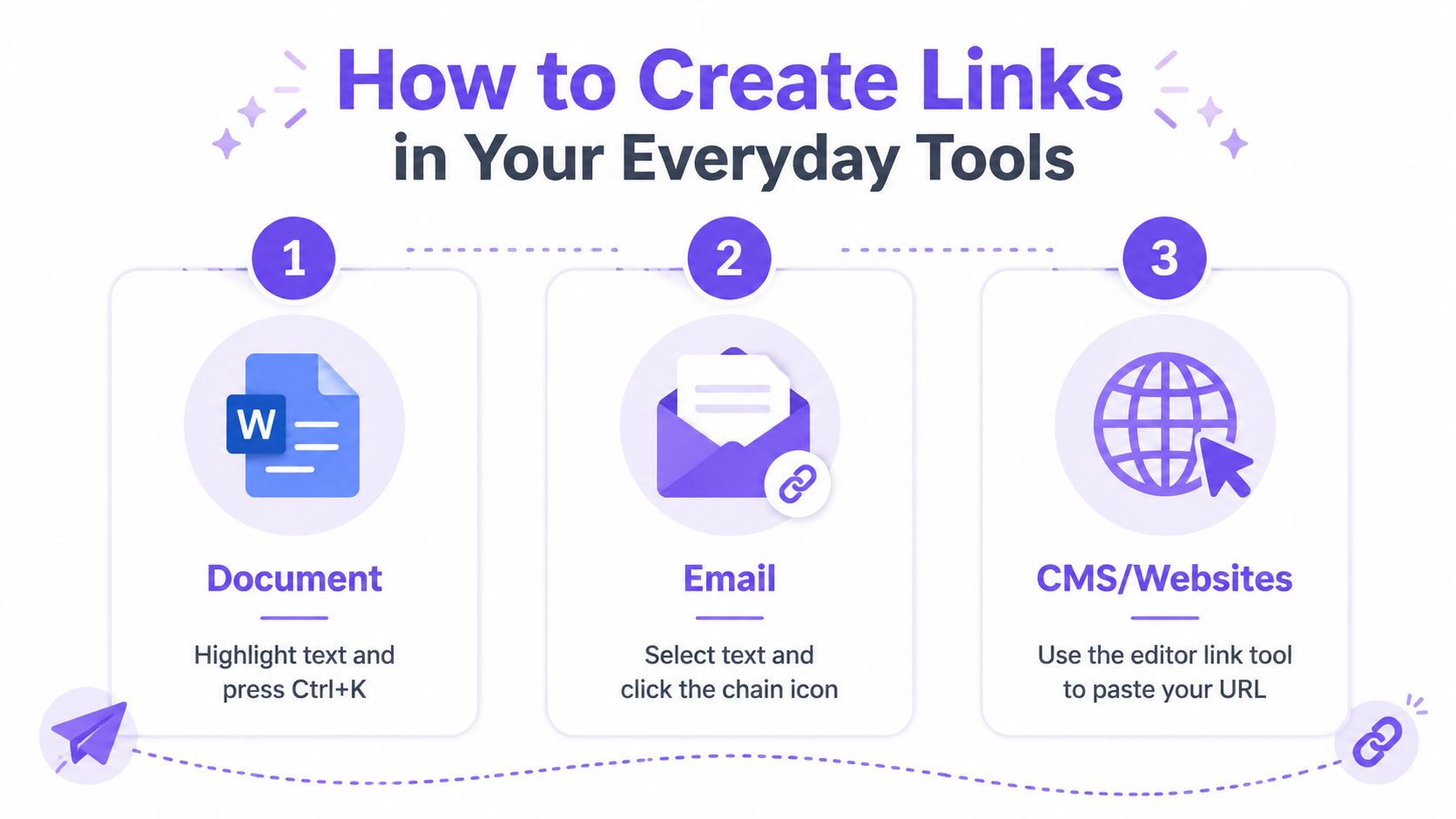
The good news is that nearly every tool uses the same basic pattern. You choose what people can click, then you attach the destination. The buttons look different, but the job stays the same.
Using Basic HTML
HTML gives you the clearest view of how links work behind the scenes. The basic structure uses the <a> tag:
<a href="https://example.com/course">View the course</a>
The destination lives inside href. The words between the opening and closing tag are the clickable part. As explained in MDN's guide to creating links, that simple structure is the foundation of linking on the web.
If you want a link to open in a new tab, use this version:
<a href="https://example.com/course" target="_blank" rel="noopener noreferrer">View the course</a>
A few details make a big difference:
- Put the full destination URL inside
href. - Write link text for humans, not just for code.
- Add
rel="noopener noreferrer"if you usetarget="_blank".
If HTML feels technical, treat it like a mailing label. href is the address. The visible text is what the reader sees on the envelope.
With Markdown
Markdown is common in blog editors, documentation tools, and some newsletter platforms because it is fast and readable. The format looks like this:
[Link text](https://example.com)
Example:
Download the template
The text in square brackets becomes clickable, and the URL in parentheses is the destination.
Markdown is especially useful if you create content in lightweight editors or publish across several platforms. It keeps your writing clean while still giving you control over the link text. That matters for creators who want every click to lead to a clear business action, such as a download, a waitlist, or a product page.
In Rich Text Editors Like WordPress and Google Docs
Visual editors usually hide the code and give you a simple toolbar instead. The process is familiar once you see it once.
- Highlight the text you want linked.
- Click the chain icon in the toolbar.
- Paste the URL into the field.
- Apply or save the link.
- Test it after publishing.
If you are building a content-driven site, study examples of how to build an author website because author platforms often depend on smart linking between book pages, email signup offers, media kits, and contact pages.
A common question comes up here. Should you link text, buttons, or images?
Use text links when you want clarity inside a paragraph. Use buttons when the action is the point, such as buying, booking, or joining. Link images only when the image clearly suggests what happens next. If the image fails to load, the surrounding content should still make sense.
If you are planning your site structure, this guide to a landing page with WordPress is useful because page layout and link placement work together. A strong page is not just attractive. It also gives visitors an obvious path to the next step.
In Email Clients Like Gmail
Email is one of the highest-value places to get links right because a single click can lead directly to a sale, a reply, or a booking.
Use this flow:
- Write the sentence first so the link fits naturally.
- Select the words you want linked.
- Click the link icon in the email toolbar.
- Paste the full destination URL.
- Send yourself a test email before sending to your list.
That final check catches small problems that can cost clicks. Some email clients handle formatting oddly. Some add spacing in strange places. Some make a linked button look fine on desktop and awkward on mobile.
Here's a quick walkthrough if you want to see the process in action:
On Social Media Platforms
Social platforms all handle links a little differently. Some support clickable links in captions. Others push links into bios, story stickers, profile buttons, or shopping tools.
The steps are still simple:
- Find the field that accepts a URL
- Paste the correct destination
- Preview the result
- Check it on mobile
The bigger decision is where that click should go. Sending social traffic to a cluttered homepage usually wastes attention. Sending it to one focused destination gives you a better chance of getting the signup, sale, or response you wanted.
For creators using Zanfia, links become more than a formatting task. A link can connect your content, offers, lead capture, and audience journey inside one system. Instead of dropping links randomly across tools, you can use them to guide people through a path you can measure and improve.
Best Practices for Powerful and Professional Links
A link can do more than send someone to another page. For a creator, it can start a signup, trigger a sale, show which post drove interest, or reveal where people drop off.
That is why a working link and a useful link are not the same thing.
Three practices make the difference: clear anchor text, accessible wording, and tracking that ties each click back to a business goal.
Write anchor text that says what the click does
Good anchor text answers the reader's quiet question before they ask it: what will open when I click?
Weak examples:
- click here
- read more
- this page
Stronger examples:
- download the workshop slides
- view the pricing page
- join the private discussion channel
Clear anchor text works like a label on a door. If the label says “storage,” you know what is behind it before you turn the handle. Links should give that same kind of clarity.
It also helps search engines understand the destination page, but the first win is for your reader.
A good anchor text can stand on its own, even if someone reads only the linked words.
That is especially helpful in articles, emails, and help docs, where people often scan instead of reading every line.
Make links easier for everyone to use
Accessibility is part of professional communication. If your link text is vague, some readers will not know what they are about to open, especially when they use screen readers or jump through links out of context.
Use this quick check before publishing:
| Better choice | Avoid |
|---|---|
| Open the lesson summary | click here |
| Download the PDF checklist | this |
| Read the onboarding guide | more |
Descriptive links also hold up better when someone copies them into notes, saves them for later, or reviews them on mobile.
If you plan to use links for referrals or partner income, this guide on how to make an affiliate link shows how to set them up clearly.
Track links if you sell anything online
Once a link is tied to revenue, tracking stops being a nice extra. It becomes part of how you run the business.
Without tracking, you cannot reliably tell whether a sale came from your newsletter, a social post, a guest feature, or a blog article. You also lose the chance to compare what is working. A creator may spend hours promoting one offer in three places and still have no clean way to tell which channel produced the buyer.
A basic tracked link often includes UTM parameters. Those are short labels added to a URL so your analytics tool can sort traffic by source, campaign, or placement.
For example, instead of linking to:
https://example.com/course
you might use a version that tells your reporting tool where that click came from.
You do not need to memorize every parameter name at first. Start with one simple habit. If a link appears in a marketing channel, add enough context to identify that channel later.
For creators using a platform like Zanfia, this approach is even more useful because your links, offers, and audience actions can connect inside one system. That makes it easier to spot which content drives engagement, which links lead to conversions, and which campaigns deserve more attention.
Business takeaway: If a link is meant to generate revenue, measure it.
Match the link to the moment
A strong link fits the reader's stage of attention.
Someone reading a beginner guide may want a checklist, short tutorial, or email signup first. Someone comparing options may be ready for pricing, a demo, or checkout. Sending both people to the same destination usually lowers response.
Professional links feel well timed because they continue the conversation the reader is already having with you. That is what makes them more effective, and more useful for your business.
Linking Strategies for Zanfia Creators
A creator publishes a helpful post, shares it on social, adds a free resource, and mentions a paid offer. The traffic arrives, but the path is messy. People click, wander, and disappear. A smarter link plan turns that scattered attention into a guided journey you can measure inside Zanfia.
Knowing how to make something into a link is only the starting skill. The business value comes from deciding where that link should lead, what action it should invite, and how you will track the result.
Use links to guide the next business action
A creator business rarely has one destination. You might have a blog, an email signup, a lead magnet, a product page, and a members area. Links are the connectors that keep those pieces working together instead of competing for attention.
A helpful question is: what should the visitor do next from this exact page?
That question keeps your links focused. A tutorial can lead to a worksheet. A free resource can lead to an email signup. A welcome page can lead to your best starter offer. If you want ideas for top-of-funnel offers, these lead magnet examples show the kinds of resources that fit early interest better than a direct sales page.
Inside Zanfia, that kind of structure becomes more useful because your content, offers, and audience activity can live in one place. You are not just adding links. You are building a path from attention to engagement to revenue.
Create reference pages that attract links
Some links move your audience through your business. Others bring new people in.
One practical SEO strategy is to publish a page other sites want to cite. That could be a glossary, a benchmark roundup, or a well-organized statistics page. Ahrefs' link-building case study shows how a reference-style page can earn links by giving writers an updated source worth citing.
For creators, the lesson is straightforward. Publish pages that save other people time. A coach might publish a term glossary. A creator educator might publish a tool comparison page. A niche expert might publish a yearly trend summary. Reference content works like a library shelf. When your page becomes the place people check and cite, it supports both search visibility and brand trust.
Treat internal links like product pathways
Internal links help visitors progress without friction. They also help you see which paths lead to signups, sales, or deeper engagement.
Here is a simple way to map it:
- Educational post to free resource
- Free resource to email sequence
- Email sequence to paid workshop
- Workshop to community or next offer
Each link should answer a small question in the visitor's mind. “What do I do next?” “Where do I get the template?” “How do I go deeper?” Good links remove hesitation the way clear signs help people move through an airport.
Build links around the next logical action. Clear paths usually convert better than crowded pages.
One more practical habit helps here. Review old links the same way you review old products. If a destination disappears, changes names, or expires, clicks stop turning into results. If you need help spotting dead destinations and understanding what expired links can mean for your content, discover expired domains with NameSnag.
Troubleshooting Common Link Issues
Even simple links break in predictable ways. Most problems have quick fixes.
My link is broken
A broken link usually means the destination URL is wrong, incomplete, or the page no longer exists.
Check these first:
- Typos in the URL. One missing letter is enough to break it.
- Extra punctuation. A period or parenthesis may have slipped into the link.
- Moved content. The page may have been renamed or deleted.
If the problem is an expired or unavailable destination, this guide on discovering expired domains with NameSnag gives helpful context on what “expired” can mean and how to evaluate a dead destination.
My link won't open in a new tab
In HTML, you'll usually need the target="_blank" attribute. In visual editors, there's often a checkbox labeled something like “Open in new tab.”
Use it carefully. New tabs can help for external resources, but they're not always necessary for internal navigation.
My link looks wrong
Sometimes the link works but the styling is odd. It may be the same color as body text, underlines may be removed by your theme, or visited links may look inconsistent.
Check your editor settings or theme styles first. Then test on mobile and desktop. If you're linking inside documentation or member resources, a structured content system like a knowledge base setup makes link consistency easier to manage.
Conclusion Putting Your Links to Work
A link starts as a small technical object. A URL, a few words, one click.
But in practice, it does much more. It guides readers, supports accessibility, improves clarity, and helps you measure which content moves your business forward. Once you understand the structure, creating links in HTML, Markdown, documents, emails, and editors becomes routine.
The shift happens when you stop thinking, “How do I make this clickable?” and start asking, “Where should this click lead next?”
That's when links stop being formatting. They become strategy.
If you want one place to publish content, connect courses and community, sell digital products under your own domain, and track how people move through your funnel, Zanfia is built for that kind of creator business. It combines courses, paid newsletters, knowledge libraries, community, payments, and automation in one Polish platform with 0% platform fees on sales, white-label branding, native video hosting, and workflows that can save creators 5 to 10+ hours a month.


