

Build a High-Converting Landing Page for WordPress
You launch an offer, send a few people to the page, and then the friction starts showing up. The layout looks close, but not quite right. The form needs different fields. Payments need a separate tool. Email automation lives somewhere else. What sounded like “just build a landing page in WordPress” turns into a chain of setup decisions that affect speed, tracking, and maintenance.
That is why so many creators start with a landing page for WordPress. WordPress gives you control over design, plugins, hosting, and your own domain. It also asks you to make more decisions than many first-time builders expect. Those decisions matter because a landing page is not just a page. It is a conversion system made up of copy, layout, forms, analytics, integrations, and page performance.
WordPress can handle that system well. It just rarely handles it by itself.
The upside is flexibility. You can build with the block editor, a page builder, a theme framework, or a custom template. You can connect forms, checkout tools, CRM workflows, heatmaps, SEO plugins, and test variations until the page fits your process. The trade-off is plugin tax. Every extra feature adds another setting, another compatibility check, another update cycle, and sometimes another monthly fee.
That trade-off is easy to miss at the start. A landing page may look simple on the front end, but behind the scenes it often depends on several moving parts working together without slowing the page down or breaking your funnel. Even conversion benchmarks point back to execution. Unbounce's landing page conversion benchmark report shows median conversion rates vary widely by industry, which is a useful reminder that results depend less on using WordPress itself and more on how well the page is built, targeted, and tuned for one action (Unbounce conversion benchmarks).
If you want the broader strategic version before getting into the setup details, this guide to building a landing page with WordPress lays out the full path. The short version is simple. WordPress is a strong option if you want control and can manage the extra configuration work. If you want fewer moving parts, this process usually makes that preference obvious pretty quickly.
Your First WordPress Landing Page
The first job of a landing page isn't to look impressive. It's to guide one visitor toward one action. If your page asks people to browse, compare, think, scroll forever, and maybe click later, it's not a landing page anymore. It's a mini website.
That's the mindset to keep when building your first landing page for WordPress. Strip the goal down to one outcome: subscribe, book, buy, apply, or join. Everything else supports that action or gets removed.
A practical first setup looks like this:
- Pick one offer . Don't sell your course, newsletter, consulting, and ebook on the same page.
- Choose one audience . “Everyone who might benefit” is where weak messaging starts.
- Write one promise . Your headline should make the result clear fast.
- Decide one CTA . If the page has three competing buttons, the visitor has to think too much.
- Remove distractions . Many landing pages work better without the full site navigation.
Practical rule: If a section doesn't help a visitor say yes, cut it.
WordPress gives you several ways to build that page. You can use core blocks, a page builder, a theme framework, or a custom template. Each route works, but each creates a different maintenance burden later. That's where most tutorials get too optimistic. They show the build. They skip the upkeep.
If you want a broader strategic walkthrough before choosing your setup, this guide to a landing page with WordPress is a useful companion. The key is to treat the landing page as a conversion asset, not a design exercise.
What beginners usually get wrong
Most first-time builders make one of three mistakes:
- Too much copy . They explain everything instead of clarifying the offer.
- Too many tools . They install plugins before they've decided on the page structure.
- Too much attention on aesthetics . Rounded corners won't save a weak value proposition.
A first page should be simple enough to launch quickly and structured enough to improve later. You don't need perfection. You need a clean page, clear messaging, and a setup you'll still be willing to maintain three months from now.
Choosing Your WordPress Landing Page Toolkit
Your build method changes more than your editing experience. It changes speed, portability, maintenance, and how painful future changes will feel.
Core blocks and the Site Editor
For many creators, the most sensible starting point is the native WordPress block editor. Learn WordPress demonstrates a no-builder workflow using custom templates, core blocks, and patterns in its tutorial on creating a landing page with a block theme. That matters because the choice between core blocks and page builders isn't cosmetic. It directly affects site speed, maintenance, and portability.
Core blocks are often the cleaner option when you want:
- Less dependency on a third-party builder ecosystem
- Better portability if you switch themes later
- A lighter front end with fewer styling layers
- A more future-proof setup tied closely to WordPress itself
The trade-off is that native blocks can feel less polished for non-technical users at first. You may need to think more carefully about spacing, reusable patterns, and template structure.
Page builders and why people choose them
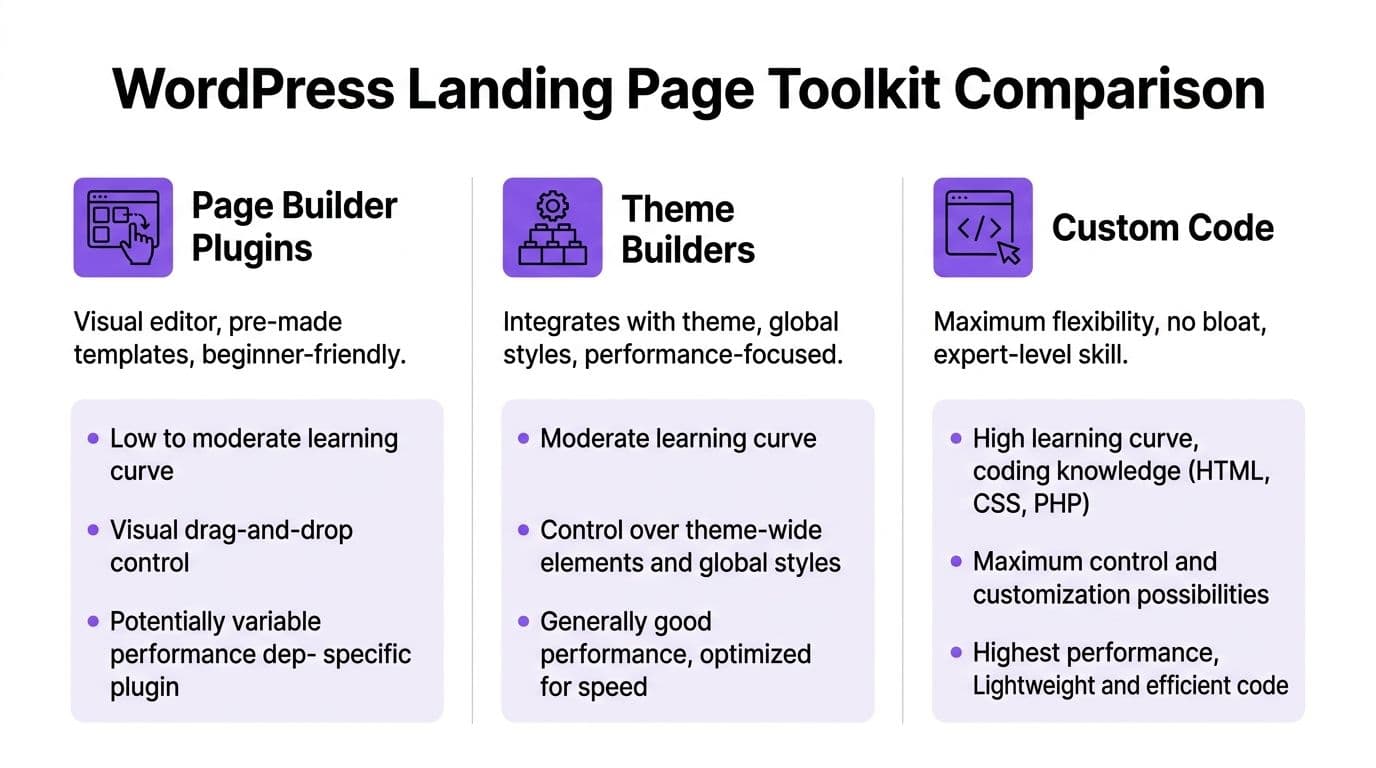
Elementor, Divi, Beaver Builder, and similar tools remain popular for a reason. They make page creation visual. That's appealing when you need a launch page this week and don't want to touch templates or CSS.
A page builder usually gives you:
| Approach | Strength | Trade-off |
|---|---|---|
| Page builder plugin | Fast visual editing | More code overhead and deeper tool dependency |
| Theme builder | Strong design control across the site | Ties layout decisions to a theme system |
| Custom code | Maximum control and lean output | Requires real development skill |
Builders work well when speed of production matters more than technical elegance. They're also useful when a marketer, VA, or designer needs to make changes without developer involvement.
A builder saves time at the start. It can cost time later when updates, styling inconsistencies, or plugin conflicts pile up.
That's why the right decision depends less on features and more on your operating model. If you're running campaigns constantly and iterating fast, convenience may outweigh technical purity. If you care about lean performance and clean handoff, core blocks often age better.
What to choose in practice
A simple way to decide:
- Use core blocks if you want a lightweight site, fewer dependencies, and better long-term portability.
- Use a page builder if visual editing speed matters most and you accept some extra overhead.
- Use custom code if you need a highly controlled experience and have development support.
If you're still comparing broader funnel-building options beyond WordPress itself, this review of best sales funnel software helps put the landing page decision in a larger business context.
Designing a High-Converting Page Layout
Open a WordPress page after installing your builder, and it is easy to spend an hour choosing column widths, button styles, and spacing before the offer itself is clear. That is usually where landing pages go off track. Layout is not decoration. It is the order in which trust gets built.

The practical goal is simple. A visitor should understand the offer fast, see enough proof to believe it, clear the obvious objections, and find the next step without hunting for it. In WordPress, that sounds straightforward until template options, mobile tweaks, global styles, and plugin widgets start competing for attention.
A good layout also needs to be repeatable. One page that looks polished is useful. A structure you can duplicate for a webinar, lead magnet, product launch, and waitlist page is far more valuable because it reduces decision fatigue and keeps your campaigns easier to maintain.
Start with the hero section
The first screen has one job. Explain what the offer is, who it helps, and what happens next.
A reliable hero section usually includes:
- A specific headline with a clear outcome
- A subheadline that explains the audience or the mechanism
- One primary CTA tied to the visitor's intent
- A supporting visual such as a product image, dashboard screenshot, photo, or mockup
Weak headline:
- Learn more about our membership
Stronger headline:
- Join a members-only community for weekly expert sessions and practical templates
The second version does more work because it answers real questions. What is it? A community. What do I get? Weekly sessions and templates. Why should I care? It sounds useful right away.
On WordPress, keep the hero simpler than you think. Heavy sliders, animated backgrounds, and stacked popups often create more friction than persuasion. They can also introduce performance and mobile layout problems that take longer to fix than the feature was worth.
Build the page in the order people make decisions
After the hero, the page should match buyer psychology, not the order your plugin template happens to use. Many prebuilt WordPress layouts jump from headline to feature grid to pricing table because that is easy to package. It is not always how a cold visitor decides.
A page sequence that works in practice looks like this:
- Problem recognition . Show the frustration, cost, or missed opportunity the visitor already feels.
- Benefit stack . Explain what improves after they buy, join, or sign up.
- Proof . Add testimonials, client logos, screenshots, short results, or trust markers.
- Offer detail . Clarify what is included, how access works, timing, and any guarantees.
- CTA repeat . Ask again once confidence is higher.
WordPress can create a quiet trade-off. You can build every section exactly the way you want, but each added testimonial carousel, toggle block, icon library, or countdown widget gives you one more styling system to manage. A cleaner page often converts better and breaks less often.
For a more detailed breakdown of message flow, section order, and conversion choices, this guide to landing page optimization best practices is useful.
A short visual explainer can also help if you're refining the flow and want to see landing page structure discussed in action:
Use CTAs that reduce friction
CTA copy often fails because it is vague. “Submit” does not tell the visitor what they get. “Click here” adds no context at all.
Stronger CTA language sets an expectation:
- Get instant access
- Start learning today
- Join the paid newsletter
- Book your strategy call
- Download the guide
Match the button to the offer and the traffic source. A visitor from a cold ad may respond better to “See pricing” or “Watch the demo” than “Buy now.” A visitor coming from your email list may be ready for a more direct ask.
Small reassurance near the button helps too. A short line about no credit card required, instant access, or what happens after the click can remove hesitation at the exact moment it appears. That detail is easy to add in WordPress. Keeping it visually consistent across desktop and mobile is the part that usually takes a second pass.
Integrating Forms, Payments, and Email
A WordPress landing page often feels finished before the risky part even starts. The design is visible. The conversion path behind it is not.
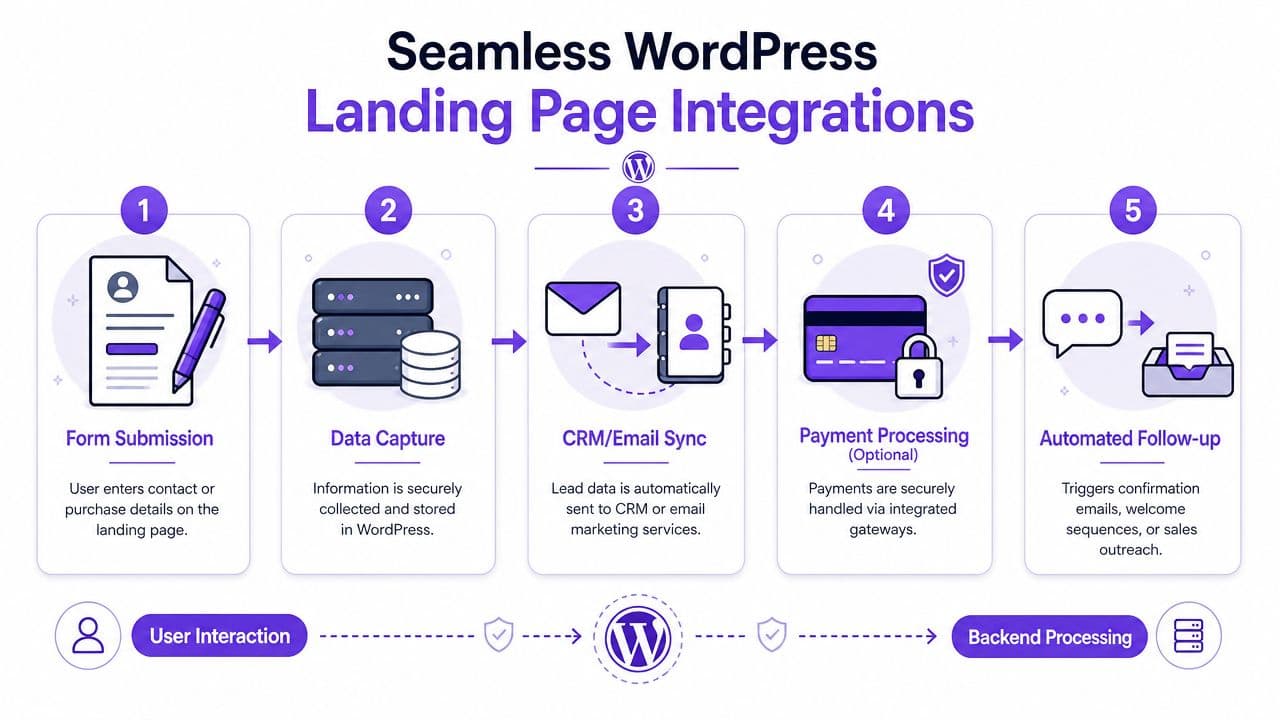
On most builds, the page lives in one system and the business logic lives in three or four others. A builder handles layout. A form plugin captures the lead. An email tool stores the contact and runs automations. Payments sit inside WooCommerce or another checkout layer. WordPress can handle all of that well, but every handoff between tools needs to be configured, tested, and maintained.
Forms and lead capture
For lead generation pages, WPForms and Gravity Forms are common choices because they are flexible and widely supported. The form itself is the easy part. The harder part is making sure the submission reaches the right place with the right data and triggers the right follow-up.
That usually means deciding a few things up front:
- Where the lead should go . Mailchimp, ConvertKit, ActiveCampaign, HubSpot, or another CRM
- How fields are mapped . Email, first name, consent checkbox, campaign source, hidden tracking fields
- What happens after submission . Thank-you page, lead magnet delivery, tag assignment, automation start, sales notification
Small mistakes here create problems that go unnoticed. I have seen forms collect emails successfully while failing to pass consent status, break tag rules, or drop UTM data that the sales team later needed. The page still looked fine. The system behind it was leaking information.
Payments add another stack to manage
Selling from the page raises the complexity. Many WordPress users add WooCommerce, a lighter checkout plugin, or a cart tool tied to Stripe or PayPal. Then the actual work starts: gateway setup, tax settings, order emails, failed payment handling, redirect rules, and post-purchase automations.
A straightforward sales page can end up depending on six separate pieces working together. Theme. Builder. Checkout plugin. Payment gateway. Email platform. Automation logic.
Before installing anything, map the journey from click to inbox:
| Step | Question to answer |
|---|---|
| Form or checkout | Is this page collecting leads or processing a sale? |
| Data destination | Which system becomes the source of truth for the contact or customer? |
| Payment flow | What should the buyer see immediately after payment or failure? |
| Follow-up | Which email, access step, or fulfillment action is triggered next? |
That exercise saves time because it exposes overlap early. Some creators install a form plugin, an email plugin, and a checkout plugin, then realize two of those tools can already handle the same job.
If you are still choosing a processor, this comparison of Stripe vs PayPal for digital sales and landing page checkouts is a useful place to sort out fees, buyer expectations, and setup trade-offs.
The maintenance burden also depends on infrastructure. Cheap hosting can turn a working checkout into an unreliable one during traffic spikes or plugin updates. If your page is tied to paid traffic or launch-day sales, start with secure and scalable WordPress hosting so the rest of the stack has a better chance of behaving predictably.
Meta Box describes a more maintainable WordPress workflow as building the approved design into a dedicated template, defining editable content areas, and connecting those areas to custom fields. That approach is cleaner than stuffing everything into a page builder canvas. It also makes the trade-off obvious. The more customized your setup becomes, the more technical knowledge it usually takes to edit safely later.
The plugin tax is not just money. It is time spent checking compatibility, retesting forms, watching failed automations, and fixing what breaks after updates.
An all-in-one option can reduce that operational load in a different way. Zanfia is built around an AI team that runs the business day to day: the creator dictates the work by chat or by voice, the assistant performs anything available in the interface, and the same workspace is exposed to external agents through an MCP endpoint on higher plans. Landing pages, checkout, community, courses, paid newsletters and automations live under one login, with a checkout designed to sell (order bumps, installments, upsells, and a test mode so you can run a real purchase before launch) and 0% platform fees on customer sales as of this writing. For creators who want fewer moving parts, that difference matters. A 14-day free trial is available, no credit card required.
Optimizing for Performance and SEO
Performance problems usually show up after the page looks finished. The design is live, the form works, checkout connects, and then the page loads slowly on mobile because the builder added extra CSS, the video embed pulls in third-party scripts, and the image in the hero is still oversized. That is a common WordPress moment. You can build almost anything, but you also inherit the job of keeping the stack fast.
Speed affects conversion because every added layer creates more chances for delay. A page builder, analytics scripts, chat widgets, A/B testing tools, font libraries, and tracking pixels can all be reasonable choices on their own. Together, they often create the drag.
Fix the bottlenecks before chasing tool scores
Start with the assets and settings that change real load time:
- Resize and compress images before upload. A homepage-style hero image is often much larger than a landing page needs.
- Use caching and page optimization carefully. WP Rocket, LiteSpeed Cache, or similar tools can help, but they sometimes conflict with builders, forms, or checkout scripts.
- Cut plugins that solve tiny problems. One extra plugin rarely breaks performance by itself. Ten small ones often do.
- Delay or remove non-critical embeds. Video, chat, maps, and social widgets add requests fast.
- Test the live page on mobile data. Desktop previews hide problems that paid traffic will expose.
Hosting matters here too. A fast design on weak infrastructure still feels slow to visitors. If your landing page supports launches, ads, or sales, review your infrastructure early. A guide to secure and scalable WordPress hosting is useful because server choices affect response time before you install a single optimization plugin.
I usually tell teams to treat page speed work as prioritization, not purification. Getting a WordPress landing page from sluggish to reliably fast is worth more than spending hours trying to reach a perfect score while your checkout scripts, pixels, and builder features keep fighting each other.
SEO starts with page clarity
Landing page SEO is less about plugin settings and more about message discipline. Search engines need a page with one clear purpose, one primary topic, and a structure that explains the offer without noise.
A practical checklist:
- Write a specific title tag that matches the offer and search intent.
- Use one H1 and keep supporting headings in a logical order.
- Match the page to a single query theme instead of trying to rank for several unrelated terms.
- Check mobile layout, tap targets, and font size before publishing.
- Write a meta description that reflects the actual promise on the page.
SEO plugins can help with titles, metadata, schema options, and indexing controls. They do not solve weak positioning, duplicate builder content, or pages bloated with decorative sections. Those are strategic problems, not plugin settings.
That distinction matters if you are comparing build paths. WordPress gives you fine control, but optimization often means adding one more layer to manage. If you want context on how funnel-first platforms reduce some of that setup work, this review of ClickFunnels for creators and small businesses is a useful comparison point.
A fast page with weak intent still struggles to rank. A well-positioned page with poor load time wastes traffic. WordPress can handle both jobs well, but only if someone is actively managing the trade-offs.
The WordPress Path vs The All-in-One Platform
You launch a landing page on WordPress, the design looks right, and the first form submission comes through. A week later, the email tag is not firing, the checkout styling broke after a plugin update, and someone on your team is asking which tool controls the thank-you page. That is the part many tutorials skip.
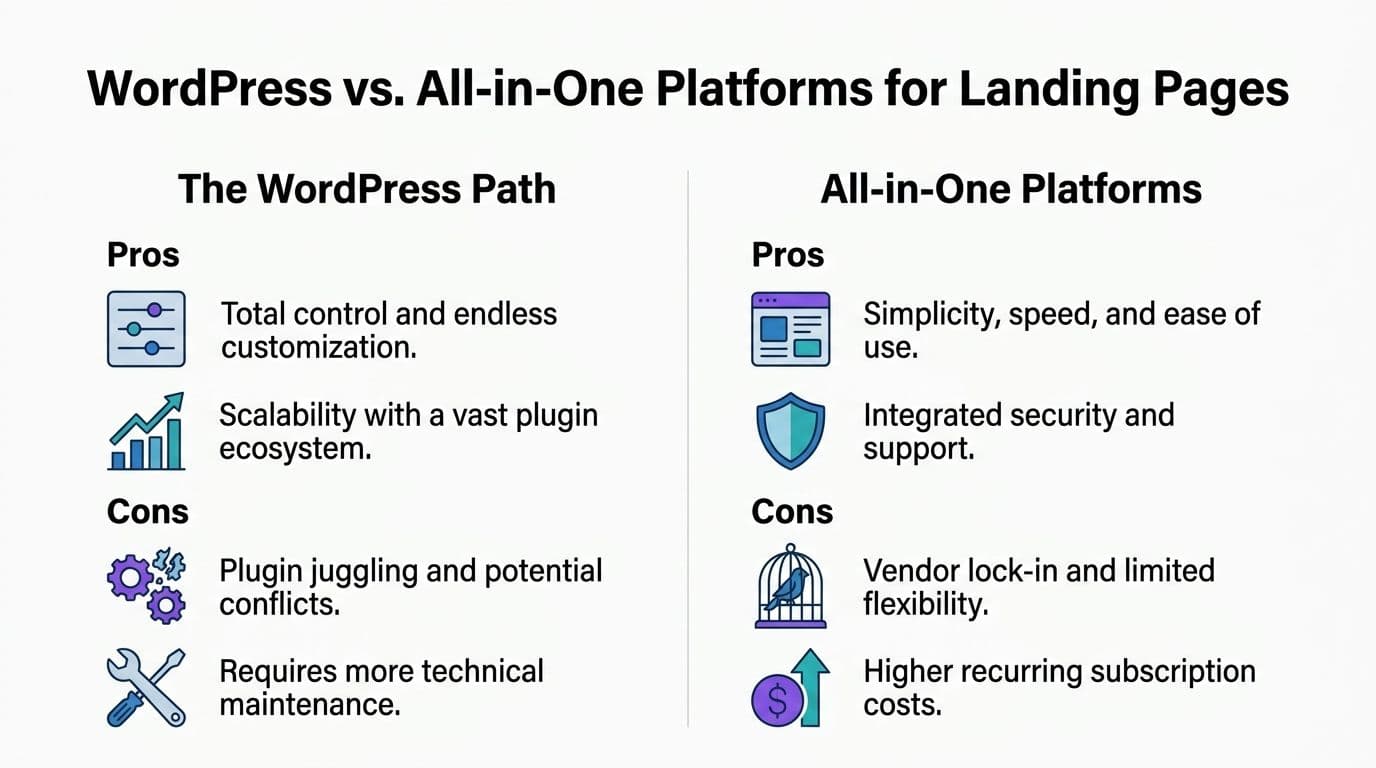
WordPress is attractive because it gives you range. You can shape almost any user experience, connect almost any tool, and keep tight control over design. For many businesses, that flexibility is worth the overhead.
But a landing page for WordPress also turns you into the integrator. You pick the theme, builder, forms plugin, email connector, checkout setup, analytics events, security tools, and performance stack. Then you keep the whole system stable over time.
When WordPress is the right choice
WordPress makes sense when the landing page is part of a larger web property, not a stand-alone sales asset.
It is usually a strong fit if you need:
- Custom architecture for a site that extends far beyond a single funnel
- Developer-level control over templates, fields, and front-end behavior
- A wide plugin ecosystem for specialized integrations
- A publishing engine for blogs, resource libraries, and long-term SEO content
It also suits teams that already have technical support. In that setup, plugin updates, template overrides, event tracking, and testing workflows are operating tasks, not constant interruptions. WordPress can support serious experimentation and content depth, but only when someone owns the stack.
What WordPress quietly asks from you
The hidden cost is ongoing attention.
Creators often underestimate a few things:
- Update management . Plugins, themes, and WordPress core all change on separate schedules.
- Conflict testing . A payment or builder update can affect form behavior, mobile layout, or tracking.
- Security responsibility . More plugins usually means more maintenance and more points to monitor.
- Workflow friction . Copy edits, CRM syncs, checkout rules, and analytics events may live in separate dashboards.
- Team handoff problems . What feels obvious to the person who built the page often feels unclear to the next person maintaining it.
This is the plugin tax. Each tool may be affordable on its own. Together, they create a maintenance system that asks for time, judgment, and recurring cleanup.
A migration-oriented resource like Cherubini Company's contractor lead plan is useful because it shows how often businesses end up needing structured help once their site setup becomes harder to manage internally.
Why all-in-one platforms appeal to creators
All-in-one platforms reduce the number of decisions and dependencies.
Instead of connecting separate tools for page building, payments, email automation, course access, community features, invoicing, and post-purchase flows, you work inside one system. That usually means fewer handoff points, fewer plugin conflicts, and less time spent figuring out which layer caused the problem.
That trade-off matters for solo creators, educators, consultants, and small teams. If the priority is to publish an offer, take payment, deliver the product, and follow up without constant maintenance, an integrated platform often matches the job better than a custom WordPress stack.
The decision is really about operating model
This choice usually maps to the role you want to play in the business.
| Path | You become responsible for | You gain |
|---|---|---|
| WordPress | Integration, updates, troubleshooting, performance tuning | Deep control and broad customization |
| All-in-one platform | Offer quality, messaging, customer experience | Faster operations with less technical overhead |
If you run an agency, have a developer on hand, or need a content-heavy site with custom behavior, WordPress can be the right engine.
If you are a creator or operator who wants the page live, the payment working, the email sent, and the product delivered without stitching together five separate tools, the all-in-one route is often a better operational fit.
Choose WordPress when custom setup is part of the value. Choose an integrated platform when speed, clarity, and lower maintenance matter more than unlimited flexibility.
If you are weighing that trade-off, this ClickFunnels review for creators and small businesses gives useful context on what funnel-first platforms simplify, and what you give up in return.
FAQ
Should I use core WordPress blocks or a page builder for my landing page?
Use core blocks if you want a lightweight site, fewer dependencies, and better long-term portability. Use a page builder like Elementor or Divi if visual editing speed matters most and you accept extra overhead. Use custom code only if you need highly controlled output and have development support.
In what order should I structure sections on my WordPress landing page?
Match the order buyers actually make decisions in, not the order your template ships with. Start with a hero that names the outcome and audience, then problem recognition, benefit stack, proof, offer detail, and a repeated CTA once confidence is higher. Prebuilt layouts that jump from headline to feature grid to pricing often skip the trust-building steps a cold visitor needs.
What makes a landing page CTA actually convert?
Replace vague copy like "Submit" or "Click here" with language that sets a clear expectation, such as "Get instant access," "Book your strategy call," or "Download the guide." Match the button to the traffic source, since a cold ad visitor may respond better to "See pricing" than "Buy now." A short reassurance near the button (no credit card required, instant access) removes hesitation at the moment it appears.
What should I plan before adding forms or payments to my WordPress landing page?
Map the journey from click to inbox before installing anything: decide whether the page collects leads or processes a sale, which system becomes the source of truth for the contact, what the buyer sees after payment or failure, and which follow-up gets triggered next. For lead forms, define where the lead goes, how fields are mapped, and what happens on submission. Small gaps here quietly leak consent status, tags, or UTM data even when the page looks fine.
What is the biggest hidden cost of building a landing page on WordPress?
Plugin tax. Every extra feature adds another setting, compatibility check, update cycle, and sometimes a monthly fee, so a simple sales page can end up depending on six pieces working together: theme, builder, checkout plugin, payment gateway, email platform, and automation logic. WordPress handles this well, but every handoff needs to be configured, tested, and maintained over time.
Zanfia fits creators who want the integrated route without giving up control of how they work. It runs the business as an AI team the creator directs by chat or voice: the assistant can perform any action available in the interface, and the same workspace is exposed to external agents through an MCP endpoint on higher plans (availability depends on the plan, see the current Zanfia pricing). The checkout is built to sell, with order bumps, installment plans that let you split a $600 course into four payments, subscription upsells, and a test mode you can use to run a real purchase before launch. Landing pages, digital products, paid communities, courses, paid newsletters, payments and automations sit under one login and one brand, with 0% platform fees on customer sales as of this writing. Plans start at $39/month, or $31/month billed annually, with a 14-day free trial and no credit card required.