

Stripe vs PayPal: The Best Choice for Your Business in 2026
You’ve built the product. The course is recorded, the newsletter is ready, the community offer makes sense, and your checkout page is one click away from going live.
Then you hit the decision that directly affects your margin every single month. stripe vs paypal.
For creators selling digital products, this choice isn’t a technical footnote. It affects what you keep from each sale, how smooth the checkout feels, how much admin you inherit, and how easily your business scales when you move from a few buyers to a real subscription engine. If your platform charges 0% transaction fees, the payment operator matters even more because that’s where your payment cost lives.
Choosing Your Payment Gateway
A lot of creators treat this like a branding choice. It isn’t. It’s an operating model choice.
Say you’re launching a paid newsletter with a community and a video mini-course. You want simple checkout for first buyers, subscription renewals that don’t break, and clean records when it’s time to reconcile revenue. If you pick the wrong setup, you won’t just lose money on fees. You’ll spend time fixing billing issues, explaining failed renewals, and chasing clarity in reports.
It also helps to know the difference between the checkout layer and the company moving the money. If you want a clean explanation, this guide on payment gateway vs payment processor is useful because many creators mix those two roles together and end up comparing the wrong things.
The practical question is simpler. Which option gives you the best mix of margin, checkout trust, recurring billing, and room to grow?
If you’re still validating your offer, the answer may be different than it is for a creator with multiple memberships, bundles, and international buyers. That’s why generic advice usually fails here. A one-size-fits-all answer ignores business model, average order size, and whether you sell one-off products or recurring access.
Practical rule: choose the provider that matches how you earn, not the one with the most familiar logo.
If you’re still deciding what kind of offer you want to sell in the first place, this breakdown of the best platforms to sell digital products is a smart companion read before you finalize payments.
An Overview of Stripe and PayPal for Creators
PayPal is the familiar consumer brand. Stripe is the infrastructure brand.
That’s the shortest useful summary.
PayPal is the trust-first option
PayPal wins on recognition. Buyers know the name, many already have an account, and that can reduce hesitation at checkout, especially with first-time customers who don’t know your brand yet.
Its scale reflects that consumer strength. In 2025, PayPal processed $1.92 trillion in total payment volume and served 435 million active users, while Stripe processed $1.14 trillion across 5.3 million active businesses according to ElectroIQ’s PayPal vs Stripe statistics. That tells you exactly where PayPal is strongest. Broad consumer reach.
For creators, that matters most when the sale is straightforward. A one-time ebook, a simple workshop, a donation-style payment, or a small digital purchase can fit PayPal’s strengths well.
Stripe is the operations-first option
Stripe is built for businesses that want more control. Better subscription logic, stronger developer tools, deeper reporting, and more flexibility when your offer stops being simple.
That doesn’t just matter to SaaS companies. It matters to creators selling memberships, installment plans, bundles, and recurring access where billing logic becomes part of the product experience. If customers upgrade, downgrade, renew, fail a payment, or buy from another country, Stripe tends to fit better.
Here’s the clean way to approach this:
| Best known for | Stripe | PayPal |
|---|---|---|
| Core identity | Business infrastructure | Consumer payment brand |
| Best fit | Scaling subscriptions, global sales, automation | Simple checkout, buyer familiarity |
| Strength | Flexibility and control | Trust and recognition |
| Weak spot | Can feel more operational | Can feel more limiting as complexity grows |
If you’re new to online selling, start with a clear understanding of what a digital product is, because the right payment setup depends heavily on whether you sell one-off files, recurring access, or a layered offer with community and content combined.
Core Feature Comparison for Digital Products
You don’t need every feature. You need the ones that protect your revenue.
Here’s the early comparison most creators should use.
| Decision area | Stripe | PayPal | Bottom-line impact |
|---|---|---|---|
| Base domestic pricing | 2.9% + $0.30 | 2.99% + $0.49 or variable pricing | Stripe is usually cleaner and cheaper at scale |
| International cost profile | ~2.5% total | ~5-8% with surcharges and conversion spread | Stripe is much better for global sales |
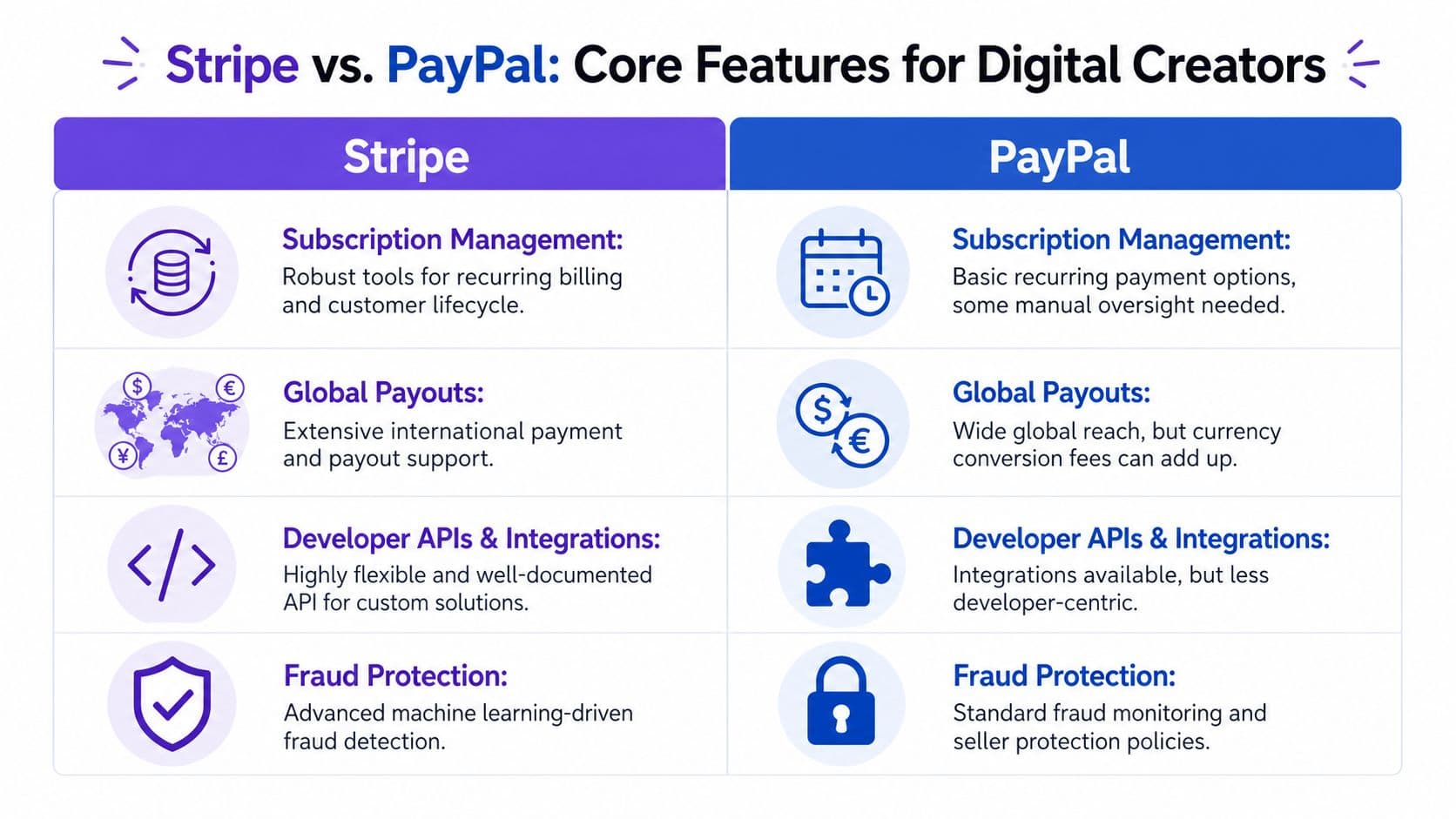
| Recurring billing | Strong for subscriptions, usage-based, hybrid models | More limited for recurring logic | Stripe fits serious memberships better |
| Currency support | 135+ currencies | 25 currencies | Stripe gives more flexibility for digital exports |
| Country reach | More limited country coverage | Operations in 200+ countries | PayPal has broader reach, but not better economics |
Fees matter more than creators think
Stripe’s standard pricing is 2.9% + $0.30, while PayPal’s base pricing is 2.99% + $0.49 and can become far more expensive on international transactions. Stripe’s international cost lands around ~2.5% total, while PayPal can rise to 5-8% once cross-border and currency conversion charges are added. At $50K monthly volume, that difference can save a business over $5,820 annually, based on this 2026 Stripe vs PayPal pricing benchmark.
That’s not a rounding error. That’s software budget, ad budget, or profit.
If most of your buyers are local and your volume is low, the gap won’t feel dramatic. Once you sell internationally or run meaningful volume through subscriptions, the gap gets expensive fast.
Recurring revenue exposes the real difference
At this point, stripe vs paypal stops being a simple fee comparison.
Stripe is built for recurring billing models that creators increasingly use. Paid newsletters, memberships, installment plans, content libraries, tiered access, and bundles all benefit from stronger subscription tooling. It also handles usage-based metering and hybrid models, which matters if your business starts mixing services, cohorts, and member perks.
PayPal can handle basic recurring payments, but it’s less flexible. That’s fine for a flat monthly membership with no complexity. It becomes frustrating when you want more control over plan logic or customer lifecycle.
A useful example is cancellation flow. If you’re trying to understand what happens when a Stripe subscription stops, this guide on how a Stripe subscription ends shows why billing behavior is not just a finance detail. It shapes customer experience.
International sales separate the serious options
If you sell digital products, geography matters more than many creators expect. You may write in English, but your buyers can come from anywhere.
Stripe supports 135+ currencies. PayPal supports 25 currencies. PayPal operates in over 200 countries, which sounds impressive, but broad availability doesn’t automatically mean better economics for a digital creator. If conversion spreads and cross-border fees eat margin, country reach becomes less valuable.
If your growth plan includes international buyers, subscriptions, or both, Stripe is usually the better business decision.
Advanced Capabilities Beyond the Transaction
The first sale is important. The system behind the sale is what determines whether your business stays manageable.
Creators often compare Stripe and PayPal as checkout buttons. That’s too shallow. Once your offer stack grows, the better question is which one gives you usable data, stronger automation, and fewer blind spots.

Stripe gives operators more leverage
Stripe’s edge is operational depth.
Its developer-focused tools reached 92% developer satisfaction, and its AI-powered dashboards provide real-time anomaly alerts with over 90% precision, according to Justt’s analysis of Stripe vs PayPal for ecommerce merchants. It also offers drill-down reporting, SQL access through Sigma, detailed subscription metrics, and broad API access.
That sounds technical, but the business effect is simple. You can answer questions faster.
- Why did renewals dip this week . Stripe gives better visibility into failed payments and transaction patterns.
- Which pricing model is holding retention back . Stripe’s billing and analytics stack makes that easier to inspect.
- Where are support tickets coming from . Better metadata and filtering reduce guesswork.
PayPal’s reporting is functional, but basic. For a creator selling a few products, that may be enough. For a business that needs decision-grade reporting, it usually isn’t.
Better tools reduce admin drag
A scaling creator doesn’t need more dashboards. They need fewer manual tasks.
If your payment layer makes reporting shallow or subscription behavior hard to inspect, your team compensates with spreadsheets, manual tagging, and workarounds. That’s where hidden operational cost shows up.
Stripe also supports more advanced integrations natively, which makes it easier to connect payments to your broader business systems. For creators comparing software for recurring revenue operations, this review of best subscription management software gives good context on what strong billing infrastructure should help you do.
PayPal is fine until your business stops being simple
That's the pattern.
PayPal works best when your payment flow is straightforward and your reporting needs are modest. It starts to feel narrow when you need detailed subscription insight, more nuanced fraud controls, or deeper workflow automation.
A payment processor shouldn’t force you to build a second job around billing cleanup.
If you’re building a serious subscription business, Stripe’s extra capability isn’t a luxury feature. It’s what keeps finance, support, and growth decisions from turning into guesswork.
Unpacking the True Cost of Getting Paid
You launch a new product on Zanfia, the platform charges 0% platform commission, and sales start coming in. That should mean clean margins. In practice, your payment gateway now has a bigger effect on profit than most creators expect.

Headline rates are only the starting point
The standard fee is only one line on the bill.
Stripe often wins on base pricing, and for many creators that matters. But if your business runs on subscriptions, global buyers, tax collection, and fraud screening, your effective cost can climb once you add the tools that keep operations under control. For SaaS-like businesses, Stripe’s full suite can push effective cost to 3.9–4.5%, according to GrowthOptix’s analysis of true effective payment costs. That means you need to compare total payment stack cost, not just the number shown on the pricing page.
For a Zanfia creator, this matters more because Zanfia is not taking a cut of each sale. If margin slips, the gateway is usually the reason.
PayPal can cost more on international sales
PayPal gets expensive fast when currency conversion enters the picture.
Many creators look at the listed transaction fee and stop there. That misses a meaningful part of the cost. PayPal’s exchange spread can take another bite out of revenue, especially if you sell digital products across borders. Before you assume an overseas sale is profitable, read this guide to uncover hidden PayPal exchange rates.
Protecting margin starts with a full calculation.
If you are setting prices and packaging offers at the same time, use this guide to subscription pricing strategies to make sure your pricing model still works after payment costs, taxes, and currency conversion.
Cost depends on what your business needs to run
A creator selling one download per week can get by with a simple setup. A creator running memberships, recurring access, and international sales needs more than payment collection.
That usually includes:
- Tax handling for digital sales in multiple jurisdictions
- Fraud protection that reduces manual review
- Recurring billing support that keeps access and payments synced
- Reporting that helps you spot churn, failed payments, and weak offers
Use this three-step check before you choose a gateway:
- List every paid add-on you need. Include billing, tax, fraud tools, and any currency-related cost.
- Review where your customers live. Domestic and international revenue do not carry the same fee profile.
- Match the gateway to your offer model. One-time digital downloads, subscriptions, and installment plans should not be priced the same way or processed with the same assumptions.
A short video can also help if you want a broader payment-fee mindset before deciding:
Which Is Right for Your Zanfia Business
Here’s the blunt answer. Stripe is a strong default for most serious digital creators. PayPal is the better niche choice in a few specific cases.

Choose Stripe if you sell subscriptions and want room to scale
If you run a paid community, course membership, recurring newsletter, installment plan, or bundled digital offer, Stripe is the stronger fit.
Its billing flexibility, stronger analytics, better international economics, and broader currency support make it more useful once your business has moving parts. If you expect to add offers, test pricing, or grow beyond your home market, Stripe gives you more operating room and fewer limitations later.
This is especially true for creators who think like operators. If this sounds like you, pick Stripe and build on a system that won’t need replacing when revenue grows.
Choose PayPal if your buyers value familiarity over system depth
If you’re selling simple one-time products to a consumer audience that already trusts PayPal, it can still make sense.
That’s strongest when your sale is low complexity. An ebook, a small digital download, a one-off workshop seat, or a lightweight offer where buyer trust at checkout matters more than deep billing logic.
PayPal also has one underrated use case. Its micropayment rate of 5% + $0.05 can be cheaper than Stripe’s standard pricing for digital items under $10, according to Outseta’s comparison of Stripe and PayPal for creators. If you sell low-priced newsletter issues or tiny digital products, that detail matters.
Use this decision filter
| If your business looks like this | Pick this |
|---|---|
| Paid membership, course library, subscriptions, international audience | Stripe |
| One-time digital sales, trust-sensitive buyers, very simple checkout | PayPal |
| Very low-priced digital items under $10 | PayPal micropayments may win |
| You expect more product complexity next year than today | Stripe |
Don’t choose based on what feels easiest this week. Choose based on what your payment setup will look like after your next successful launch.
For most creators building a real digital business, Stripe is the stronger fit. PayPal is useful, but usually as a tactical fit, not the long-term core.
Final Recommendation and Integrating with Zanfia
If you want the short version, here it is.
Choose Stripe if you’re building a subscription business, selling internationally, or want stronger analytics and automation support. It’s the better foundation for a creator business that plans to grow.
Choose PayPal if your offer is simple, your audience strongly prefers the brand, or you sell very low-priced digital items where micropayments improve economics.
That’s the practical answer to stripe vs paypal.
The bigger advantage is that you don’t have to make this decision around platform commissions. As of publication, Zanfia charges 0% platform commission on customer sales, so the processor choice becomes cleaner because you’re evaluating the payment layer on its own merit. That’s exactly how this decision should be made.
Operationally, don’t stop at checkout. Think through invoicing, accounting, and reconciliation too. If Stripe is your choice and you want a practical finance workflow reference, this guide on reconciling Stripe payments in Xero is a helpful example of the kind of back-office clarity growing creators should aim for.
And whichever processor you choose, keep the standard high. Your payment setup should support the business you’re building, not create friction around it.
FAQ
How much can a creator actually save by choosing Stripe over PayPal on international sales?
The article cites a benchmark showing that at $50K monthly volume, the difference between Stripe's ~2.5% total international cost and PayPal's 5-8% (with surcharges and conversion spread) can save over $5,820 annually. That gap widens as your cross-border volume grows, since PayPal's exchange spread quietly takes another bite out of every non-domestic sale.
Is PayPal's larger country reach a real advantage for digital creators?
PayPal operates in over 200 countries versus Stripe's more limited coverage, but the article makes clear that broad availability doesn't automatically mean better economics. Stripe supports 135+ currencies against PayPal's 25, and once conversion spreads and cross-border fees eat into margin, country count becomes far less valuable than cost per transaction.
Why does the payment processor choice matter more on a 0% commission platform?
When the platform itself takes no cut of your sales, the payment gateway becomes the single biggest recurring cost on each transaction. That means every basis point of fee, every currency conversion spread, and every failed renewal directly hits your margin instead of being masked by a larger platform fee.
When is PayPal genuinely the better choice for a creator?
The article positions PayPal as the stronger fit when the sale is straightforward: a one-time ebook, a simple workshop, a donation-style payment, or a small digital purchase, especially with first-time customers who don't recognize your brand yet. Its buyer recognition (435 million active users, $1.92 trillion processed in 2025) reduces checkout hesitation in those low-complexity scenarios.
What is the real 'effective cost' of Stripe once you add the tools a subscription business needs?
Headline pricing of 2.9% + $0.30 is only the starting line. The article cites analysis showing that for SaaS-like businesses, Stripe's full suite (tax handling, fraud protection, advanced recurring billing, reporting) can push effective cost to 3.9-4.5%, so you should compare total payment stack cost rather than the number on the pricing page.
If you want to build your digital business on a platform where an AI team does the work of running the business, take a look at Zanfia. It currently charges 0% platform commission on customer sales, and the AI assistant knows the whole application: you can dictate any action available in the interface by chat or by voice, from setting up a new product to editing a checkout. Twelve product types live under one brand, so courses, communities, paid newsletters and digital downloads sit behind one login on your own domain. The checkout is built to sell: order bumps, subscription upsells, installments that let you split a $600 course into four payments, plus a test mode so you can buy your own product before launch and confirm tracking fires end to end. Availability of the full AI team, the MCP endpoint for your own agents, and white-label AI depends on the plan, so check the current Zanfia pricing before you decide. Starter runs $39/month, or $31/month billed annually, and every plan includes a 14-day free trial with no credit card required.