

All-in-One vs Stack: Why Creators Are Consolidating Tools in 2026

Open your laptop on a Monday morning and count the tabs. Stripe for payments. Teachable for the course. Circle for the community. ConvertKit for emails. Calendly for calls. Notion for the knowledge base. Gumroad for the ebook. Vimeo for video hosting. Zapier to duct-tape it all together. Then there are the dashboards you forgot you were paying for. By the time you finish your coffee, you have logged into six tools and answered exactly zero customer questions.
This is the modern creator stack, and in 2026 it is quietly bleeding small businesses dry. Not just in subscription fees, but in lost hours, broken handoffs, and customers who churn because the experience feels like five different brands stitched together. The shift this year is unmistakable: creators are consolidating. The all-in-one creator platform vs stack debate has flipped, and the data behind why is more compelling than most operators realize.
This guide walks through the real cost of fragmentation, what to consolidate versus what to keep separate, how to migrate without nuking your revenue, and a side-by-side cost comparison so you can model the switch with your own numbers.
The hidden cost of a 12-tool creator stack
Most creators underestimate their stack cost by 60 to 70 percent because they only count subscription line items. The actual cost has four layers, and three of them are invisible until you start measuring.
Layer 1: The subscription bill you can see
A typical six-figure creator stack in 2026 looks something like this:
- Course platform: $99 to $399 per month
- Community tool: $89 to $299 per month
- Email service provider: $79 to $249 per month
- Scheduling and bookings: $20 to $40 per month
- Video hosting: $20 to $75 per month
- Digital product delivery: $29 to $99 per month plus transaction fees
- Knowledge base or wiki: $20 to $60 per month
- Automation glue (Zapier or Make): $29 to $99 per month
- Analytics overlay: $50 to $150 per month
- Payment processor: 2.9 percent plus $0.30 per transaction (always)
Add it up and a moderately equipped creator is spending $450 to $1,500 per month just to keep the lights on. Multiply by 12 and you have an annual tooling cost between $5,400 and $18,000, before you account for the human time required to operate it.
Layer 2: The integration tax
Every tool you add doubles the connection points to the previous ones. Three tools require three integrations. Six tools require fifteen. Twelve tools require sixty-six. This is graph theory, not opinion.
Each integration is a place where data drops, webhooks fail silently, or a customer ends up in the wrong segment. The fix is usually a Zapier task burning credits or a developer hour you bill against your own revenue. According to a 2024 Harvard Business Review analysis on operational complexity, organizations underestimate coordination overhead by an average of 40 percent when running fragmented systems. Creators are not exempt.
Layer 3: The cognitive load
Context-switching has a measurable cost. Research from the University of California, Irvine, repeatedly cited in workplace productivity studies, shows it takes an average of 23 minutes to fully refocus after switching tasks. When your morning involves bouncing between six dashboards to answer one customer ticket, you are not running a business. You are running a circus where you are also the only animal.
For solo creators, this shows up as 8 to 12 hours per week spent on tool maintenance: reconciling member lists, fixing broken automations, manually triggering tagging flows that should have been automatic. At a freelance rate of $100 per hour, that is $32,000 to $48,000 of unbillable time per year.
Layer 4: The customer experience tax
This is the most expensive layer and the one creators almost never measure. When your customer buys a course on Teachable, gets a welcome email from ConvertKit, joins a community on Circle, and books a call through Calendly, they are not experiencing your brand. They are experiencing four vendors who each took a small piece of your relationship.
The result: lower brand recall, weaker upsell conversion, and a churn rate that looks fine in any single tool but is actually compounding across the journey.
Integrated platform: 3x retention (the data)
The retention case for consolidation is not theoretical. It shows up across every dataset that tracks creator businesses through 2025 and into 2026.
What the creator economy reports show
Industry trend reports throughout 2025, including Uscreen’s creator economy analysis and Behind the Scenes monetization research, consistently document the same pattern: creators running on integrated platforms see member retention rates 2 to 3 times higher than those running fragmented stacks. The numbers vary by niche, but the direction does not.
The mechanism is simple. Retention is a function of perceived value, friction, and emotional connection. Integrated platforms reduce friction at every touchpoint: one login, one notification stream, one place where the member’s progress, conversations, and content all live together. Fragmented stacks force the member to remember which tab their cohort discussion happens in, which app has the next module, and which inbox the call invite landed in.
According to Pew Research on platform usage patterns, users abandon experiences requiring three or more authentication steps at rates approaching 60 percent. Your stack is producing exactly this friction every week.
The 12-month retention gap
In typical creator businesses, monthly community churn sits at 8 to 12 percent on fragmented stacks. On integrated platforms it tends to land between 3 and 5 percent. Over 12 months, that gap compounds dramatically. A cohort of 1,000 members at 10 percent monthly churn becomes 282 members after a year. The same cohort at 4 percent monthly churn becomes 610 members. Same acquisition spend, 2.16x the LTV.
Why the lift is real, not marketing
Three structural reasons explain the retention gap:
- Unified progress tracking. When the platform knows the member watched four lessons, posted twice, and missed last week’s call, it can trigger relevant nudges. Fragmented stacks cannot see this picture.
- One identity per customer. No more cleaning up duplicates between your course platform email field and your community profile. Members feel known instead of re-onboarded.
- Faster feature loops. Integrated platforms ship updates that work everywhere at once. Fragmented stacks ship updates that break the integration you set up last quarter.
What to consolidate first: payments, content, community
Not everything in your stack is equal. Some tools cost you customer trust every day you keep them separate. Others can live on the side without much damage. Here is the priority order if you are starting consolidation in 2026.
Priority 1: Payments and checkout
Your checkout is the most expensive piece of fragmentation in your stack. Every additional click, every redirect, every “finalize on the next page” reduces conversion. Industry benchmarks suggest a 7 to 12 percent conversion lift when checkout lives inside the same domain as the offer page, with no third-party redirect.
This is why platforms like Gumroad charge such steep margins. They know controlling checkout is the lever. Consolidating payment, invoicing, order bumps, and subscription logic into one system gives you that lever back. Pay attention to whether your platform supports order bumps with separate invoicing, subscription upsells at checkout, installment plans that let you split a $600 course into four payments, multi-quantity offers for team licensing, test mode so you can buy your own product before launch to verify checkout and tracking end to end, and wallet payments like Apple Pay and Google Pay. These features compound conversion in ways a stitched-together Stripe + landing page stack cannot match.
Priority 2: Content delivery and community
The course-and-community split is the single most damaging fragmentation in the creator economy. Members buy a course expecting transformation. Transformation requires conversation. When the conversation lives in a separate tool with a separate login, members rarely make the jump. Cohort engagement collapses.
Consolidating course and community into one interface is the single highest-leverage move you can make this year. The retention numbers above are largely driven by this one decision.
Priority 3: Knowledge bases and digital products
Ebooks, downloadable templates, premium articles, and reference libraries are the long-tail of creator monetization. They are also where fragmentation hurts the most quietly. A member who buys an ebook on Gumroad, downloads it once, and never returns is a member you have lost forever. When the ebook lives in your main platform alongside courses and community, it stays in front of the member every time they log in.
What to keep separate: email marketing, analytics, ads
Consolidation is not religion. There are tools that should stay separate in 2026, and creators who consolidate the wrong ones make their lives worse.
Email marketing belongs in a dedicated ESP
This one surprises people, but it is the right answer. Dedicated email service providers like ConvertKit, MailerLite, and ActiveCampaign have spent a decade optimizing one thing: getting your emails into the primary inbox. They have IP reputation systems, deliverability teams, and warming infrastructure that no all-in-one platform can match.
Your platform should send transactional emails (purchase confirmations, account notifications, drip module unlocks) and product communications. But broadcast campaigns, nurture sequences, and segmentation logic belong in a real ESP. Use your platform’s API to sync purchase events and member tags, then run campaigns from the dedicated tool.
Advanced analytics deserves a dedicated layer
If your business is small, your platform’s built-in analytics are enough. Once you are doing serious money and want to model customer journeys, cohort behavior, or attribution across channels, you need a real analytics stack: Mixpanel or PostHog for product analytics, GA4 for web, and possibly a warehouse like BigQuery for serious reporting.
Paid advertising is its own discipline
Meta Ads Manager, Google Ads, and TikTok Ads are not features. They are entire skill sets. No all-in-one platform should be running your ad campaigns. Use them for what they are: dedicated buying interfaces with their own pixel and conversion tracking, integrated with your platform via standard conversion APIs.
Webinars and live events
Live webinar tools like Zoom, Demio, and WebinarJam have specific functionality (registration walls, replay infrastructure, polling, breakout rooms) that does not translate well into general platforms. Keep them separate, and integrate via registration triggers.
Migration playbook: switching without breaking your business
The number one reason creators stay on fragmented stacks longer than they should is fear of the migration. They imagine a multi-week outage where customer service crumbles, revenue stops, and members revolt. None of that needs to happen if you migrate in phases.
Phase 1: Audit (week 1)
Before you change anything, document what you have. Map every tool, what it costs, what data it holds, what integrations connect it to other tools, and how many active customers depend on it. Most creators discover during this phase that they are paying for 2 to 3 tools they completely forgot about.
Output: a spreadsheet with tool name, monthly cost, primary function, customer dependency, and integration points.
Phase 2: Pilot with one product (weeks 2 to 4)
Do not migrate everything at once. Pick your smallest, least-revenue-critical product. An ebook, a low-volume mini-course, or a beta cohort. Set it up entirely on the new platform. Run a real launch through it. Measure everything: checkout conversion, member activation, support ticket volume.
This phase is about discovering the unknown unknowns. Every platform has quirks you cannot see from a demo. You want to find them on your $99 ebook, not your $2,500 flagship cohort.
Phase 3: Migrate by customer cohort, not by product (weeks 5 to 10)
Here is the counterintuitive move. Do not migrate Product A entirely, then Product B. Instead, migrate customer cohorts. Start with new customers (anyone who buys after a chosen date lands on the new platform). Let your existing customers stay on the old stack until their natural lifecycle ends or until you can offer them a clear upgrade.
This protects revenue because no existing customer experiences disruption. It also lets you optimize the new platform with fresh customer feedback before you ask long-term members to switch.
Phase 4: Sunset the old stack (weeks 11 to 16)
Once your new customers are humming and your old customers have either migrated voluntarily or churned naturally, start canceling subscriptions. Be ruthless. Every month you delay canceling is another month of double payment for no incremental value.
Communicate the sunset clearly to any remaining old-stack customers, give them a migration window, and then make the cut. The vast majority will either migrate or they would have churned anyway.
Cost comparison: stack vs all-in-one (real numbers)
Numbers vary by creator size, but here is a realistic comparison for a creator running 500 active members across courses, a community, paid newsletter, and digital products. All-in-one creator platform vs stack costs are based on typical 2026 market pricing.
The fragmented stack scenario
- Teachable Pro: $199 per month
- Circle Plus: $99 per month
- ConvertKit (5,000 subscribers): $79 per month
- Calendly Teams: $20 per month
- Vimeo Pro: $20 per month
- Gumroad: $10 per month plus 10% + $0.30 per transaction
- Notion Plus (knowledge base): $10 per month
- Zapier Professional: $49 per month
- Total fixed: $486 per month, or $5,832 per year
- Plus Gumroad transaction fees: averaging $200 per month at modest sales volume
- Plus Stripe fees across all platforms: 2.9% + $0.30 per transaction (unavoidable)
Realistic annual tooling cost: $8,000 to $10,000, before counting the integration tax and time cost.
The integrated platform scenario
- Integrated platform (mid-tier): $99 to $199 per month, or $1,200 to $2,400 per year
- Dedicated ESP: $79 per month, or $948 per year
- Analytics layer (if needed): $0 to $50 per month
- Webinar tool: $20 to $40 per month if applicable
- Total: $2,500 to $4,500 per year, plus only Stripe processor fees on customer sales
The math beyond the line items
The hard dollar savings are typically $3,500 to $6,000 per year. The bigger savings are invisible: 6 to 10 hours of operational time per week reclaimed, integration tax eliminated, and customer experience unified.
Most creators who consolidate report breaking even on the migration time within 90 days and netting a clear positive ROI by month six.
How Zanfia replaces 6+ tools at 0% platform fee
This is where Zanfia fits into the consolidation play. Zanfia is built as an AI team that runs a creator business, with courses, community, paid newsletters, knowledge bases, ebooks, consulting bookings, and subscriptions all living under one roof on your own white-label domain. Instead of configuring each surface by hand, the creator tells the assistant what to do, by chat or by voice, and the assistant performs any action available in the interface. For creators who bring their own agents, Zanfia exposes an MCP endpoint on higher plans so external AI assistants can work directly with the workspace. Every surface, from the checkout to the community, is built to end in a sale.
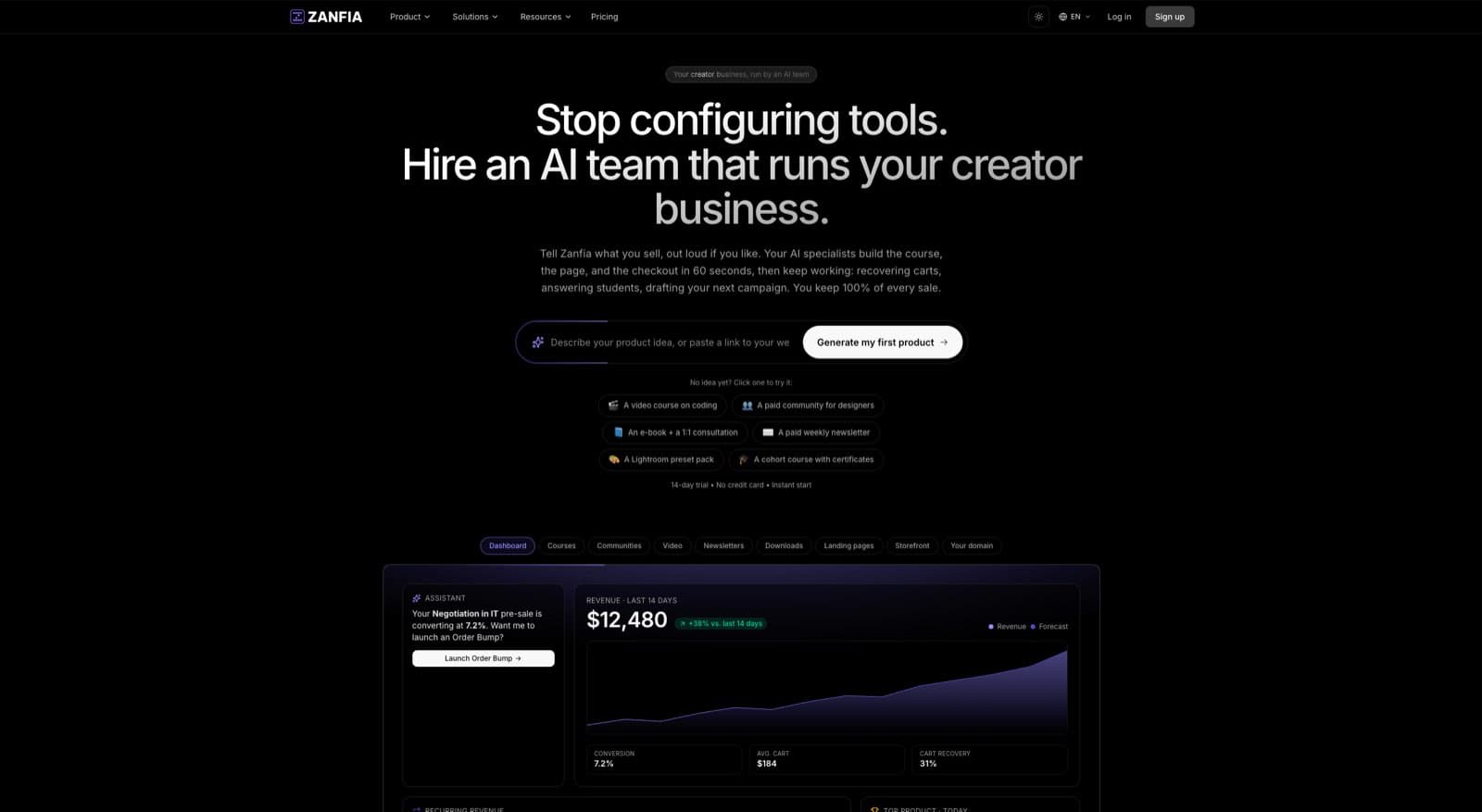
What Zanfia replaces in a typical stack
If you are running a typical creator stack today, here is what Zanfia consolidates:
- Course platform (Teachable, Thinkific, Kajabi): native video hosting with smart progress-memory player, time-locked module unlocking for drip content, quizzes and completion certificates, and course duplication for franchising or repeat cohorts. Integrations with YouTube, Vimeo, Wistia, and Bunny.net if you prefer external hosting.
- Community tool (Circle, Skool, Discord): topic discussion channels, announcement-only channels, roles and gamification, natively integrated with course content so members access everything in one interface. A community AI agent can draft posts from your own content, and everything it publishes is labeled as AI.
- Newsletter platform (Substack, Beehiiv): paid newsletter subscriptions with built-in delivery and member-only archive access.
- Digital product delivery (Gumroad, Podia): ebooks, downloads, and knowledge bases with secure file delivery, pay-per-download or bundled with subscriptions. Twelve product types live under one brand, from a single ebook to a full membership.
- Booking tool (Calendly, SavvyCal): scheduling and payment for one-on-one sessions (Bookings and Consultations are marked coming soon on the product menu, so this piece is rolling in rather than live today).
- Subscription management : recurring billing logic built into the checkout, including installments and free trials, with test mode so you can buy your own product before launch to verify checkout and tracking end to end.
What is different about Zanfia’s pricing model
Most all-in-one platforms charge a SaaS subscription plus a platform fee on every sale. Kajabi takes a cut. Podia takes a cut. Gumroad takes 10 percent plus $0.50 per direct transaction, and 30 percent on marketplace sales.
Zanfia charges 0% platform commission on your customer sales on every plan. Only your payment processor (Stripe or PayPal) takes their standard fees, which you cannot avoid on any platform. Every plan includes a 14-day free trial with no credit card required, so you can run a real product through the platform before committing. Entry starts at $39 per month on Starter, or $31 per month billed annually.
White-label and custom domain
Zanfia gives every creator a subdomain at slug.zanfia.co out of the box, with the option to map your own custom domain on higher plans (see the current Zanfia pricing for what unlocks on each tier). This matters for two reasons: brand recall (customers remember your URL, not your platform’s) and conversion (checkout on your own domain converts better than checkout on a third-party domain).
Checkout and payment infrastructure
The Zanfia checkout supports the conversion levers that matter in 2026: order bumps with separate invoicing per add-on, subscription upsells at checkout, discount codes (percentage or flat), multi-quantity offers for team licensing, and wallet payments via Apple Pay and Google Pay. Payment processing runs through Stripe and PayPal, with pricing models covering one-time, subscription, installments (for example splitting a $600 course into four payments), and free trial. Test mode lets you run a real test purchase, with events tagged TEST and kept out of the live order list, so you can verify the funnel before the first paying customer.
Mobile app for members
Zanfia ships a native iOS and Android mobile app (live since 2026) where your members consume courses, paid newsletters, and knowledge bases. Community support in the mobile app is rolling out behind a per-workspace flag, so if mobile community is essential to your business today, plan accordingly.
What Zanfia does NOT do
To be clear about the scope: native email campaigns and broadcasts are rolling out to workspaces rather than open to everyone today, so a dedicated ESP (ConvertKit, MailerLite, or ActiveCampaign) still runs your nurture sequences for now. Zanfia is not a webinar platform (use Zoom, Demio, or WebinarJam), not a podcast host (use Buzzsprout, Transistor, or Anchor), and not a public affiliate marketplace (referral rewards let you reward your own customers, and the affiliate program lets partners recommend you for a commission). This is by design. Zanfia consolidates the products, checkout, and member experience layer. The dedicated tools above stay dedicated because they should.
If you want to see how Zanfia fits your specific stack, the best move is to look at the pricing page and start the 14-day free trial. Run one product through it before you migrate anything else.
FAQ
Is consolidating to an all-in-one platform actually cheaper than a stack?
For most creators running 200 or more active members, yes. The hard subscription savings range from $3,000 to $6,000 per year. The bigger wins are operational time recovered (6 to 10 hours per week) and improved retention from a unified member experience. For creators under 50 members, the math is closer, and a low-cost stack can be competitive on hard dollars alone.
What is the riskiest part of migrating from a stack to an all-in-one platform?
The riskiest move is migrating all your customers at once. Instead, migrate by cohort: new customers land on the new platform from a chosen date, while existing customers stay on the old stack until natural lifecycle ends. This protects revenue and lets you discover platform quirks on lower-stakes customers first.
Should I move my email marketing to my all-in-one platform too?
No, for most creators. Dedicated email service providers like ConvertKit, MailerLite, and ActiveCampaign have deliverability infrastructure that all-in-one platforms cannot match. Use your platform for transactional and product emails, but run broadcast campaigns and nurture sequences from a dedicated ESP. Sync via API.
How much does an integrated creator platform cost compared to running 6 separate tools?
A typical mid-tier integrated platform runs $99 to $199 per month, while a comparable six-tool stack typically runs $400 to $600 per month before transaction fees. Annual savings of $3,500 to $6,000 are common, plus elimination of the Gumroad-style 10 percent transaction tax on direct sales.
What is the difference between an all-in-one creator platform vs stack approach in 2026?
An all-in-one creator platform delivers courses, community, payments, and digital products under one login on your own domain. A stack stitches together separate tools for each function via integrations. The all-in-one approach generally produces 2 to 3 times higher retention, lower operational overhead, and stronger brand recall, while the stack approach offers more best-in-class tooling per category at the cost of complexity. The right answer depends on whether your business is constrained more by feature depth or operational simplicity.
Can I keep my existing payment processor when I switch to an all-in-one platform?
Usually yes. Most modern platforms (including Zanfia) connect directly to Stripe and PayPal accounts you already own. Your existing customer payment history, subscription terms, and processor relationships transfer cleanly. You do not need to re-onboard customers to a new payment vendor.
How long does it realistically take to migrate from a fragmented stack to a consolidated platform?
For a typical creator with 200 to 1,000 members across multiple products, the full migration usually takes 10 to 16 weeks if done in phases: 1 week of audit, 2 to 3 weeks of pilot with one product, 5 to 6 weeks of cohort migration, and 3 to 5 weeks of sunsetting the old stack. Trying to compress this into 4 weeks or less is the most common reason migrations break and revenue dips.