

Squarespace Pricing vs Wix: Find Your Best Deal
A creator sits down on Sunday night to make a simple decision: Squarespace or Wix. The pricing pages look manageable at first. Then the asterisks appear. One plan includes a free domain for a year. Another includes ecommerce only after an upgrade. One platform advertises 0% transaction fees, but only on the right plan. Another looks cheaper until annual billing forces a larger upfront payment.
That confusion isn't a small detail. It's the whole decision.
Most comparisons of squarespace pricing vs wix stop at the advertised monthly rate. That misses the part that affects your bank account most: total cost of ownership, or TCO. For a creator, consultant, educator, or small business owner, TCO includes the annual billing commitment, domain renewal, transaction fees, storage limits, and the likelihood that you’ll need paid extras as your business grows.
A portfolio site and a digital product business don't buy the same thing, even if both start from a website builder. One needs a polished homepage. The other needs margin protection, predictable scaling, and fewer surprise costs.
That’s why broad “Wix is cheaper” or “Squarespace is better value” advice usually fails in practice. Your real question isn’t which platform has the lower sticker price. It’s which one stays financially sensible after your first year, your first sales, and your first content expansion.
If you want a second opinion beyond US-centric comparisons, Altitude Design offers practical advice on website builders for Scotland that’s useful for thinking about regional business needs, not just headline pricing. And if you're still mapping the bigger economics of online publishing, this guide on how internet sites make money helps frame why platform fees matter so much once revenue starts flowing.
Introduction Beyond the Sticker Price

The trap starts with annual pricing. A creator sees Squarespace at $16 per month and Wix at $17 per month, then assumes the difference is trivial. But that framing hides the fact that those entry plans are billed annually, meaning $192 for Squarespace and $204 for Wix, and domain renewal can add more after the first year, including about $20 per year in one Wix user’s experience, as discussed in this side by side Wix and Squarespace comparison.
That changes the psychology of the purchase. You’re not testing a monthly tool in the casual way the pricing page suggests. You’re making a yearly commitment before your site has proven itself.
Why monthly price misleads creators
For creators, the danger isn't only overpaying. It's buying a plan that looks affordable until your business model becomes clearer. A photographer can live comfortably on a simple site plan. A course creator can't. A coach selling downloads may think all they need is “a website,” then discover that checkout, storage, and product delivery turn the platform into an operating cost, not just a design expense.
Financial lens: The cheapest plan is only the cheapest if it still works six months later.
That’s where TCO becomes more useful than advertised pricing. TCO asks better questions:
- Upfront cash commitment: How much do you have to pay before the site earns anything?
- Sales friction: Will platform fees eat into digital product margins?
- Growth pressure: Will storage caps or paid upgrades appear as soon as you expand your offer?
- Operational complexity: Will you end up stitching together extra tools to fill core gaps?
The hidden budget line nobody models
Many creators budget for a plan, then forget to budget for the business they intend to build on top of it. That’s a mistake. If your goal is revenue, your platform decision should be treated like an infrastructure decision.
Squarespace often wins on entry price and simplicity. Wix often wins if you value some of its higher-tier marketing and AI-related features enough to justify the premium. But both can become more expensive than expected if you choose based on homepage pricing alone.
Core Pricing Plans A Head-to-Head Comparison
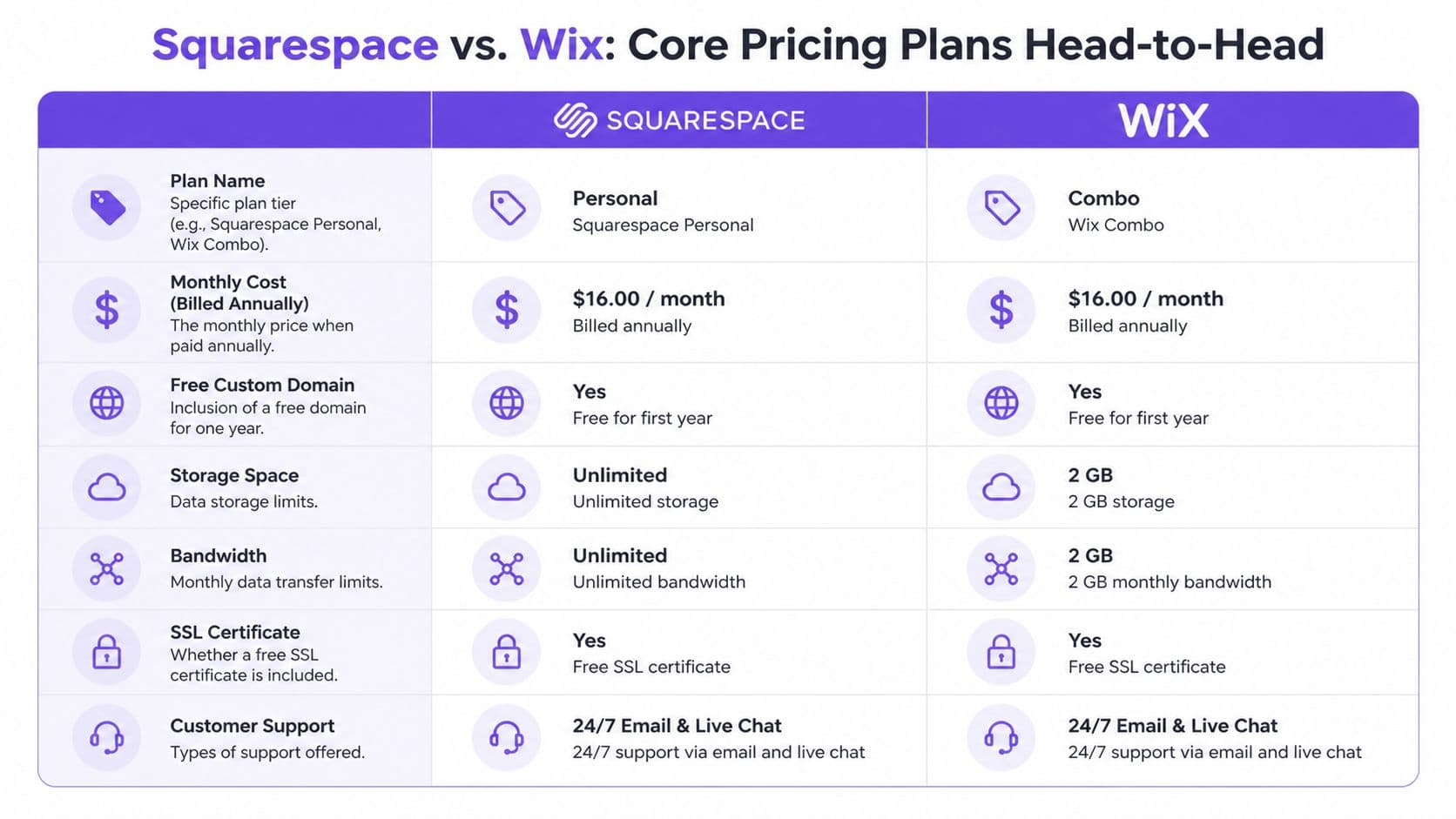
Below is the cleanest starting point for squarespace pricing vs wix if you want the pricing logic without the noise.
| Category | Squarespace | Wix |
|---|---|---|
| Cheapest ad-free plan | $16/month billed annually | $17/month billed annually |
| Annual cost at entry tier | $192/year | $204/year |
| Lowest plan for selling products | Business plan at $23/month | Core plan at $29/month |
| Free domain | Free for the first year | Free tier exists with ads, custom domain limitations on free plan |
| Storage and bandwidth approach | Unlimited bandwidth and storage on all plans | Tiered storage by plan |
| Ecommerce fee structure | Platform fee on Business plan, removed on Commerce plans | 0% platform transaction fees on ecommerce plans |
The key pricing comparison comes from Squarespace’s own Wix comparison page, which lists Squarespace Personal at $16 per month and Wix Light at $17 per month, both billed annually, and shows that selling products starts on Squarespace Business at $23 per month versus Wix Core at $29 per month.
If you’re comparing broader options for monetization, this roundup of best platforms to sell digital products is useful because website builders and digital product platforms often solve different problems.
Squarespace plans in practical terms
Squarespace’s structure is easier to read because the ladder is shorter and the pricing jumps are easier to interpret.
Personal plan
This is the low-cost entry point at $16 per month billed annually. It’s the plan for a brochure site, portfolio, or informational business site. It is not the right tool if you intend to start selling products immediately.
Business plan
Selling begins at $23 per month. That matters because the jump from Personal to Business isn't just about features. It's the line between having a website and having a commercial website.
For a new seller, this plan is attractive because it gets you into ecommerce at a lower monthly price than Wix’s entry ecommerce tier. But there’s a catch, and it becomes the core financial issue in the next section.
Commerce tiers
Squarespace’s higher ecommerce tiers remove platform transaction fees and make more sense for businesses with steady sales. The broad pattern is simple: Squarespace starts cheap, but some sellers will outgrow the Business plan quickly.
Wix plans in practical terms
Wix gives you more visible plan variety, but that flexibility can make budgeting harder.
Light plan
Wix’s cheapest ad-free option is $17 per month billed annually. It includes 2GB storage, but no ecommerce tools. For a simple service business or early-stage site, that may be enough. For a seller, it’s only a temporary stop.
Core plan
At $29 per month, this is the first Wix plan that supports ecommerce. That means Wix asks you to pay more before your first transaction, but it also avoids the platform transaction fee problem that Squarespace introduces at its lower ecommerce tier.
Business and Elite tiers
Wix’s higher plans target businesses that want more scale, marketing capability, and room for heavier operations. The pricing rises quickly. That doesn’t automatically make Wix poor value. It means Wix tends to make more sense when a business actively uses its premium capabilities rather than needing only “a website that can sell.”
The first non-obvious conclusion
Most readers stop at this line of thinking: Squarespace is cheaper. That’s only partly true.
Squarespace is usually cheaper to start. Wix can become cheaper to operate for some sellers if the transaction-fee math turns against Squarespace’s lower ecommerce tier.
That distinction matters because it separates entry cost from operating cost. If you’re launching on a tight budget, Squarespace has a clear edge. If you already know you’ll be selling consistently, headline pricing becomes less important than fee structure, storage policy, and upgrade pressure.
The Real Cost Transaction Fees and Payment Processing
A website plan is fixed. Sales fees are variable. Fixed costs annoy people. Variable costs change business models.
That’s why transaction fees deserve more attention than design features when you compare squarespace pricing vs wix for digital sales.
Two different fee philosophies
Squarespace and Wix don’t just price ecommerce differently. They think about it differently.
According to this Expert Market comparison of Wix and Squarespace, Squarespace charges a 3% transaction fee on its Business plan, and that fee disappears on a Commerce plan starting at $27 per month and up. Wix takes a different route. It charges 0% platform transaction fees on ecommerce plans, but you must be on Core or higher, and use Wix Payments with standard processing fees.
Consequently, both platforms still require payment processing. A primary distinction lies in whether the website builder imposes an additional fee of its own.
If you manage recurring payments, failed renewals, or subscription operations, this guide on what happens when Stripe ends a subscription is helpful because payment flow design often matters as much as plan pricing.
Why low-volume sellers read this wrong
A beginner often looks at Squarespace Business and says, “It’s still cheaper than Wix Core.” On the surface, that’s correct. But that comparison ignores how quickly the extra platform fee can erase the monthly savings.
Expert Market gives a simple example: a seller on Squarespace’s Business plan making $2,000 per month would pay $60 in extra platform fees. That makes the upgrade to a Commerce plan financially sensible very quickly.
Practical rule: If your sales are steady, compare the fee burden over a year, not the monthly plan difference.
Creators make expensive mistakes. They optimize for the first invoice, not the first successful quarter.
A margin problem, not just a fee problem
For physical products, some sellers can absorb platform fees with pricing. For digital products, the psychology is different. Buyers expect prices that feel accessible. A platform fee on a lower-ticket ebook, template, workshop, or membership can take a disproportionate bite out of profit because the product has no shipping buffer to hide behind.
That doesn’t mean Squarespace is wrong for digital sellers. It means the Business plan is often a transitional plan, not a durable one.
Consider the decision path:
- You want the lowest launch cost. Squarespace Business gets you to market sooner.
- You expect consistent sales. Squarespace Commerce may be the better version of Squarespace for you.
- You hate platform transaction fees from day one. Wix Core becomes more defensible despite its higher entry price.
The stronger financial question
The smartest comparison isn’t “Which platform has 0% fees?” It’s “At what sales level does my current plan stop making economic sense?”
That reframes the choice from branding to unit economics. For creators, that’s the adult version of this decision.
Beyond the Plan Add-ons Marketplace and Hidden Costs
The subscription and transaction fee aren’t the whole bill. They’re the visible bill. The rest shows up later.

Domain renewals and the annual billing illusion
A free domain for the first year sounds generous until renewal arrives. That isn’t a scandal. It’s normal. The problem is that creators often treat “free for one year” as “included,” then discover the domain is a separate recurring cost after year one.
Annual billing creates a second blind spot. The monthly number looks manageable, but the actual decision is made in a larger upfront payment. For a side project, that may be tolerable. For a new creator with uncertain revenue, the larger prepaid commitment raises the risk of buying the wrong platform too early.
App dependence changes the economics
Wix’s broader app ecosystem can be a strength. It can also become a budget leak.
When you rely on third-party apps, your website builder stops being a simple subscription and becomes a stack. A stack can be powerful, but it’s harder to forecast. Costs don’t always appear on the main pricing page. They appear when you need one more workflow, one more integration, or one more feature your plan doesn’t handle cleanly.
Squarespace usually feels more constrained here, but that constraint can produce cleaner budgeting. Fewer moving parts often mean fewer surprise invoices.
If cart recovery matters to your sales process, this resource on how to convert lost sales with better emails is worth reading because abandoned-cart performance often depends as much on your email setup as on your store platform.
New premium features create new cost tiers
Wix has introduced another type of hidden cost decision: premium visibility tooling. Its own Wix vs Squarespace comparison notes that higher-tier Wix plans include AI Visibility Overview, a feature that helps businesses track brand mentions in AI chat models. Squarespace doesn’t currently match that specific feature.
That matters less for a local portfolio site and more for a marketing-focused business that treats discovery as a measurable growth channel.
Some upgrades aren’t “overpriced.” They’re just overpriced for businesses that won’t use them.
For the wrong buyer, AI-related visibility features are expensive decoration. For the right buyer, they may justify the premium because they support a real acquisition strategy.
You should also think about the pricing of your own products while choosing the platform. This guide on how to price digital downloads is useful because platform fees and product pricing are linked. You can’t set one intelligently while ignoring the other.
Cost Scenarios Real-World Budgets for Creators
General comparisons become clearer when you anchor them in actual business types.

Scenario one, the portfolio-based creative
A designer, consultant, or photographer needs a polished site, a custom domain, and room to present work. They don’t need ecommerce on day one.
For that buyer, Squarespace has the cleaner budget story. Its entry tier costs less than Wix’s ad-free entry plan, and a content-heavy visual business gets an extra advantage from Squarespace’s storage approach. According to this cost comparison of Squarespace and Wix, Squarespace provides unlimited bandwidth and storage on all plans, while Wix starts at 2GB on Light, rises through tiered caps, and only reaches unlimited storage on Business Elite at $159 per month.
That makes Squarespace more predictable for a creative who uploads lots of assets over time.
A portfolio site often becomes a content archive. Unlimited storage matters more after year one than on launch day.
Scenario two, the first-time small store
This business wants to launch quickly, validate demand, and keep software spending under control. It may sell a handful of products and doesn't yet know whether volume will justify a more advanced setup.
Squarespace often wins the launch phase because the ecommerce entry point is lower. The merchant gets into selling at a lower monthly cost than Wix requires.
But the economics change if sales become steady. A small store that starts on Squarespace to save money may need to upgrade sooner than expected to avoid a fee structure that gradually penalizes success. Wix asks for more upfront, but that higher starting cost can become easier to defend if the store sells consistently and wants to avoid extra platform transaction fees from the beginning.
Scenario three, the digital product creator
At this point, the comparison becomes less flattering for both general website builders.
A creator selling downloads, memberships, or course materials doesn’t just need pages and checkout. They need durable margins, organized delivery, and enough storage to avoid upgrade anxiety. Squarespace’s unlimited storage policy is appealing here. Wix’s storage caps can create pressure if the library grows.
A short explainer can help if you want to see how these trade-offs are commonly framed:
The deeper issue is operational fit. General website builders can support digital product sales. They don’t always optimize the economics or the workflow around them.
The budget lesson hidden inside all three scenarios
The platform with the lowest first-year price isn’t always the platform with the lowest decision cost.
- For simple sites, lower entry pricing and unlimited storage can be enough to make Squarespace the sensible choice.
- For active sellers, platform fees and upgrade timing matter more than launch price.
- For digital product businesses, infrastructure fit often matters as much as price, because the business depends on recurring delivery, content hosting, and margin preservation.
That’s where many creators reach an uncomfortable conclusion. They aren’t really choosing between two website builders. They’re choosing whether a website builder is the right category at all.
The All-in-One Alternative When to Choose Zanfia
For digital creators, the pricing debate often goes wrong at the category level. Squarespace and Wix are broad website platforms. A creator selling courses, newsletters, downloads, subscriptions, and community access is running something closer to a digital product business than a standard website.
That distinction matters because costs don’t only show up as plan fees. They also show up as friction, tool sprawl, and revenue leakage.
Where website builders become operationally expensive
A digital creator usually needs several things to work together:
- Content delivery: products, files, video, or learning materials
- Member access: subscriptions, gated areas, or customer segmentation
- Community tools: discussions, announcements, or shared spaces
- Automations: granting access after payment, handling renewals, organizing users
- Brand control: custom domain and white-label presentation
A general site builder can cover some of this. It often covers the rest through workarounds, extra apps, or a stack of connected tools. That may work for a while. It rarely feels elegant once the business grows.
Why Zanfia becomes relevant
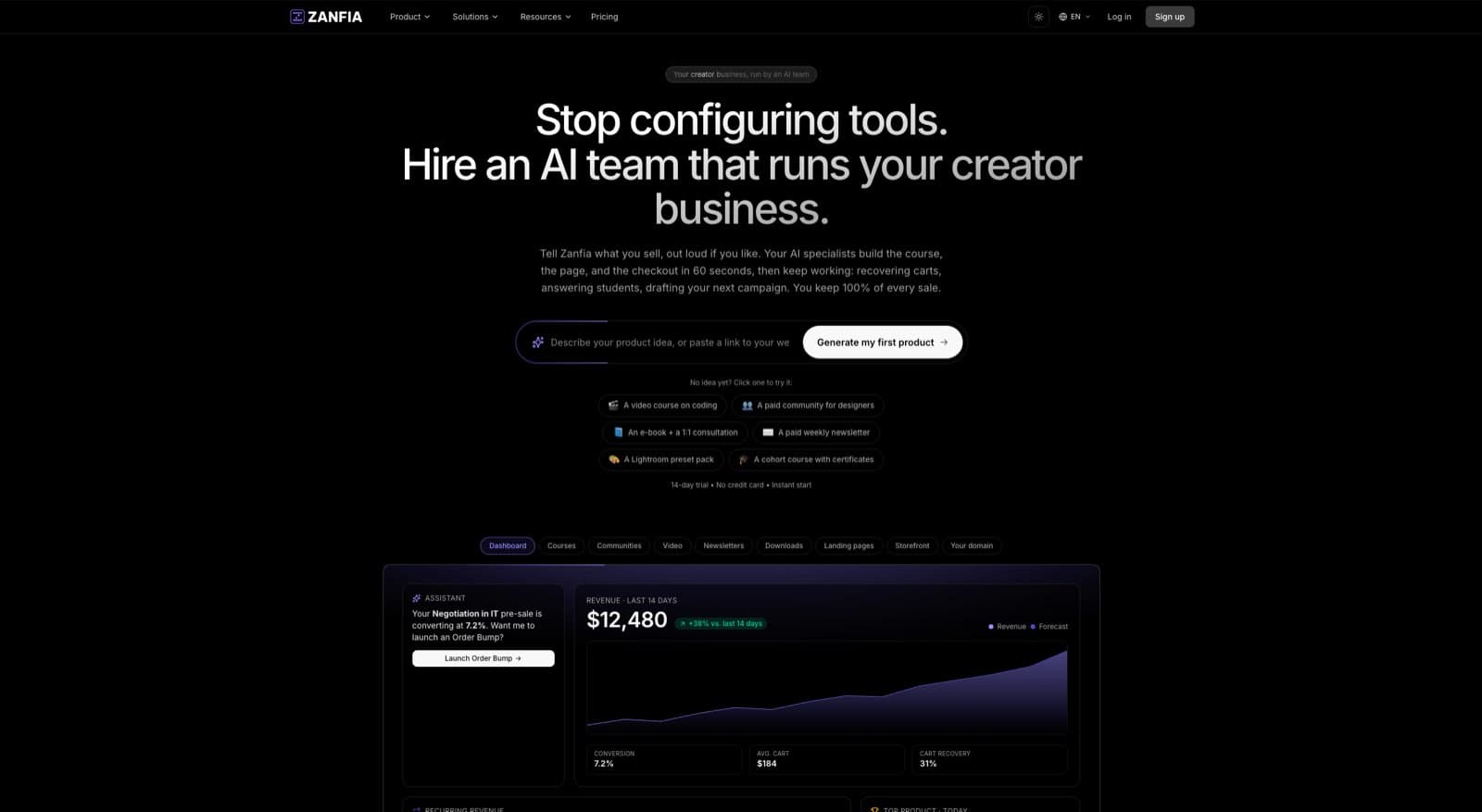
Zanfia is closer to an AI team that runs a creator business than a website builder. It combines courses, paid newsletters, knowledge libraries, communities, subscriptions, downloads, and checkout inside one branded system, and it lets the creator dictate the work to an assistant by chat or voice instead of clicking through settings. Anything the interface can do is also exposed through an MCP endpoint, so an outside AI agent can act on the workspace directly, on higher plans (see the current Zanfia pricing).
The financial difference starts with the fee model.
Keep 100% of your revenue at the platform level. As of publication, Zanfia charges 0% platform transaction fees. Creators only pay the fees charged by payment operators.
That’s not a cosmetic feature. It changes how creators think about pricing, margins, and scaling. If your business sells digital products repeatedly, a flat software subscription is easier to model than software that keeps taking a cut.
Pricing starts at $39 per month, or $31 per month billed annually, on the Starter plan, with a 14-day free trial and no credit card required. There is no permanent free plan. For creators comparing category fit, this guide to the best platform for content creators is useful because it looks at the broader business needs, not just page building.
Operational value matters as much as fee value
Zanfia also addresses the workflow problems that website builders often leave partially solved.
It includes native video hosting, which removes the need for a separate video host for many course businesses. It supports single-login access across community, courses, and checkout under the creator’s own brand, with 12 product types living side by side, from courses and communities to newsletters, downloads, bundles, consultations and events. Custom domain and removing Zanfia branding are available on higher plans, so an established business isn’t forced to compete with platform branding.
The checkout is built to sell, not just to accept a payment. Creators can attach order bumps, run subscription upsells, and split a higher-ticket product like a $600 course into installments, so the price of admission stops being the reason people bounce. A test mode lets the creator run the whole checkout end to end, with conversion events routed to the test surfaces of connected trackers, before the first real sale goes live.
The automation layer also matters. Zanfia can automatically grant course access after payment, place buyers into the right community channels, trigger welcome emails, handle subscription renewals, and revoke access when a plan ends. According to the company brief, those automations can save 5 to 10+ hours per month, and any of them can be triggered or built by asking the assistant instead of hand-configuring the workflow.
The operational fit many creators undervalue
There’s another cost factor that doesn’t show clearly on a website builder’s pricing page: how much work the platform actually does for you day to day. Zanfia supports Stripe and PayPal, with card, Apple Pay and Google Pay at checkout, so an American creator can accept payments without adding another processor. What sits on top matters more than the rails, though. The AI team drafts, publishes, answers members, updates courses and reports on sales, and the creator moves the business forward by talking to it.
TCO broadens beyond mere subscription math. The cheapest platform isn’t always the one with the lowest monthly price. It’s often the one that asks for the fewest compromises.
Final Recommendation Which Platform Is Right For You
A useful decision framework is simpler than most comparison pages make it seem.
Choose Squarespace if
You want the lowest-friction entry into a professional site, and your priorities are design quality, predictable entry pricing, and generous storage. It’s especially compelling for portfolios, service businesses, and content-heavy sites that may grow in asset volume before they grow in sales complexity.
Squarespace also makes sense for sellers who want to launch quickly and are prepared to upgrade plans once revenue is steady.
Choose Wix if
You’re willing to pay more upfront for ecommerce access, and you value the broader app ecosystem or higher-tier marketing features enough to justify the premium. Wix becomes more defensible when your business wants 0% platform transaction fees on ecommerce plans from the start and sees real value in features like AI visibility tracking.
Wix is less attractive when you need cheap scaling for content-heavy operations and don’t want to monitor storage tiers.
Choose Zanfia if
You’re not just building a website. You’re building a digital product business around courses, communities, newsletters, subscriptions, or downloads, and you want an AI team, not another tab in the browser, doing the operational work under your own brand.
That’s the point where the squarespace pricing vs wix debate often stops being the right debate. An AI-first, agent-first platform with 0% platform commission as of publication, a checkout built to sell, native video hosting, built-in automations and an MCP endpoint on higher plans can produce a lower real-world cost than a general website builder, even if the homepage comparison seems less familiar at first.
The right platform isn’t the one with the prettiest pricing card. It’s the one that keeps your margins intact and your operations manageable.
Frequently Asked Questions
Is Squarespace always cheaper than Wix?
Not always. Squarespace is usually cheaper to start, especially at entry level and early ecommerce tiers. But for active sellers, transaction-fee structure and upgrade timing can change the economics. The cheaper launch option isn’t always the cheaper operating option.
Does Wix have fewer hidden costs than Squarespace?
Not necessarily. Wix avoids platform transaction fees on ecommerce plans, which is a real advantage. But its tiered storage model and reliance on apps or higher plans for some advanced use cases can create costs that don’t show up in the basic plan comparison.
Which platform is better for digital products?
Both can support digital sales, but neither is purpose-built in the same way a creator-focused all-in-one platform is. If your business revolves around courses, memberships, newsletters, downloads, and community access, you should evaluate whether a specialized platform will reduce fee drag and operational complexity.
Is annual billing a big deal?
Yes, especially for early-stage creators. A plan advertised monthly often requires full annual payment. That increases the cost of making the wrong choice because you’ve committed more cash before validating your business model.
Should I choose based on storage limits?
If you publish lots of media, course materials, or downloadable assets, yes. Storage policy affects long-term cost predictability. It matters less for a simple brochure site and much more for a growing digital library.
If you're building a serious digital product business, not just a website, Zanfia is worth a close look. It gives creators one branded system for courses, communities, newsletters, downloads, subscriptions and checkout, with an AI team that can be run by chat or voice, an MCP endpoint on higher plans, native video hosting, and 0% platform commission as of publication. Starter is $39 per month, or $31 billed annually, with a 14-day free trial and no credit card required. That combination can protect margins and remove the operational clutter that often appears when general website builders are pushed beyond their natural use case.