

How to Validate an Online Course Idea Before You Build It (2026)
Most online courses fail before the first lesson is ever recorded. Not because the creator lacked expertise. Not because the production quality was poor. They fail because nobody validated whether real people would actually pay real money to solve the problem the course addresses. By the time the creator realizes their audience didn’t want what they built, six months of weekends are gone and the launch email lands with a thud. Three sales, all from friends.
The good news: validation is a skill, not a gift. There’s a repeatable process for testing whether your course idea has commercial demand before you spend a single hour in front of a camera. This guide walks through that process. Audience research, presell mechanics, beta cohort design, signal reading, and the path from validated idea to your first minimum viable course. By the end, you’ll know exactly how to validate an online course idea before you commit to building it.
Why most courses fail before the first lesson is recorded
The painful truth about course creation is that the failure mode is almost always the same: creators fall in love with their idea, build for months in isolation, then discover the market doesn’t share their enthusiasm. According to industry analysis from Forbes Coaches Council contributors, the online learning market has matured to the point where audience demand, not content quality alone, separates winners from losers.
Three patterns repeat in failed launches:
Pattern 1: Solution looking for a problem. The creator builds a course on something they find fascinating but their audience doesn’t lose sleep over. “Advanced Notion workflows for productivity” sounds great until you realize people who care about Notion already learn from free YouTube tutorials.
Pattern 2: Problem too small to pay for. The audience acknowledges the problem but won’t pay $300 to solve it. They’ll watch a 12-minute YouTube video and call it good. The problem needs to be painful, recurring, and tied to money, time, or status for someone to whip out a credit card.
Pattern 3: Wrong audience for the price point. The course solves a real, painful problem, but the audience the creator built doesn’t have the budget. Hobbyists won’t pay $1,000 for a course. Professionals will. Match the audience to the price.
The validation process exists to surface these failures before you build. Spending two weeks validating beats spending six months building something nobody buys.
Audience research: finding a problem people already pay to solve
Validation starts with research, not with your idea. Before you sketch a curriculum, you need to find out what your audience is already spending money on. Not what they say they want. What they actually pay for.
Where to look
Start with three sources of behavioral evidence:
- Existing paid courses in your niche. Search Udemy, Skillshare, Maven, and competitor platforms for courses adjacent to your topic. Look at review counts, recency of reviews, and the specific complaints in 3-star reviews. Those complaints are gold. They tell you what the existing market is failing to deliver.
- Communities where your audience already gathers. Reddit subs, Slack groups, Discord servers, Facebook groups, LinkedIn comment sections. Read the questions people ask repeatedly. The same question asked 50 times in 90 days is a signal that nobody has solved it well.
- Search behavior. Use Google Trends, AnswerThePublic, and keyword tools to see what people are actively searching for. Tools like Ahrefs or even free alternatives like Ubersuggest show you the volume and competition behind specific phrases.
What to ask
Once you’ve identified candidates, the next step is direct conversation. Talk to 10-15 people who fit your target audience profile. Not friends. Not your existing followers who are biased toward liking you. Real strangers who match the profile of someone you’d want as a paying student.
The questions that work:
- What did you try last to solve [problem]? What happened?
- How much time or money have you spent trying to solve this in the last year?
- If you could wave a magic wand and have one specific outcome from learning [topic], what would it be?
- What would have to be true about a course on this for you to pay $500 for it?
You’re listening for two things: specificity (do they describe the problem in concrete, painful terms?) and spend history (have they already opened their wallet for adjacent solutions?). If neither shows up, you’re probably looking at a problem too small to monetize.
The presell test: selling the outline before you build
The single most reliable validation method is to sell the course before it exists. This is called preselling, and it’s the only validation signal that actually counts, because it involves real money changing hands.
Preselling works because it eliminates the gap between intention and action. When you ask someone “would you buy a course on X?” they say yes to be polite. When you ask them to enter their credit card details, they reveal what they actually believe.
How to structure a presell
You need four assets to run a clean presell test:
- A clear promise. One sentence that describes who the course is for and what specific outcome they’ll get. “By the end of this course, [target audience] will be able to [specific, measurable outcome] in [timeframe].” If you can’t fit it in one sentence, you don’t have a course. You have a wish list.
- A detailed outline. Module-by-module breakdown of what learners will get. Be specific. “Module 3: Setting up your sales pipeline in HubSpot, 6 lessons, 90 minutes.” Vague outlines kill conversion.
- A landing page. Simple. Headline, who it’s for, what they’ll learn, who you are, FAQ, and a buy button. No fancy design needed for a test. Conversion comes from clarity, not aesthetics.
- A delivery date. Tell buyers exactly when the first cohort starts. Six to twelve weeks out is realistic. This forces a commitment and lets you build with their feedback during construction.
Pricing the presell
Discount the presell, but not too much. A 30-50% discount off your eventual launch price signals risk-sharing without devaluing the product. If your eventual launch price is $497, a presell at $297 is reasonable. Going lower than 50% off trains the market to wait for sales and undercuts your future pricing.
Add a guarantee. Offer a full refund if the course doesn’t deliver what you promised. This removes the biggest objection during a presell (“what if this turns out to be vapor?”) without costing you much, because if you’ve validated correctly, refund rates stay low.
Beta cohort pricing and feedback loops
Once your presell hits its first cohort, the dynamic shifts. You’re no longer just validating demand. You’re co-building the product with the people who paid for it. This is the highest-leverage phase of the entire process.
The beta cohort isn’t just a way to get the course built. It’s a research engine that tells you what to keep, what to cut, what to expand, and how to position the final version when you launch publicly.
Beta pricing structure
Run the beta at the presell price (your 30-50% discount). Make it explicit: “This is the beta cohort. You’re getting half off because I’m building with you. In exchange, I need your feedback at the end of each module.” People love being insiders. Frame it as access, not as a fire sale.
Cap the beta at 15-40 students. Smaller than 15 and you don’t get enough feedback variety. Larger than 40 and you can’t engage individually. Around 25 is the sweet spot for most creators.
Feedback mechanisms that actually work
Don’t rely on “reach out if you have questions.” Most students won’t. Build feedback into the structure:
- End-of-module surveys. Three questions, max: What was most useful? What was confusing? What’s missing? Two-minute completion time. Use Google Forms or Tally.
- Weekly office hours. A 45-minute group Zoom every week. The questions students ask in live calls reveal gaps in your written/video content. Record these. They become FAQ content for future cohorts.
- Private community channel. Slack or Discord for beta students. Pin a “share your wins and stuck-points” thread. The patterns that emerge here become your case studies and marketing copy.
The signals you’re looking for: where do students get stuck? Where do they skip ahead? What outcomes do they report? What did they expect that wasn’t there? Track all of it in a single document. By the end of the beta, you’ll know exactly what version 2 of the course needs to be.
Reading the signals: when to build, pivot, or kill
Validation isn’t binary. You don’t just get a yes or no. You get signals on a spectrum, and you have to interpret them. Knowing when to push forward, when to pivot, and when to kill the idea entirely is what separates patient course builders from ones who waste years on dying products.
Build signals
You should commit to building when these show up together:
- Your presell sold at least 15-20 spots within the announced window (typically 2-4 weeks)
- Conversion rate from landing page visit to sale is above 1.5% with cold traffic, or above 4% with your existing audience
- Refund requests during the beta are under 10%
- End-of-beta NPS scores are above 30 (and ideally above 50)
- At least 20% of beta students unprompted ask if they can refer friends or buy more from you
Pivot signals
You should pivot (keeping the audience but reshaping the offer) when:
- Sales come in slower than expected, but feedback from buyers is enthusiastic
- Beta students consistently ask for something adjacent to what you taught (“this was great, but what I really need is X”)
- You’re getting unsolicited interest from a different audience segment than the one you targeted
- Your landing page gets traffic but the conversion is below 1%, usually a positioning problem, not a demand problem
Pivoting is cheap during validation. It’s expensive after you’ve built three modules of video content. This is exactly why the validation phase exists.
Kill signals
You should kill the idea and start over when:
- You can’t sell 5-10 spots even with promotion to your existing audience
- Discovery conversations consistently surface the problem as “interesting but not painful”
- You can’t find any existing paid products in adjacent spaces, usually means there’s no commercial market, not that you’re a pioneer
- Refund rates on your beta exceed 25%
Killing isn’t failure. It’s the system working. The market told you, you listened, and you saved yourself months of wasted work. The next idea is always cheaper to validate than the current one is to force.
From validated idea to first version: the minimum viable course
You’ve presold. You’ve run a beta. The signals point to build. Now what?
The temptation at this stage is to build the perfect, comprehensive, 12-module course you originally envisioned. Resist it. The lesson of the validation phase is that the market tells you what to build, and the market usually wants something tighter and more focused than the creator originally imagined.
Defining your MVC (minimum viable course)
The minimum viable course is the smallest version of your offering that delivers the promised outcome. If you promised “by the end of this course you’ll have launched your first email newsletter,” the MVC is the shortest possible path to that result. Anything that doesn’t directly contribute to the promised outcome is cut from version 1.
Most validated courses end up being 4-7 modules, not 10-15. Insights from Harvard Business Review research on online learning suggest that completion rates drop sharply as courses extend past 6-8 hours of total content. A focused 4-hour course that 70% of buyers complete is worth more than a 12-hour course that 15% finish.
Production decisions for v1
Your version 1 doesn’t need broadcast-quality production. It needs to be clear, watchable, and to deliver the outcome.
- Audio matters more than video. Spend $100-200 on a decent USB microphone. Bad audio kills retention faster than mediocre video.
- Screen recordings beat talking heads for most topics. If you’re teaching software, processes, or anything visual, record your screen with a voiceover. Cheaper, faster, more useful for learners.
- One take is fine. Don’t re-record three times. Cut obvious mistakes, leave the rest. Authenticity reads as expertise.
- Use the beta cohort to fix gaps. Your version 1 won’t be perfect. That’s what version 1.1 is for. Ship, gather, iterate.
Pricing version 1
Once you transition from beta to public launch, raise your price. The beta cohort got the discount because they took the risk on an unbuilt product. Public buyers get a finished product, so they pay full price.
A common structure: beta at $297, public launch at $497, with periodic sales back to $397. The beta price never returns. This rewards early supporters and protects pricing integrity going forward.
How Zanfia lets you presell before you build
The presell mechanic only works if you can collect money before delivery. That requires a platform that handles checkout, payment processing, drip delivery, and student access, and that gets out of your way while you validate. Zanfia is built as an AI team that runs the creator business behind you: the assistant can build the presell page, configure the checkout, and set up delivery timing on your instructions, whether you type them or dictate them out loud. Anything available in the interface is available to your own agents too, through the Zanfia MCP endpoint, which is one of the reasons this workflow can move as fast as your validation questions.
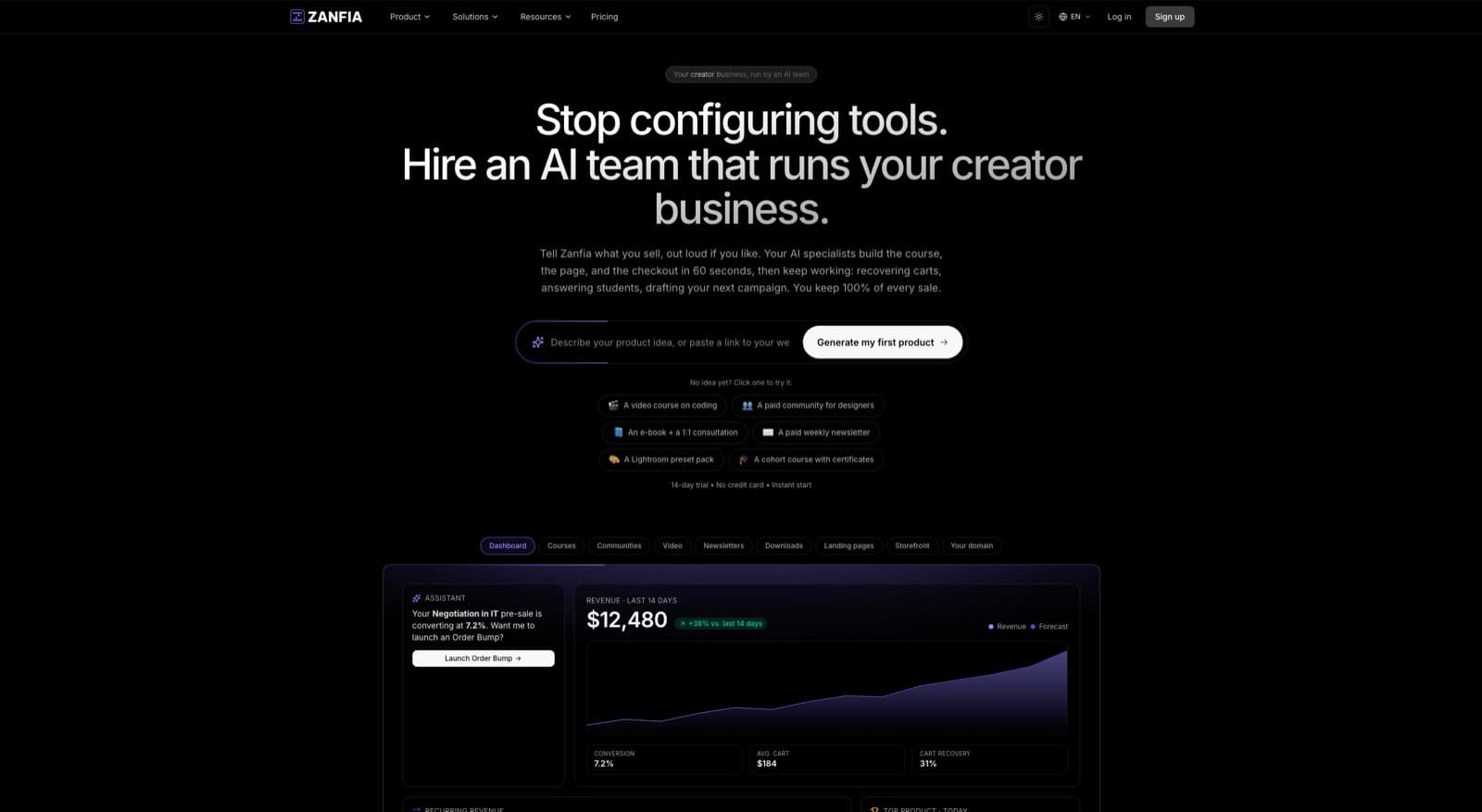
This is exactly the gap Zanfia was built to fill for creators at the validation stage.
Start with a 14-day free trial
Zanfia offers a 14-day free trial, no credit card required, that lets you set up your creator workspace, build a landing page, configure your checkout, and start collecting payments before you commit to a paid plan. You can put the entire presell infrastructure in place, launch the test, and only continue on a paid plan once you’ve seen real demand. For a creator with no audience and no proof yet, this removes a real financial objection to running a proper validation test. Plans start at $39/month, or $31/month billed annually on Starter (as of August 2026, see the current Zanfia pricing).
Cart 2.0: built to sell
Cart 2.0 is Zanfia’s checkout engine, and it handles the pricing mechanics a presell actually needs, so the offer you test is the offer you’ll launch with:
- Presell with full payment. Collect payment now, deliver later. Set the delivery date and Cart 2.0 manages access timing.
- Free trial conversion. Let prospects access a free intro module, then convert to paid for the full course. Useful for validating not just demand but conversion mechanics.
- Installment payments. Some buyers want to commit but can’t pay $497 upfront. Cart 2.0 supports installment structures (for example, split a $597 course into three payments of $199) that increase conversion without sacrificing price.
- Subscription pricing. If your validation reveals that your audience would prefer ongoing access (cohort-based learning, community membership) over a one-time course purchase, Cart 2.0 handles that pivot natively.
- Order bumps and upsells. Test add-ons during the presell: a 1-on-1 consult, a workbook, a community membership. The data tells you which premium tier to build for v2. Order bumps and upsells are available on higher plans, see the current Zanfia pricing .
- Test mode. Buy your own product end to end before your first real customer sees the checkout. Conversion events fire to your platforms’ test surfaces and are tagged TEST in the events log, so tracking is verified without polluting live data.
Cart 2.0 supports Stripe and PayPal for payment processing, plus Apple Pay and Google Pay for wallet checkouts. That covers the vast majority of US buyers without requiring custom integration work.
White-label from day one
Your presell page runs on your own subdomain (or a custom domain you map, available on higher plans, see the current Zanfia pricing), not on a generic Zanfia URL. That matters for credibility during validation, buyers are far more likely to trust a polished, branded presell page than a generic third-party storefront. As of August 2026, Zanfia charges 0% platform commission on customer sales, so the only cost during validation is the payment processor fee (Stripe’s standard 2.9% + $0.30 in the US).
From presell to delivery, all on one platform
The cleanest validation workflow looks like this: presell on Zanfia’s 14-day trial with Cart 2.0, collect payments, notify beta students of the cohort start date, upload modules as you build them, with drip-unlock timing, run office hours through Zanfia’s community feature, ship version 1 and launch publicly. Twelve product types live under one brand and one login, so a course today, a paid community tomorrow, and a consultation upsell later on all fit on the same account without a second platform. No platform-switching, no integration headaches, no platform commissions eating into your margin.
For creators who want to see how the mechanics fit together before committing, explore Zanfia and start the 14-day trial to set up your first presell page. Approaches outlined in Entrepreneur’s coverage of business idea validation emphasize that the platform you choose during validation should remove friction, not add it. Zanfia’s bet is that creators validate faster when an AI team handles the setup, when checkout, delivery, and community all live in one place, and when the trial itself carries no paywall.
FAQ
How long should the validation phase take?
Four to eight weeks for most creators. Two weeks for audience research and customer conversations, two weeks to build the presell landing page and run the test, then four to six weeks for the beta cohort. If you’re trying to compress this into a weekend, you’re not validating. You’re rushing.
How many presell sales do I need to commit to building?
The minimum threshold depends on your price point and audience size. As a rough heuristic: 15-20 sales at your presell price, generated within the announced window (2-4 weeks). If you can’t hit that with existing audience and modest paid promotion, the demand signal is weak and you should consider pivoting.
What if I have no audience to presell to?
You can still validate, but the path is longer. Build the presell landing page, then drive traffic through targeted outreach: relevant subreddits, niche Slack and Discord communities, LinkedIn connections, and small-scale paid traffic ($100-300 test budget). Conversion will be lower from cold traffic, but the test is still valid. If you can’t get strangers to buy with a clear offer and a fair price, having a bigger audience won’t fix the underlying demand problem.
Should I disclose that the course doesn’t exist yet during the presell?
Yes, always. Transparency is non-negotiable. Frame it as a feature, not a flaw: “You’re getting in at the beta cohort price because you’re building this with me. The first module ships [date], and you’ll have direct input on how the rest of the course evolves.” Buyers who understand the structure self-select for the kind of engaged students you want.
What if my beta cohort feedback contradicts itself?
Common, expected, and useful. Different students have different needs. Look for the patterns. What do at least 30% of students agree on? Those signals matter. Edge-case feedback from one student matters less. The goal isn’t to satisfy everyone in v1; it’s to serve the core need of your target audience well.
Can I validate multiple course ideas at once?
You can, but most creators do it sequentially because the bandwidth required to run a presell well (landing page, traffic, conversations, beta cohort) is significant. Running two validations simultaneously usually means doing both poorly. Pick the highest-confidence idea, validate it cleanly, then move to the next one.
What’s the difference between a presell and a launch?
A presell sells a product before it’s built, usually to a small group at a discount, with the explicit understanding that you’re co-building. A launch sells a finished product to the broader market at full price. Presells are validation tools. Launches are revenue events. Don’t confuse the two. Pitching a presell as a finished launch destroys trust when buyers realize what they actually bought.