

How to Create a Website with a Forum (The 2026 Guide)
Most creators don’t struggle with the idea of launching a forum. They struggle with what comes after the idea.
They’ve got a course, newsletter, coaching offer, or niche audience. They know a forum could keep people engaged longer, create better customer feedback loops, and turn one-time buyers into members who stick around. But then the usual questions show up. Which platform should you use? How much setup is involved? Do you need WordPress, custom code, or something simpler? And how do you avoid building an empty community page that nobody visits twice?
That’s the core job when learning how to create a website with a forum. You’re not just adding a discussion feature. You’re building an asset that can support retention, trust, and revenue if it’s planned properly.
One data point is worth paying attention to early. Websites with integrated forums report a 50% average increase in time-on-site, and active discussions can drive a 20-30% uplift in conversions for digital products like courses and newsletters, according to this walkthrough on forum-led engagement. That doesn’t mean every forum succeeds. It means the upside is real when the structure is right.
Planning Your Community-Powered Website
A healthy forum starts before you touch software.
The fastest way to waste time is to build categories, invite people in, and hope discussion appears on its own. Forums rarely work that way. People join because the space solves a specific problem, supports a shared goal, or gives them access to peers they can’t easily find elsewhere.
Start with the business reason
A forum can do several jobs at once, but one of them should lead.
For an educator, the forum might reduce student isolation and support course completion. For a consultant, it might create a place where clients ask better questions before buying. For a niche creator, it might become the core paid membership layer that keeps subscribers engaged between content drops.
If you can’t finish the sentence “this forum exists to help members do X,” your idea is still too loose.
Use a short planning filter:
- Audience fit: Decide exactly who the space is for. If that feels fuzzy, it helps to identify your target audience before naming channels or writing community copy.
- Primary use case: Pick one anchor use case such as peer support, implementation help, expert Q&A, or member networking.
- Commercial role: Clarify whether the forum supports a paid product, stands alone as a membership, or works as a retention layer around existing offers.
- Access model: Choose whether the space is open, private, or mixed. Many strong communities keep some content public and reserve deeper discussions for members.
A focused forum feels useful immediately. A broad one feels optional.
Define the shape before the features
Creators often ask what forum software can do before they decide what members need to do. Reverse that.
List the core member actions you want to support in week one. Usually that means joining, introducing themselves, asking questions, replying, finding past discussions, and seeing important announcements. If you also sell digital products, you may want members to access private areas based on purchases or subscriptions.
That’s enough for an excellent launch.
Practical rule: Don’t launch with more categories than you can personally keep active.
Too many sections make a new forum look empty. A smaller structure creates momentum faster because discussion clusters in visible places.
A lean starting map often looks like this:
- Welcome and announcements for onboarding, rules, and updates
- General discussion for broad conversation within the niche
- Help or Q&A for questions that need practical answers
- Wins and case notes so members can share progress
- One premium or specialist area if access is tied to a paid offer
That’s usually enough to create clarity without scattering attention.
Seed the room before anyone walks in
An empty forum is socially expensive. New members don’t want to be the first person speaking into silence.
Prepare starter content before launch. Write a welcome thread, a rules post, a “start here” guide, and several prompts that invite easy participation. Seed a few practical discussions that reflect the behavior you want from members. If you run a course, post questions tied to lesson milestones. If you serve business owners, start threads around common implementation blockers.
The point isn’t to fake activity. It’s to remove friction.
A helpful benchmark from the planning side is to create 5-10 initial threads before inviting members, as outlined in the forum creation guidance referenced in this no-code setup overview. That gives new members something to react to instead of a blank page.
Write the culture into the product
Rules matter, but tone matters more.
If you want a forum that produces thoughtful discussion, write guidelines that reward substance. If you want peer support, say that clearly. If self-promotion belongs only in one area, define it early. Communities become what they repeatedly permit.
A simple pinned post can cover:
- what belongs in each section
- how members should disagree
- where promotion is allowed
- when moderators step in
- what kind of contributions are especially valued
That early structure gives people confidence. It also makes moderation easier later.
If you’re still shaping the broader member experience, this guide on starting a community platform that people actually use is a useful companion to forum planning.
Choosing Your Platform The Three Main Paths
A bad platform choice usually shows up six months after launch.
The forum is getting traction, members want clearer access rules, you decide to add a paid tier or a course, and suddenly every change creates extra work. What looked affordable at the start turns into plugin conflicts, manual admin, or a custom build that keeps pulling time away from sales and member experience.
Your platform is not just a publishing tool. It sets the cost, speed, and operational complexity of running the community as a real business asset.
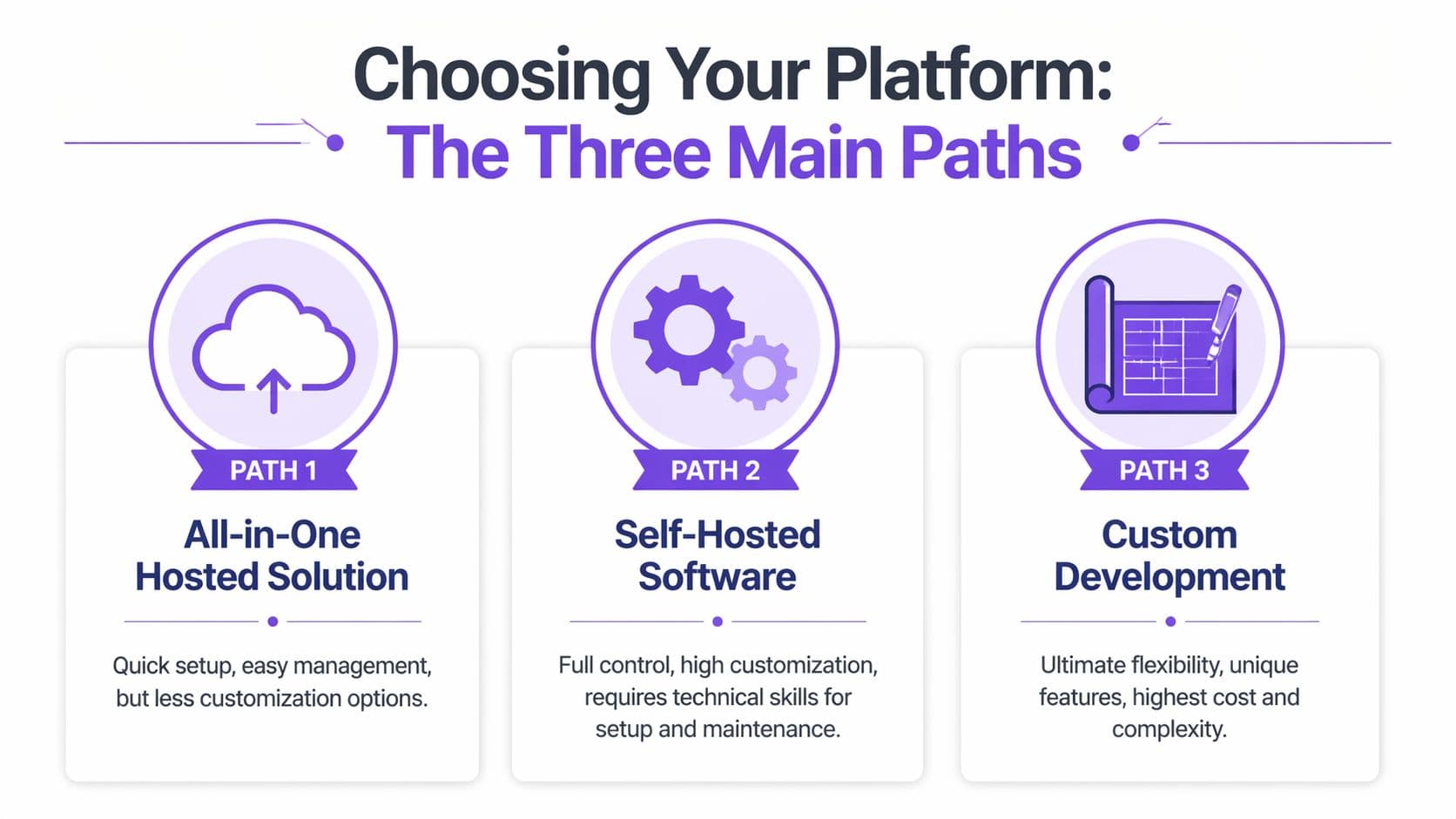
Path one: DIY with self-hosted forum software
This route usually means Discourse, phpBB, NodeBB, or a custom stack on your own hosting.
The upside is control. You can shape the environment, customize workflows, and decide how the forum connects to the rest of your systems. For software companies or teams with in-house developers, that control can be worth the effort.
The cost is ongoing responsibility. You handle hosting, security, updates, performance, backups, spam protection, and technical issues. If you later want paid memberships, course access, gated areas, or deeper CRM connections, that work usually expands rather than shrinks.
I only recommend this path when the community itself needs product-level customization or the business already has engineering capacity. For a creator, coach, educator, or small service business, self-hosting often creates a maintenance problem before it creates a growth asset.
Path two: WordPress plus forum plugin
This is the default choice for many site owners because WordPress is already in place.
It can work. If you have a content-heavy site and only need a basic discussion area, adding a forum plugin may be the fastest short-term move. You keep your existing pages, theme, and familiar admin setup.
The trade-off shows up as the business matures. Forums rarely stay simple for long. You add memberships, payments, email flows, private groups, analytics, maybe a course area, and each addition increases the chance of conflicts between plugins, themes, and hosting settings. A setup that looked inexpensive starts charging you in admin time and technical cleanup.
For anyone comparing CMS-first website builds before making a forum decision, this guide to the best content management systems is useful context.
Path three: All-in-one hosted platforms
For most creators and online businesses, this is a strong option worth weighing carefully.
An all-in-one platform gives you the site, forum, member accounts, payments, and product delivery in one system. That matters because a community performs better when it is tied directly to what you sell. A course can feed discussion. A subscription can gate premium spaces. A free trial can let members preview the space before committing to a paid tier. You are building one business system, not assembling five separate tools and hoping they cooperate.
That is the main advantage. Less technical overhead. Better retention loops. Faster iteration.
Hosted also does not mean limited in the ways that matter to a business owner. It often means faster launch, cleaner operations, and fewer points of failure. If your goal is to grow recurring revenue and keep members active, that usually beats having maximum server-level control.
Zanfia fits this path in a distinctive way. It runs an AI team on top of the platform, not just a set of tools next to it. The creator dictates work by chat or by voice and the assistant performs anything available in the interface, and on higher plans agents can connect over an MCP endpoint. Communities, courses, newsletters and other product types all live under one brand, with a checkout built to sell: order bumps, installments, upsells and a test mode that lets you buy your own product before launch. A 14-day free trial is available with no credit card required. Availability of individual capabilities depends on the plan, so check the current Zanfia pricing.
The comparison that actually matters
The practical question is not which option gives the most features on paper. The practical question is which one helps you launch, sell, and manage the community with the least friction.
| Criteria | DIY (e.g., Discourse) | WordPress + Plugin | All-in-One SaaS |
|---|---|---|---|
| Setup burden | High. You configure infrastructure and keep it running. | Moderate at first, then heavier as the stack grows. | Low. Core infrastructure is already handled. |
| Customization | High, if you have technical skill or budget. | Moderate, often limited by plugin and theme compatibility. | Strong for branded business use cases. |
| Maintenance | Continuous and technical. | Continuous across multiple tools. | Mostly managed for you. |
| Checkout mechanics | Usually custom work. Payment plans, order bumps and test mode all need to be built or stitched in. | Possible through additional plugins, but installments and one-click bumps are rarely native. | Typically native. Order bumps, installments, upsells and test mode ship in the checkout itself. |
| Risk of tool conflict | Lower at the plugin level, higher at the infrastructure level. | High once memberships, payments, and automation are added. | Lower, because fewer moving parts are involved. |
| Best fit | Product-led companies and technical teams. | Existing WordPress sites with simple forum goals. | Creators, educators, memberships, and digital product businesses. |
What to choose based on the business model
Choose DIY if the forum is a custom product and you have technical resources to support it.
Choose WordPress plus plugins if your site already runs on WordPress and the forum is a secondary feature.
Choose all-in-one if the forum is meant to support revenue through memberships, courses, paid communities, or customer retention. That path is usually the fastest way to get a branded community live without inheriting a maintenance stack you did not plan for.
If you want a broader side-by-side view before picking a vendor, this list of community platform options for creators and businesses is a smart place to compare approaches.
Setup and Configuration From Domain to Launch
Once the platform decision is made, the build process becomes much simpler. Most failed launches don’t fail because the tool was weak. They fail because the setup ignored structure, access, or onboarding.
The technical clicks vary by product, but the launch sequence is consistent.
Connect your own domain first
If the forum matters to your brand, put it on your domain from the beginning.
That decision affects trust, discoverability, and long-term flexibility. Members should feel like they’re joining your ecosystem, not being pushed into a disconnected corner of the internet. It also keeps your course area, sales pages, newsletter, and community experience more coherent.
If you’re still sorting out naming, renewal choices, or registration basics, this primer on Domain Names is a practical refresher.
Build the forum around real member journeys
Don’t organize the site based on what sounds neat internally. Organize it around what members need to do.
A useful launch sequence looks like this:
- Create the core navigation: Keep the path to the forum obvious from your homepage, member area, or product dashboard.
- Set category logic: Group discussions by use case, not by abstract labels. “Course support,” “member wins,” and “questions before purchase” are clearer than vague category names.
- Decide visibility rules: Some areas may be public, others member-only, and some accessible via specific purchases or plans.
- Prepare pinned content: Add a welcome post, community rules, and a “start here” thread to remove uncertainty.
- Test the first session: Register as a new member and walk through the whole experience yourself.
That final step catches more mistakes than almost anything else.
Tie access to the business model
A forum becomes much more valuable when access matches the product.
For example, someone who buys a course might automatically enter the private student discussion area. A newsletter subscriber might gain access to an announcements channel and a member Q&A space. A premium client might see a smaller, higher-touch discussion group.
Integrated systems outperform patched-together setups. You don’t want to manually move people between lists, chase expired access, or answer support tickets caused by messy permissions. Good automation handles the boring but critical work in the background.
The cleaner the access logic, the more professional the community feels.
Onboarding is part of setup, not a later task
A forum launch isn’t complete when the pages are published. It’s complete when a new member knows what to do next.
Write a short onboarding flow that includes:
- a welcome message
- one clear first action
- a prompt to complete a profile or introduction
- links to key threads or channels
- a reminder of community standards
It's vital to recognize that people don’t naturally infer your community norms. They copy what they see.
If your setup includes a broader membership area, this guide to building a member website that feels cohesive from day one can help you think beyond the forum tab and shape a better overall member experience.
Designing for Engagement and Usability
A member lands in your forum five minutes after buying a course or joining a paid subscription. If the space feels confusing, slow, or disconnected from the rest of your business, that first burst of intent disappears fast.
Design affects retention more than many creators expect. The goal is simple. Help people understand where they are, what to do next, and why it is worth participating. A forum that supports your revenue model should feel like part of the product, not a side room built with different tools.

Keep the visual identity consistent
Brand consistency is functional, not cosmetic.
Use the same typography, colors, voice, and navigation patterns members already know from your main site, course area, or membership hub. That continuity lowers friction and reassures people that their account, purchase, and community access all belong to one system. All-in-one platforms like Zanfia have a clear advantage here because the forum does not need to be forced into alignment with a stack of separate plugins and third-party tools.
Structure matters just as much. Category names should be obvious on first read. "Course Questions" beats clever labels. "Wins and Progress" beats vague community jargon. If people have to stop and interpret the map, fewer of them will post.
Design for the way people actually use forums
Community participation often happens in short sessions on a phone. Someone checks replies between client calls, posts a quick question after a lesson, or catches up from the school pickup line.
That changes what good design looks like.
Readable text, clear spacing, simple menus, and fast access to active discussions matter more than decorative extras. Posting should feel easy on a small screen. So should replying, uploading an image, and finding the right category without opening a maze of nested sections.
A few choices improve usability quickly:
- Keep category depth shallow: Too many layers hide conversation and make the forum feel empty.
- Show active threads early: Recent activity gives new members a reason to stay.
- Use sticky posts carefully: Pin the rules and one start-here thread, then let real discussion stay visible.
- Test the posting flow yourself: Open the forum on your phone, create an account, write a reply, upload a file, and fix every point of friction.
Make the first session feel productive
Empty forums do not look premium. Overbuilt forums do not perform much better.
A better approach is to give new members a few clear actions that create momentum. Pre-seed useful discussions. Feature one introduction thread. Add a small number of prompts tied to the member's reason for joining, such as course implementation questions, case study breakdowns, or a weekly feedback post. That gives people something to do besides stare at blank categories.
This short demo is a good reminder that usability often comes down to small choices in layout and flow.
Good onboarding and good interface design work together. If you want more members to post, return, and eventually upgrade into higher-value offers, refine the entry experience with these user onboarding best practices for digital communities.
Community Management and Monetization
A forum becomes commercially valuable when the management model and the revenue model support each other.
That’s where many creators split the work incorrectly. They treat moderation as “community stuff” and monetization as “business stuff.” In practice, members pay for spaces that feel well run, useful, and worth returning to. The product is the experience.

Good management protects value
You don’t need heavy-handed moderation to run a strong community. You need visible standards and consistent follow-through.
That usually means:
- Clear guidelines: Members should know what belongs, what doesn’t, and how disagreements are handled.
- Defined moderator roles: Someone needs authority to move threads, resolve conflict, and remove spam or abuse.
- Editorial presence: The owner or lead expert should still show up. Members notice when the expert disappears.
- Cadence: Recurring prompts, themed discussions, and periodic summaries keep momentum from flattening.
A neglected forum teaches members not to invest effort. A guided one teaches them their contributions matter.
Paid communities rarely fail because members hate the concept. They fail because the space stops feeling maintained.
Monetization works best when it fits behavior
The simplest monetization mistake is charging for access before you’ve defined what the access is worth.
A forum can make money in several ways. The right one depends on the role it plays in your business.
Subscription-led membership
This model works when the ongoing conversation is the product. Members pay for continuing access to expert guidance, peer discussion, curated resources, or accountability.
It’s strongest when the forum solves an ongoing need rather than a one-time problem.
Forum as a product bonus
Sometimes the forum shouldn’t be sold on its own. It works better as a value layer around a course, newsletter, cohort, or consulting offer.
That approach often improves the main product because members get support, accountability, and context from one another. It also increases the perceived completeness of the offer.
Tiered access
This is useful when your audience has different needs.
You might keep an entry-level discussion space open, then reserve deeper implementation areas, expert sessions, or specialized channels for paying members. This creates a clean upgrade path without forcing every conversation behind a paywall.
Flexible pricing gives you room to learn
Rigid monetization creates unnecessary constraints.
The strongest community businesses usually want options. One-time purchases can work for finite programs. Recurring subscriptions fit ongoing access. Installment plans may help for premium educational products, for example splitting a $600 cohort into four payments so the ticket does not scare buyers off. Bundles can combine community with courses, downloads, or newsletters in a way that lifts the overall offer. Order bumps at checkout let members add a related product without a second purchase flow, and a test mode is useful for buying your own offer end to end before launch.
The point isn’t to use every model. It’s to choose a platform that doesn’t lock you into one.
You also want clean operations around access, payments, and member changes. Manual admin work kills margin faster than most creators expect, especially once products start overlapping.
If you’re tightening the operational side of a paid community, this guide on modern community management systems and workflows is worth reading.
Promoting Your Forum and Driving Growth
A forum grows best when promotion is tied to existing attention, not random outreach.
Start with the assets you already own. Invite your email list. Mention the forum in your newsletter welcome flow. Link to key discussions from social posts, product dashboards, and thank-you pages. If you have a course, place the community invitation where students naturally need help, not buried in a footer.
Search visibility can become a meaningful long-term advantage too. Forums generate discussion-led content that reflects real customer language. That makes them useful for discovery, especially when category names and thread titles are specific.
Growth gets easier when you watch what members respond to. Look at active threads, repeat questions, top contributors, and discussions that lead people deeper into your ecosystem. Earlier in this article, I referenced data showing that forums can increase time-on-site and support stronger product conversions. Those gains come from paying attention to participation patterns, then shaping the community around them.
A simple growth loop looks like this:
- Spot traction: Find the topics members already care about.
- Amplify winners: Feature those discussions in email, social, and onboarding.
- Convert attention into structure: Turn recurring themes into new categories, resources, or product offers.
- Reward contributors: Make active members visible so others see what good participation looks like.
That’s how a forum stops being “extra content” and becomes part of the business engine.
Frequently Asked Questions
Do I need coding skills to create a website with a forum?
No. Modern no-code tools have changed the entry barrier dramatically.
The broader shift is significant. What once took developers 20-40 hours with older tools like phpBB can now be done in minutes, and no-code tools are widely preferred by SMBs for community building, as noted earlier in the no-code setup reference. If your goal is to launch a branded community quickly, coding usually isn’t the hard part anymore. Decision-making is.
Should I make my forum free or paid?
Start with the value logic, not the pricing label.
A free forum works well when you want reach, audience research, top-of-funnel trust, or a support layer around public content. A paid forum works when members get access they can’t easily replace elsewhere, such as expert support, structured accountability, premium discussion rooms, or direct ties to other paid products.
Many businesses do best with a mixed model. They keep some areas open and reserve premium spaces for paying members.
How much time does forum management take each week?
It depends on the stage and the operating model.
A small but healthy forum often needs regular attention rather than constant attention. You’ll spend time welcoming members, prompting discussion, responding where your expertise matters, and making sure the space stays useful. The workload drops when your platform automates access, notifications, and routine admin tasks.
The wrong setup increases time spent on support and cleanup. The right one lets you focus on members.
Can I connect a forum to courses, newsletters, or memberships?
Yes, and that’s often where the best business results come from.
A forum doesn’t have to stand alone. It can support student progress inside a course, deepen retention in a paid newsletter, or become part of a broader membership offer. The key is linking access and user roles cleanly so buyers land in the right space immediately.
That integration is often more important than having the most advanced forum feature set.
What’s the biggest mistake new community owners make?
Launching with too much structure and too little purpose.
They create too many categories, write too little seed content, and assume members will generate momentum on their own. In reality, early communities need direction. They need clear prompts, visible norms, and an owner who participates enough to set the standard.
A smaller, better-run forum almost always outperforms a larger but chaotic one.
Is WordPress still a good option for forums?
Sometimes, but only if the forum is a modest part of the business and you’re comfortable managing plugin complexity.
If the forum will become central to your customer experience, retention model, or paid offer stack, a more integrated approach is usually easier to run. The issue isn’t whether WordPress can do it. It’s whether you want to manage the dependencies required to make it work cleanly.
Can I move an existing community from another platform?
Usually yes, but the difficulty depends on what you’re moving.
Content migration, member accounts, access levels, and historical discussion structure all need review before the move. The smartest migration plans don’t just transfer data. They simplify architecture at the same time. This is a good moment to archive dead sections, improve naming, and reset unclear permissions.
If the current community feels messy, migration can be the right time to fix the operating model, not just copy it.
What should be live before I invite the first members?
At minimum, have these ready:
- a connected custom domain
- a clear homepage or member entry point
- a small set of sensible categories
- community rules
- a welcome thread
- several seeded discussions
- tested access permissions
- a basic onboarding flow
That’s enough to make the forum feel intentional from day one.
If you want to build a forum as part of a real digital business, not just bolt a discussion area onto a site, Zanfia is worth a close look. It runs an AI team on top of the platform: you can dictate work by chat or by voice, the assistant performs anything available in the interface, and on higher plans agents can plug in directly through an MCP endpoint. Community, courses, paid newsletters, subscriptions, digital products, automations and payments all live under one brand and one domain, with a checkout built to sell: order bumps, installments, upsells and a test mode you can use before your first real sale. A 14-day free trial is available with no credit card required, and Zanfia currently charges 0% platform commission on customer sales, so you keep your revenue and only pay the payment processor’s fees. Availability of individual capabilities depends on the plan, so check the current Zanfia pricing.